TP-Link TL-SG1008D
Buy TP-Link TL-SG1008D 8-Port Gigabit Desktop Switch in Kenya from Orbitlink Solutions. Get 8 Gigabit ports, 16Gbps switching, fanless operation and plug-and-play networking.
TP-Link TL-SG1008D 8-Port Gigabit Desktop Switch in Kenya
The TP-Link TL-SG1008D 8-Port Gigabit Desktop Switch is a compact unmanaged Ethernet switch designed for homes, offices, workgroups, fibre networks and Starlink installations that need additional high-speed wired connections. It provides 8 × 10/100/1000Mbps RJ45 ports, with Auto-Negotiation and Auto MDI/MDIX supported on every interface.
Unlike Fast Ethernet models such as the TL-SF1008D, the TL-SG1008D supports Gigabit Ethernet up to 1,000Mbps per port, making it much better suited to modern broadband, NAS storage, NVRs, PCs, access points and other bandwidth-intensive network devices. TP-Link also specifies a 16Gbps switching capacity, 15KB Jumbo Frames, 4K MAC address table and Store-and-Forward switching on the documented V8 model.
The TL-SG1008D is designed for easy deployment. It is fanless, requires no configuration, supports IEEE 802.3x flow control and can be placed on a desktop or mounted on a wall.
TP-Link TL-SG1008D Key Features
| Feature | Specification |
|---|---|
| Model | TP-Link TL-SG1008D |
| Product Type | 8-Port Gigabit Desktop Switch |
| Switch Type | Unmanaged |
| Ethernet Ports | 8 × 10/100/1000Mbps RJ45 |
| Maximum Port Link Rate | 1Gbps |
| Switching Capacity | 16Gbps |
| MAC Address Table | 4K |
| Jumbo Frame | 15KB on documented V8 |
| Auto-Negotiation | Yes |
| Auto MDI/MDIX | Yes |
| Flow Control | IEEE 802.3x |
| Transmission Method | Store-and-Forward |
| Fan | Fanless |
| PoE | No |
| Management | Unmanaged |
| Installation | Desktop / Wall mount |
| Dimensions | Approx. 180 × 90 × 26mm on V8 |
| Maximum Power Consumption | Approx. 4.6W on V8 |
| Green Ethernet | Supported |
TP-Link currently lists multiple hardware revisions up to V11.60, and notes that model and hardware-version availability varies by region. Power adapters, dimensions and other secondary specifications can therefore differ between revisions.
8 Gigabit Ethernet Ports
The TL-SG1008D provides eight Gigabit RJ45 interfaces, each capable of automatically negotiating 10Mbps, 100Mbps or 1,000Mbps according to the connected device.
| Connected Equipment | Typical Negotiated Link |
|---|---|
| Legacy Ethernet device | 10Mbps |
| Fast Ethernet device | 100Mbps |
| Gigabit PC | 1Gbps |
| Gigabit router | 1Gbps |
| NAS | Up to 1Gbps link |
| NVR | Up to 1Gbps link |
| Access point | Up to 1Gbps link |
| Smart TV | According to device capability |
This makes the TL-SG1008D suitable for mixed networks containing both older Fast Ethernet equipment and modern Gigabit devices.
Auto-Negotiation
Each port automatically detects the supported Ethernet rate of the connected device.
For example:
10Mbps device → 10Mbps
100Mbps device → 100Mbps
Gigabit device → 1,000Mbps
TP-Link describes this automatic link-speed detection as part of the switch's plug-and-play operation.
Auto MDI/MDIX
All eight interfaces support Auto MDI/MDIX, which removes the traditional need to choose between straight-through and crossover Ethernet cables in ordinary installations.
There is no dedicated uplink port required.
Any appropriate Gigabit port can be used to connect the TL-SG1008D to a router or another network switch.
16Gbps Switching Capacity
The TL-SG1008D provides a documented 16Gbps switching capacity.
This represents the theoretical full-duplex aggregate capacity of its eight Gigabit interfaces:
8 ports × 1Gbps × 2 directions = 16Gbps
It does not mean that one device receives a 16Gbps connection.
Each port provides a maximum nominal Ethernet link rate of 1Gbps in either direction.
The high internal switching capacity allows multiple Gigabit devices to communicate simultaneously without the switch fabric itself becoming the primary bottleneck under normal use.
Gigabit Ethernet Performance
Gigabit Ethernet is one of the biggest reasons to choose the TL-SG1008D over the TL-SF1008D.
| Network Type | Fast Ethernet | TL-SG1008D Gigabit |
|---|---|---|
| Maximum Port Link | 100Mbps | 1,000Mbps |
| Relative Link Capacity | 1× | 10× |
| Starlink | Can bottleneck | Better |
| 200Mbps Fibre | Bottleneck | Suitable |
| 500Mbps Fibre | Bottleneck | Suitable |
| NAS | Limited | Much better |
| NVR | Limited | Better |
| Access Point Uplink | Limited | Better |
| Large File Transfers | Slower | Much faster |
For modern homes and businesses, Gigabit Ethernet provides substantially more headroom for both internet access and local network traffic.
15KB Jumbo Frame Support
The documented TL-SG1008D V8 supports 15KB Jumbo Frames.
Jumbo Frames can reduce protocol overhead when transferring large amounts of data between compatible devices.
This can be particularly useful for:
-
NAS transfers
-
Local backups
-
Video files
-
NVR recordings
-
Large office files
-
Media servers
Jumbo Frames do not increase the 1Gbps physical link speed, and all devices in the relevant path must support compatible frame sizes for them to be useful.
4K MAC Address Table
The TL-SG1008D uses a 4K MAC address table on the documented V8 hardware.
The switch automatically learns the MAC addresses of connected devices and associates them with the relevant Ethernet ports.
This allows traffic to be forwarded directly toward the correct destination port rather than unnecessarily flooding frames across every interface.
The process is automatic and requires no manual configuration.
Store-and-Forward Switching
TP-Link specifies Store-and-Forward as the transmission method for the TL-SG1008D.
Under this approach, Ethernet frames are received and processed before being forwarded toward their intended destination.
This provides reliable packet handling while preserving the simplicity of an unmanaged Gigabit switch.
IEEE 802.3x Flow Control
The TL-SG1008D supports IEEE 802.3x flow control, along with back pressure on documented versions.
Flow control can help manage temporary congestion when one connected device receives network traffic faster than it can process it.
This contributes to reliable data transfer in home and small-business networks containing a mix of devices.
Green Ethernet Technology
The TL-SG1008D includes TP-Link's energy-efficient Green Ethernet technology.
TP-Link's documented V8 page states that the technology can save power consumption according to link status and network conditions, while some official regional documentation cites savings of up to 80% compared with specified conventional TP-Link switching scenarios. Actual savings vary by usage and hardware revision.
This feature is particularly useful because network switches are often left powered continuously.
Fanless Operation
The TL-SG1008D uses a fanless cooling design.
This makes it suitable for quiet indoor environments such as:
-
Home offices
-
Reception areas
-
Meeting rooms
-
Retail counters
-
Small business offices
-
TV and entertainment areas
-
Study rooms
Fanless construction also means fewer mechanical components requiring maintenance.
Desktop and Wall-Mount Design
TP-Link specifies a plastic case with desktop or wall-mount installation.
The documented V8 version measures approximately:
180 × 90 × 26mm
which makes it compact enough to position beside a router, under a desk, inside a suitable communications area or on a wall.
Plug-and-Play Installation
The TL-SG1008D is completely unmanaged for normal operation.
A typical installation is:
Internet → Router → TL-SG1008D → Wired Devices
For example:
Router → TL-SG1008D → PCs + NAS + Printer + TV + NVR + Access Point
TP-Link states that no configuration is required and that the switch automatically handles link negotiation and cable detection.
The router continues to handle:
DHCP → NAT → Firewall → Internet Routing
while the TL-SG1008D handles:
Ethernet switching → LAN expansion → Local traffic forwarding
TP-Link TL-SG1008D for Home Networks
The TL-SG1008D is particularly useful where a home router does not have enough Ethernet ports.
A typical layout could be:
Router → TL-SG1008D → TV + Gaming PC + NAS + Printer + Desktop PCs
Its Gigabit interfaces make it suitable for:
-
Streaming devices
-
Smart TVs
-
Gaming PCs
-
NAS storage
-
Desktop computers
-
Home offices
-
Media servers
-
Network printers
Compared with a Fast Ethernet switch, Gigabit connectivity provides much more bandwidth for both broadband access and local device-to-device transfers.
TP-Link TL-SG1008D for Small Offices
Small businesses can use the TL-SG1008D to expand wired network capacity without introducing managed-switch complexity.
Example:
Router → TL-SG1008D → Office PCs + Printer + NAS + Access Points
It is suitable for:
-
Cloud applications
-
File sharing
-
Network printing
-
Business software
-
VoIP data traffic
-
Internet access
-
Shared storage
-
Office workstations
Its eight ports also provide more expansion capacity than the five-port TL-SG1005D.
TP-Link TL-SG1008D for Starlink
The TL-SG1008D works well as a wired network expansion switch for Starlink installations where an Ethernet connection is available.
A typical setup is:
Starlink → Router/Gateway → TL-SG1008D → Wired Devices
It can connect:
-
PCs
-
Smart TVs
-
NVRs
-
Network printers
-
NAS systems
-
Access points
-
Other routers or network equipment
Because the TL-SG1008D uses Gigabit Ethernet, it avoids the 100Mbps port ceiling that can restrict performance on Fast Ethernet switches.
The switch itself does not increase Starlink speed; it simply allows more wired devices to use the connection.
TP-Link TL-SG1008D for Fibre Internet
The TL-SG1008D is also well suited to modern fibre networks.
Typical topology:
Fibre ONT → Router → TL-SG1008D → Ethernet Devices
| Fibre Package | TL-SG1008D Suitability |
|---|---|
| 20Mbps | Excellent |
| 50Mbps | Excellent |
| 100Mbps | Excellent |
| 200Mbps | Excellent |
| 500Mbps | Very suitable |
| 1Gbps | Suitable with Gigabit infrastructure |
| Above 1Gbps | Multi-Gigabit switch recommended |
For connections above 1Gbps, a 2.5GbE, 5GbE or 10GbE switch may be more appropriate.
TP-Link TL-SG1008D for NAS Storage
Gigabit Ethernet makes the TL-SG1008D substantially better for NAS storage than a Fast Ethernet switch.
Example:
Router → TL-SG1008D → NAS + PCs
It is useful for:
-
File sharing
-
Backups
-
Local media streaming
-
Shared business folders
-
Photo archives
-
Video storage
A 1Gbps link offers far more headroom than a 100Mbps Fast Ethernet connection.
For very high-performance storage, however, 2.5GbE or 10GbE switching may be preferable.
TP-Link TL-SG1008D for CCTV
The TL-SG1008D can transport traffic between CCTV cameras, NVRs and routers.
Example:
Router → TL-SG1008D → NVR + IP Cameras
Its Gigabit interfaces provide better capacity than Fast Ethernet for multiple higher-resolution video streams.
However, the TL-SG1008D does not provide PoE.
PoE-powered cameras therefore require:
-
PoE injectors
-
Separate power adapters
-
Or a PoE switch
For a new CCTV installation, a Gigabit PoE switch may be more convenient.
TP-Link TL-SG1008D for Wireless Access Points
The TL-SG1008D can connect modern wireless access points using Gigabit Ethernet.
Example:
Router → TL-SG1008D → Wireless APs
This is preferable to Fast Ethernet where the AP is capable of carrying more than 100Mbps of wireless traffic.
However, the switch does not supply PoE, so compatible APs must receive power from a separate adapter, PoE injector or PoE switch.
TP-Link TL-SG1008D vs TL-SF1008D
| Feature | TL-SF1008D | TL-SG1008D |
|---|---|---|
| Ports | 8 | 8 |
| Ethernet Standard | Fast Ethernet | Gigabit Ethernet |
| Maximum Port Link | 100Mbps | 1,000Mbps |
| Relative Link Capacity | 1× | 10× |
| Management | Unmanaged | Unmanaged |
| PoE | No | No |
| Starlink | Can bottleneck | Better |
| Fast Fibre | Limited | Better |
| NAS | Limited | Recommended |
| Modern APs | Limited | Better |
| Large File Transfers | Slower | Much faster |
For most new networking installations, the TL-SG1008D is the more future-ready choice.
TP-Link TL-SG1008D vs TL-SG1005D
| Feature | TL-SG1005D | TL-SG1008D |
|---|---|---|
| Ethernet Ports | 5 | 8 |
| Port Speed | 1Gbps | 1Gbps |
| Management | Unmanaged | Unmanaged |
| Auto MDI/MDIX | Yes | Yes |
| PoE | No | No |
| Typical Endpoint Ports* | 4 | 7 |
| Best For | Small LAN | Larger home/office LAN |
*Assuming one port is used to connect the router.
The TL-SG1005D is suitable where only a few wired devices are required.
The TL-SG1008D provides greater expansion room for growing networks.
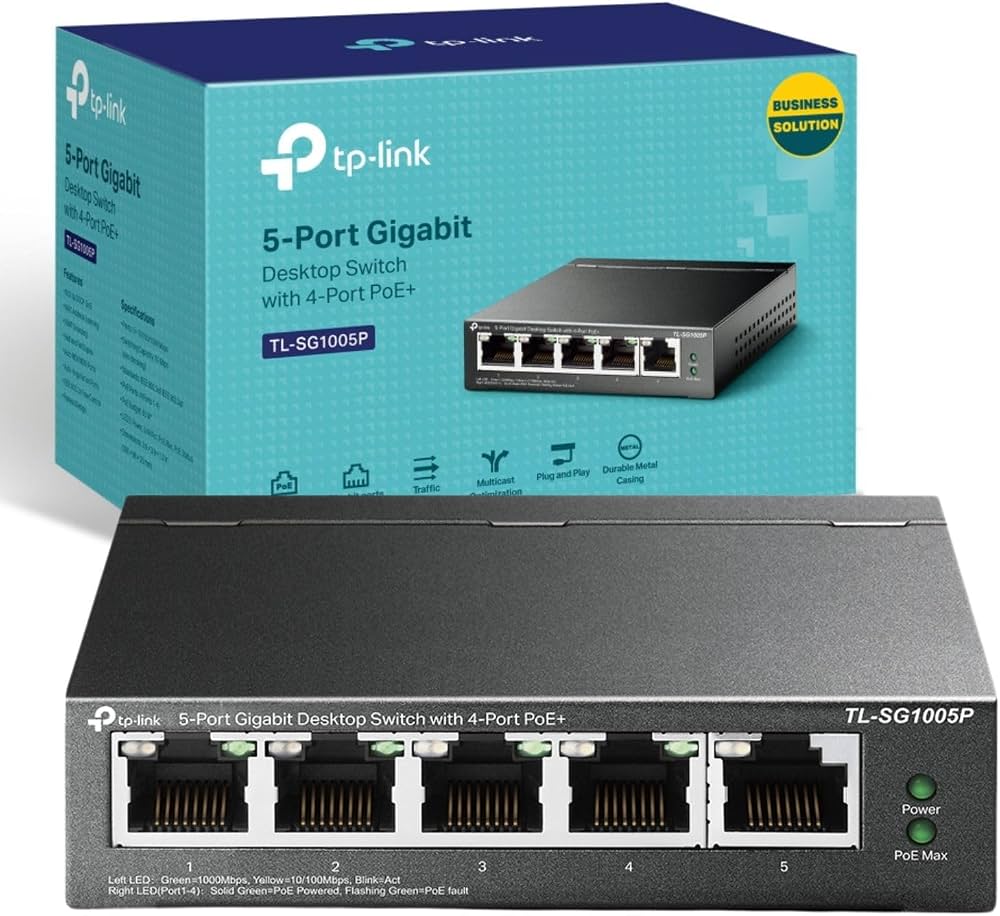
TP-Link TL-SG1008D vs TL-SG1005P
| Feature | TL-SG1008D | TL-SG1005P |
|---|---|---|
| Total Ports | 8 | 5 |
| Gigabit | Yes | Yes |
| PoE Ports | No | 4 PoE+ |
| PoE Budget | None | Model/revision dependent |
| Best for PCs/TVs/NAS | Better port count | Suitable |
| Best for Cameras/APs | Data only | Data + Power |
| Network Expansion | Better | More limited |
Choose the TL-SG1008D when the priority is additional Gigabit ports.
Choose the TL-SG1005P when PoE power for cameras or access points is required.
Does the TL-SG1008D Support PoE?
No.
The TP-Link TL-SG1008D does not supply Power over Ethernet.
It can carry Ethernet data to:
-
IP cameras
-
Wireless access points
-
VoIP phones
but those devices need a separate source of power.
Is the TL-SG1008D Managed?
No.
The TL-SG1008D is an unmanaged switch.
It does not provide manually configurable:
-
VLANs
-
ACLs
-
Port monitoring
-
Link aggregation
-
Omada SDN control
-
Layer 3 routing
Its advantage is simplicity and straightforward Gigabit Ethernet expansion.
Does TL-SG1008D Support Omada?
The TL-SG1008D is not an Omada-managed switch.
It can still be used in a network containing Omada access points or gateways, but the TL-SG1008D itself is not centrally managed through the Omada controller.
Does TL-SG1008D Provide Wi-Fi?
No.
The TL-SG1008D provides wired Ethernet only.
Wi-Fi must come from a:
-
Wireless router
-
Access point
-
Mesh Wi-Fi system
Does TL-SG1008D Increase Internet Speed?
No.
A switch cannot increase the speed supplied by an ISP.
Its purpose is to provide more Ethernet ports and allow local devices to communicate.
The benefit of the TL-SG1008D is that its Gigabit ports are much less likely to restrict modern broadband compared with a 100Mbps Fast Ethernet switch.
Does TL-SG1008D Replace a Router?
No.
The normal network layout is:
Internet → Router → TL-SG1008D → Devices
The router handles:
-
DHCP
-
NAT
-
Firewalling
-
Internet routing
The TL-SG1008D handles Ethernet switching.
Advantages and Limitations
| Advantages | Limitations |
|---|---|
| 8 Gigabit ports | No PoE |
| Up to 1Gbps per port | Unmanaged |
| 16Gbps switching capacity | No configurable VLANs |
| 15KB Jumbo Frames | No SFP/SFP+ |
| 4K MAC table | No 2.5GbE |
| Auto-Negotiation | No 10GbE |
| Auto MDI/MDIX | No Omada switch management |
| IEEE 802.3x flow control | No Wi-Fi |
| Store-and-Forward | No Layer 3 routing |
| Fanless | External power adapter |
| Green Ethernet | Limited to eight ports |
| Desktop/wall mount | Plastic enclosure |
Who Should Buy the TP-Link TL-SG1008D?
The TL-SG1008D is a strong choice for users who need simple, affordable Gigabit Ethernet expansion without PoE or managed-switch features.
It is particularly suitable for:
-
Home networks
-
Small offices
-
Starlink installations
-
Fibre internet
-
PCs
-
Network printers
-
Smart TVs
-
NAS systems
-
NVRs
-
Gaming equipment
-
Wireless access point uplinks
-
Media servers
For users requiring PoE, advanced VLANs or speeds above 1Gbps, Orbitlink Solutions can recommend a different TP-Link switch.
Detailed TP-Link TL-SG1008D Specifications
| Specification | Details |
|---|---|
| Model | TP-Link TL-SG1008D |
| Product Type | 8-Port Gigabit Desktop Switch |
| Switch Type | Unmanaged |
| Interfaces | 8 × 10/100/1000Mbps RJ45 |
| Auto-Negotiation | Yes |
| Auto MDI/MDIX | Yes |
| Standards | IEEE 802.3i, 802.3u, 802.3ab, 802.3x |
| Switching Capacity | 16Gbps |
| Jumbo Frame | 15KB on V8 |
| MAC Address Table | 4K on V8 |
| Transmission Method | Store-and-Forward |
| Flow Control | IEEE 802.3x |
| Fan | Fanless |
| PoE | No |
| Management | Unmanaged |
| External Power Adapter | Revision/region dependent |
| V8 US Adapter | 9V DC / 0.6A |
| Documented UK Adapter | 5V DC / 0.6A |
| Dimensions | Approx. 180 × 90 × 26mm on V8 |
| Maximum Power Consumption | Approx. 4.6W on V8 |
| Operating Temperature | 0°C–40°C |
| Operating Humidity | 10%–90%, non-condensing |
| Green Technology | Supported |
Power-adapter specifications vary across regions and hardware revisions. TP-Link's current support page lists hardware versions including V11.60, V11.46, V11.40, V11, V10.60, V10, V9, V8.20, V8 and earlier models, so the actual unit should be checked when revision-specific details matter.
What's Included in the Box?
Official TP-Link documentation lists:
| Package Item | Included |
|---|---|
| TP-Link TL-SG1008D Switch | Yes |
| Power Adapter | Yes |
| Installation Guide | Yes |
TP-Link TL-SG1008D Price in Kenya
The TP-Link TL-SG1008D price in Kenya varies according to supplier, hardware revision, stock availability, promotions and VAT treatment.
For the Orbitlink Solutions website, use:
Price: Contact Orbitlink Solutions for the current TP-Link TL-SG1008D price in Kenya and stock availability.
This avoids confusing third-party marketplace pricing with Orbitlink Solutions' actual quotation.
Why Buy TP-Link TL-SG1008D from Orbitlink Solutions?
Orbitlink Solutions supplies TP-Link Gigabit switches, PoE switches, routers, gateways, wireless access points and related networking equipment for homes, SMEs and commercial installations across Kenya.
Customers can get assistance choosing between Fast Ethernet, Gigabit, PoE, managed, Omada, 2.5G and 10G switches according to internet speed, number of devices, CCTV requirements, wireless access points and expected network growth.
For larger projects, customers can also submit their BOQ for equipment recommendations and project pricing.
Watch the TP-Link TL-SG1008D Video
The TP-Link TL-SG1008D is particularly useful when a router does not provide enough wired LAN ports. Eight Gigabit Ethernet interfaces allow several computers, TVs, printers, NAS devices, NVRs and access points to connect through one compact switch, while Auto-Negotiation automatically selects the correct Ethernet speed for each endpoint.
Its 16Gbps switching capacity gives the switch enough aggregate internal bandwidth to support simultaneous Gigabit connections across all eight interfaces in full-duplex operation. Combined with 15KB Jumbo Frames, a 4K MAC address table and Store-and-Forward switching on documented hardware, this makes the TL-SG1008D well suited to ordinary modern home and small-office LAN traffic.
The main limitation is feature depth rather than basic Ethernet speed. The TL-SG1008D does not provide PoE, advanced management, SFP uplinks or multi-gigabit Ethernet. Customers needing to power cameras or access points should consider a PoE switch, while networks above 1Gbps should move toward 2.5GbE or faster switching.
Frequently Asked Questions About TP-Link TL-SG1008D
What is the TP-Link TL-SG1008D?
The TL-SG1008D is an 8-port unmanaged Gigabit Ethernet desktop switch designed to expand wired home and small-office networks.
How many Ethernet ports does it have?
It provides 8 × 10/100/1000Mbps RJ45 ports.
Is the TL-SG1008D Gigabit?
Yes. Each port supports a nominal Ethernet link of up to 1,000Mbps.
What is the switching capacity?
TP-Link specifies 16Gbps switching capacity on the documented V8 model.
Does it support Jumbo Frames?
Yes. The documented V8 version supports 15KB Jumbo Frames.
What is the MAC address table size?
The documented V8 model uses a 4K MAC address table.
Does TL-SG1008D require configuration?
No. TP-Link describes it as plug-and-play with no configuration required.
Does it support Auto MDI/MDIX?
Yes. All eight interfaces support Auto MDI/MDIX.
Is it fanless?
Yes.
Can TL-SG1008D work with Starlink?
Yes. Its Gigabit ports make it a good choice for expanding a Starlink Ethernet network.
Can TL-SG1008D work with fibre internet?
Yes. It is suitable for many broadband connections up to the Gigabit class when the rest of the network is also Gigabit capable.
Can I use it with a NAS?
Yes. Gigabit Ethernet provides much better performance for NAS access than Fast Ethernet.
Can I connect CCTV cameras?
Yes for Ethernet data, but the switch cannot provide PoE power.
Does TL-SG1008D support PoE?
No.
Can it connect wireless access points?
Yes, but access points requiring PoE need a separate power adapter, injector or PoE switch.
Does TL-SG1008D provide Wi-Fi?
No. It is a wired Ethernet switch.
Is it managed?
No. It is unmanaged.
Does it support configurable VLANs?
No. Choose a suitably managed TP-Link switch if VLAN configuration is required.
Does it support Omada management?
No. The TL-SG1008D itself is not an Omada-managed switch.
How many endpoint devices can I connect?
The switch has eight ports. If one is used to connect the router, seven ports remain for endpoint devices.
Does TL-SG1008D increase internet speed?
No. It does not increase ISP speed; it expands Gigabit wired connectivity.
What is the difference between TL-SG1008D and TL-SF1008D?
The TL-SG1008D supports Gigabit Ethernet up to 1,000Mbps, while the TL-SF1008D is limited to 100Mbps Fast Ethernet.
What is the difference between TL-SG1008D and TL-SG1005D?
Both are unmanaged Gigabit switches, but the TL-SG1008D provides eight ports while the TL-SG1005D provides five.
What is the TP-Link TL-SG1008D price in Kenya?
Pricing depends on supplier, hardware revision, stock and VAT treatment. Contact Orbitlink Solutions for the current exact-model quotation.
Buy TP-Link TL-SG1008D in Kenya
The TP-Link TL-SG1008D 8-Port Gigabit Desktop Switch is a practical solution for expanding modern wired networks without the complexity of a managed switch. Its eight Gigabit Ethernet ports, 16Gbps switching capacity, Auto-Negotiation, Auto MDI/MDIX, IEEE 802.3x flow control, Jumbo Frame support, fanless design and plug-and-play operation make it suitable for homes, offices, fibre networks and Starlink installations.
Compared with Fast Ethernet alternatives, the TL-SG1008D provides substantially more bandwidth for PCs, NAS systems, NVRs, smart TVs, access points and high-speed broadband. Customers needing PoE, advanced switch management or multi-gigabit speeds can move to an appropriate TP-Link PoE, Omada or higher-speed switch.
Contact Orbitlink Solutions
Orbitlink Solutions
Address: Lyric House, Kimathi Street, Nairobi
Phone: +254 743 720 551
Email: info@orbitlinksolutions.co.ke
Opening Hours: Monday–Saturday, 9:00 AM–6:00 PM
Availability: Nairobi pickup and nationwide delivery
Contact Orbitlink Solutions for the current TP-Link TL-SG1008D price in Kenya, Gigabit switches, PoE switches, Omada networking equipment, routers, wireless access points and complete fibre or Starlink networking solutions.
Need Help Choosing? Ask a Technician
Get guidance on setup, compatibility, stock, and delivery before buying for your project.