TP-Link Archer C24 AC750
Buy TP-Link Archer C24 AC750 in Kenya from Orbitlink Solutions. Get dual-band Wi-Fi, 4 antennas, Router/AP/Extender modes, parental controls and guest Wi-Fi.
TP-Link Archer C24 AC750 Dual-Band Wi-Fi Router in Kenya
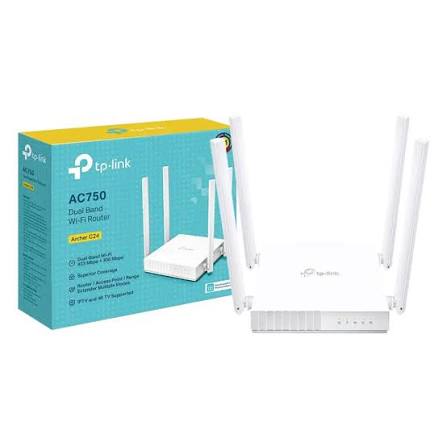
The TP-Link Archer C24 AC750 Dual-Band Wi-Fi Router is a compact Wi-Fi 5 router designed for apartments, small homes, home offices and other light-to-medium networking environments. It delivers up to 433Mbps on the 5GHz band and 300Mbps on 2.4GHz, giving a combined theoretical AC750 wireless rating.
Four fixed external antennas help distribute wireless coverage around the home, while three operating modes allow the Archer C24 to function as a Router, Access Point or Range Extender. TP-Link also includes guest networks, parental controls, QoS, IPv6 support and management through the TP-Link Tether app.
The main limitation buyers should understand is that the Archer C24 uses 10/100Mbps Fast Ethernet ports rather than Gigabit Ethernet. This makes it a good affordable choice for internet packages below roughly 100Mbps, but it is not the best router if the goal is to preserve the full speed of faster fibre or Starlink connections.
TP-Link Archer C24 Key Features
| Feature | Specification |
|---|---|
| Model | TP-Link Archer C24 |
| Wireless Class | AC750 |
| Wi-Fi Generation | Wi-Fi 5 |
| 2.4GHz Speed | Up to 300Mbps |
| 5GHz Speed | Up to 433Mbps |
| Bands | Dual-band |
| Antennas | 4 fixed external antennas |
| WAN Port | 1 × 10/100Mbps |
| LAN Ports | 4 × 10/100Mbps |
| Router Mode | Yes |
| Access Point Mode | Yes |
| Range Extender Mode | Yes |
| Guest Network | 2.4GHz and 5GHz |
| Parental Controls | Yes |
| QoS | Device-based |
| IPv6 | Supported |
| IPTV | IGMP Proxy/Snooping, Bridge, Tag VLAN |
| Management | TP-Link Tether App / Web interface |
| Power | 9V DC / 0.6A |
| Dimensions | 115 × 106.7 × 24.3mm |
TP-Link currently lists the Archer C24 as a dual-band Wi-Fi 5 router with four antennas, Router/AP/Range Extender modes and Fast Ethernet connectivity.
AC750 Dual-Band Wi-Fi
The Archer C24 provides two Wi-Fi bands that can be used for different types of devices.
| Band | Maximum Theoretical Rate | Best Use |
|---|---|---|
| 2.4GHz | 300Mbps | General browsing, smart devices and longer-range connections |
| 5GHz | 433Mbps | Streaming, downloads and devices closer to the router |
| Combined Class | AC750 | Dual-band wireless capacity |
The 5GHz band generally offers less congestion and more bandwidth, while 2.4GHz usually provides better range through walls. TP-Link positions the C24 for apartments and approximately two-bedroom-home environments, though actual coverage depends heavily on walls, placement and interference.
The AC750 figure does not mean a single device will receive 750Mbps. It is the combined theoretical maximum of the 300Mbps 2.4GHz and 433Mbps 5GHz radios.
Four External Antennas
The Archer C24 includes four fixed external antennas designed to improve signal distribution across different directions.
The router is suitable for compact environments such as apartments, bedsitters, small offices and smaller houses where a single wireless router can provide the required coverage.
Router placement still matters. A central, open and elevated position will normally provide better Wi-Fi than installing the router inside a cabinet, on the floor or behind thick concrete walls.
Three Operating Modes
One of the most useful Archer C24 features is its ability to work in three different modes.
| Mode | Purpose |
|---|---|
| Router Mode | Creates a private network from an internet connection |
| Access Point Mode | Adds Wi-Fi to an existing wired network |
| Range Extender Mode | Extends an existing wireless network |
Router Mode
In normal router mode, the C24 connects to an internet source through its WAN port and shares that internet connection with wired and wireless devices.
Typical layout:
Internet / Modem → Archer C24 → Phones, TVs, Laptops and PCs
Access Point Mode
Access Point mode allows the Archer C24 to add dual-band Wi-Fi to an existing router or network.
Example:
Main Router → Ethernet Cable → Archer C24 → Wi-Fi
This can be useful where the main router has poor Wi-Fi coverage or is installed in another part of a building.
Range Extender Mode
Range Extender mode allows the C24 to connect wirelessly to another router and rebroadcast the existing Wi-Fi signal.
This is useful where running Ethernet cable is difficult, although a wired Access Point connection generally provides better performance and reliability.
Fast Ethernet Ports
The Archer C24 provides:
1 × 10/100Mbps WAN port
4 × 10/100Mbps LAN ports
This is one of the most important specifications to consider before buying.
| Internet Speed | Archer C24 Suitability |
|---|---|
| 10–30Mbps | Excellent |
| 50Mbps | Very suitable |
| 80Mbps | Suitable |
| Around 100Mbps | Near Ethernet limit |
| 150Mbps | Ethernet bottleneck |
| 200Mbps+ | Choose a Gigabit router |
Although the wireless radio is rated up to 433Mbps on 5GHz, internet traffic passing through the WAN port is constrained by the router's Fast Ethernet interface.
For faster fibre or Starlink plans, a TP-Link router with Gigabit WAN and LAN ports is a better option.
TP-Link Archer C24 for Fibre Internet
The Archer C24 can work with fibre internet where the ISP provides Ethernet connectivity from an ONT or modem.
Typical setup:
Fibre ONT → Archer C24 WAN → Wi-Fi Devices
It is particularly appropriate for fibre plans below approximately 100Mbps.
For example, if the internet service provides 20Mbps, 40Mbps or 50Mbps, the C24 can be a practical low-cost dual-band router.
For 150Mbps, 300Mbps, 500Mbps or Gigabit fibre, the Fast Ethernet WAN port becomes a significant bottleneck.
TP-Link Archer C24 for Starlink
The Archer C24 can also be connected downstream of a Starlink network where Ethernet connectivity is available.
Typical configuration:
Starlink → Archer C24 → Home Wi-Fi
However, Starlink can often deliver internet speeds above 100Mbps. Since the Archer C24's WAN port is limited to Fast Ethernet, it may prevent users from taking advantage of the full Starlink connection.
Therefore, the C24 makes more sense where the objective is basic secondary Wi-Fi coverage or a budget access point, rather than maximizing modern Starlink performance.
For primary Starlink routing, a Gigabit Wi-Fi 6 router such as an Archer AX-series model is generally the better long-term choice.
Guest Wi-Fi Network
The Archer C24 supports separate guest networks on both 2.4GHz and 5GHz.
Guest networking allows visitors to connect to the internet without using the main household or office Wi-Fi credentials.
This is particularly useful for:
| Environment | Guest Network Benefit |
|---|---|
| Home | Separate visitor internet access |
| Small office | Keep guests away from internal devices |
| Airbnb | Provide tenant Wi-Fi |
| Small shop | Customer internet access |
| Reception area | Separate visitor connectivity |
Parental Controls
TP-Link includes parental controls with URL filtering and time controls on current Archer C24 product information.
Parents or network administrators can use these features to control when selected devices can access the internet and restrict specific online content.
For basic household network management, this provides more control than simply giving every device unrestricted access.
Device-Based QoS
The Archer C24 includes QoS by device, allowing selected devices to receive higher network priority.
For example, priority can be given to:
Work laptop → High Priority
while less important devices use normal priority.
QoS cannot create additional internet bandwidth, but it can help determine how available bandwidth is shared when several devices are active.
IPTV Support
TP-Link includes IPTV-related features such as:
IGMP Proxy, IGMP Snooping, Bridge Mode and Tag VLAN.
These functions can help when using compatible ISP television services that require specific multicast or VLAN settings.
Availability and setup requirements depend on the ISP.
IPv6 Support
The Archer C24 supports both IPv4 and IPv6.
IPv6 support helps ensure compatibility with newer network infrastructures and internet providers as adoption of the newer addressing protocol continues.
Wi-Fi Security
Current regional Archer C24 pages list security capabilities including:
| Security Feature | Support |
|---|---|
| SPI Firewall | Yes |
| Access Control | Yes |
| IP & MAC Binding | Yes |
| Guest Network | Yes |
| WPA | Yes |
| WPA2 | Yes |
| WPA3-Personal | Supported on current listed regional versions |
Because encryption availability can depend on hardware revision and firmware, users should keep the router updated and verify their exact model version.
Easy Setup with TP-Link Tether
Through Tether, users can configure wireless settings, manage connected devices and access common router controls from a smartphone.
This makes the C24 suitable for users who want straightforward home-network installation without managing a complex business networking platform.
Compact and Wall-Mountable Design
The Archer C24 measures approximately 115 × 106.7 × 24.3mm, making it one of TP-Link's more compact wireless routers.
Its compact enclosure makes it suitable for:
-
Apartments
-
Small offices
-
Desks
-
Shelves
-
Wall mounting
-
Reception areas
The router requires a 9V DC / 0.6A power adapter.
Archer C24 for Home Wi-Fi
For a home with a moderate internet plan, the Archer C24 provides a simple dual-band Wi-Fi upgrade.
The 2.4GHz network can be used for phones, smart plugs and general browsing, while the 5GHz network can handle nearby laptops, smart TVs and streaming devices.
Its main advantage is affordability and flexibility rather than maximum throughput.
Archer C24 for Small Offices
The C24 can also serve a small office with light network requirements.
A typical setup could include:
ISP Connection → Archer C24 → Computers, Printer, Phones and Smart TV
It can also be configured as an access point behind a more advanced business router.
For offices with many users, multiple VLANs, VPN requirements, several internet providers or centralized access points, a TP-Link Omada gateway and EAP access-point system will be more appropriate.
Archer C24 vs Archer C20

Both the Archer C24 and Archer C20 belong to TP-Link's entry-level AC750 Wi-Fi router range, but model-specific hardware differs by revision.
The C24's main characteristics are its compact design, four antennas, dual-band AC750 wireless and Router/AP/Range Extender modes.
When choosing between the two, check the exact Ethernet interfaces and hardware revision rather than relying only on the AC750 label.
Archer C24 vs Archer AX10
| Feature | Archer C24 | Archer AX10 |
|---|---|---|
| Wi-Fi Generation | Wi-Fi 5 | Wi-Fi 6 |
| Wireless Class | AC750 | AX1500 |
| 2.4GHz | 300Mbps | Higher-capacity Wi-Fi 6 |
| 5GHz | 433Mbps | Up to 1201Mbps class |
| WAN | 100Mbps | Gigabit |
| LAN | 100Mbps | Gigabit |
| Best For | Budget/basic internet | Modern fibre and Starlink |
For customers with internet speeds above 100Mbps, an AX-series Gigabit router offers considerably more room for future growth.
Archer C24 vs Archer AX55
| Feature | Archer C24 | Archer AX55 |
|---|---|---|
| Wi-Fi | Wi-Fi 5 | Wi-Fi 6 |
| Wireless Class | AC750 | AX3000 |
| 5GHz Rate | 433Mbps | Up to 2402Mbps theoretical |
| Ethernet | Fast Ethernet | Gigabit |
| 160MHz | No | Supported |
| Best For | Entry-level use | High-speed modern homes |
The Archer AX55 is a substantially stronger option for customers with modern fibre or Starlink and many higher-bandwidth devices.
Advantages and Limitations
| Advantages | Limitations |
|---|---|
| Affordable dual-band Wi-Fi | Fast Ethernet WAN |
| Wi-Fi 5 AC750 | Fast Ethernet LAN |
| 4 external antennas | Cannot fully utilize >100Mbps internet |
| Router mode | Not Wi-Fi 6 |
| Access Point mode | Limited for large homes |
| Range Extender mode | No multi-Gigabit capability |
| Guest Wi-Fi | Basic home-class hardware |
| Parental controls | Not an Omada business router |
| QoS | No PoE |
| IPv6 | — |
| Tether app management | — |
| Compact design | — |
Who Should Buy the TP-Link Archer C24?
The Archer C24 is particularly suitable for users who want an affordable dual-band router for internet connections below approximately 100Mbps.
Good use cases include small apartments, budget home networks, bedsitters, small offices, Airbnb units, student accommodation, guest Wi-Fi, access-point installations and range-extension applications.
Customers with 150Mbps, 200Mbps, 300Mbps or faster fibre or Starlink should consider a router with Gigabit Ethernet instead.
What Is Included in the Box?
TP-Link lists the following package contents for the Archer C24.
| Package Item | Included |
|---|---|
| TP-Link Archer C24 Router | Yes |
| Power Adapter | Yes |
| RJ45 Ethernet Cable | Yes |
| Quick Installation Guide | Yes |
Detailed TP-Link Archer C24 Specifications
| Specification | Details |
|---|---|
| Model | TP-Link Archer C24 |
| Product Type | AC750 Dual-Band Wi-Fi Router |
| Wi-Fi Generation | Wi-Fi 5 |
| 5GHz Standard | IEEE 802.11ac/n/a |
| 2.4GHz Standard | IEEE 802.11n/b/g |
| 5GHz Speed | Up to 433Mbps |
| 2.4GHz Speed | Up to 300Mbps |
| Wireless Class | AC750 |
| Antennas | 4 fixed external antennas |
| WAN | 1 × 10/100Mbps |
| LAN | 4 × 10/100Mbps |
| Router Mode | Yes |
| Access Point Mode | Yes |
| Range Extender Mode | Yes |
| Guest Network | 2.4GHz and 5GHz |
| Parental Controls | URL filtering / time controls |
| QoS | Device-based |
| IPv4 | Supported |
| IPv6 | Supported |
| IPTV | IGMP Proxy/Snooping, Bridge, Tag VLAN |
| WAN Types | Dynamic IP, Static IP, PPPoE, PPTP, L2TP |
| NAT | Port Forwarding, Port Triggering, DMZ, UPnP |
| DDNS | NO-IP, DynDNS |
| Management | TP-Link Tether / Web interface |
| Power | 9V DC / 0.6A |
| Dimensions | 115 × 106.7 × 24.3mm |
The specifications above are based on currently indexed TP-Link regional product information and official datasheets. Firmware functions can vary slightly by hardware revision and country.
TP-Link Archer C24 Price in Kenya
Recent Kenyan marketplace listings show the Archer C24 at approximately KES 4,500 to KES 6,900, although some listings are higher depending on seller and stock. Recent examples include KES 4,500, KES 5,500, KES 6,171 and KES 6,900.
| Recent Kenya Market Reference | Approximate Price |
|---|---|
| Jumia listing | KES 4,500 |
| Jumia listing | KES 5,500 |
| Jumia listing | KES 6,171 |
| Jumia listing | KES 6,900 |
These are market-reference prices, not Orbitlink Solutions' fixed selling price.
For the Orbitlink website, use:
Price: Contact Orbitlink Solutions for the current TP-Link Archer C24 price in Kenya and availability.
Why Buy TP-Link Archer C24 from Orbitlink Solutions?
Orbitlink Solutions supplies TP-Link networking equipment for homes, offices, businesses and networking projects across Kenya. Customers can get help choosing the correct router based on internet speed, building size, number of users and whether the network uses fibre, Starlink or another ISP.
Orbitlink can also help customers compare the Archer C24 with Gigabit Wi-Fi 5 routers, Wi-Fi 6 Archer models, Deco mesh systems and Omada business networking equipment where higher performance or broader coverage is required.
For networking projects, Orbitlink Solutions provides Nairobi pickup, nationwide delivery, technical support, BOQ assistance and equipment recommendations.
Watch: TP-Link Archer C24 AC750
The TP-Link Archer C24 is designed as a compact and affordable dual-band router for users who want better wireless flexibility than a basic 2.4GHz-only router. Its 433Mbps 5GHz radio can handle nearby streaming and downloading devices, while the 300Mbps 2.4GHz band provides broader compatibility and longer-range connectivity.
The router's three operating modes make it more versatile than a conventional entry-level router. It can be used as the main router, converted into an access point for an existing wired network or configured as a range extender to improve coverage in another part of the home.
Its Fast Ethernet ports are the key factor buyers should consider. For internet packages below 100Mbps, this limitation may not matter. For modern high-speed fibre or Starlink, however, using a Gigabit router will usually provide better performance and greater room for future upgrades.
Frequently Asked Questions About TP-Link Archer C24
What is the TP-Link Archer C24?
The Archer C24 is an AC750 dual-band Wi-Fi 5 router with four external antennas and Router, Access Point and Range Extender operating modes.
What is the speed of the Archer C24?
It supports theoretical speeds of up to 433Mbps on 5GHz and 300Mbps on 2.4GHz.
Is Archer C24 dual-band?
Yes. It broadcasts both 2.4GHz and 5GHz Wi-Fi.
How many antennas does the Archer C24 have?
It has four fixed external antennas.
Does Archer C24 have Gigabit ports?
No. It has one 10/100Mbps WAN port and four 10/100Mbps LAN ports.
Can Archer C24 handle 200Mbps internet?
Not at full speed through its WAN interface. The Fast Ethernet port becomes a bottleneck above approximately 100Mbps.
Can Archer C24 work with fibre?
Yes, provided the fibre ONT or modem provides an Ethernet connection. It is most suitable for plans below around 100Mbps.
Can Archer C24 work with Starlink?
Yes, it can be connected downstream of Starlink where Ethernet connectivity is available, but Fast Ethernet limits how much Starlink speed can pass through it.
Does Archer C24 support Access Point mode?
Yes.
Can Archer C24 work as a Wi-Fi extender?
Yes. It supports Range Extender Mode.
Does Archer C24 support guest Wi-Fi?
Yes. TP-Link lists separate guest networks for both the 2.4GHz and 5GHz bands.
Does Archer C24 have parental controls?
Yes. Current TP-Link specifications list URL filtering and time controls.
Does Archer C24 support WPA3?
Current TP-Link regional listings include WPA3-Personal support, although functionality can depend on hardware revision and firmware.
Does Archer C24 support IPv6?
Yes.
Can I configure Archer C24 using my phone?
Yes. It supports management through the TP-Link Tether app.
Is Archer C24 suitable for a large house?
It is primarily positioned for smaller homes and apartment-style environments. Larger or multi-storey houses may benefit more from a mesh system or multiple access points.
What is the TP-Link Archer C24 price in Kenya?
Recent Kenyan listings are commonly around KES 4,500–6,900, although prices vary by retailer, stock and promotion.
Buy TP-Link Archer C24 AC750 in Kenya
The TP-Link Archer C24 AC750 Dual-Band Wi-Fi Router is a practical entry-level option for small homes, apartments, home offices and users with internet packages below approximately 100Mbps. Its dual-band Wi-Fi, four antennas, guest network, parental controls and three operating modes provide useful flexibility at an affordable price.
Customers using faster fibre or Starlink should pay particular attention to its Fast Ethernet ports. If the objective is to preserve internet speeds above 100Mbps, a Gigabit Wi-Fi 5 or Wi-Fi 6 router will be a better investment.
Contact Orbitlink Solutions
Orbitlink Solutions
Address: Lyric House, Kimathi Street, Nairobi
Phone: +254 743 720 551
Email: info@orbitlinksolutions.co.ke
Opening Hours: Monday–Saturday, 9:00 AM–6:00 PM
Availability: Nairobi pickup and nationwide delivery
Contact Orbitlink Solutions for the current TP-Link Archer C24 AC750 price in Kenya, TP-Link routers, Wi-Fi 6 upgrades, Deco mesh systems, Starlink and fibre networking, access points, switches and professional network installation.
Need Help Choosing? Ask a Technician
Get guidance on setup, compatibility, stock, and delivery before buying for your project.