TP-Link Archer C64 AC1200
Buy TP-Link Archer C64 AC1200 in Kenya from Orbitlink Solutions. Get dual-band Wi-Fi, full Gigabit ports, MU-MIMO, Beamforming, EasyMesh and WPA3.
TP-Link Archer C64 AC1200 Wireless MU-MIMO Wi-Fi Router in Kenya
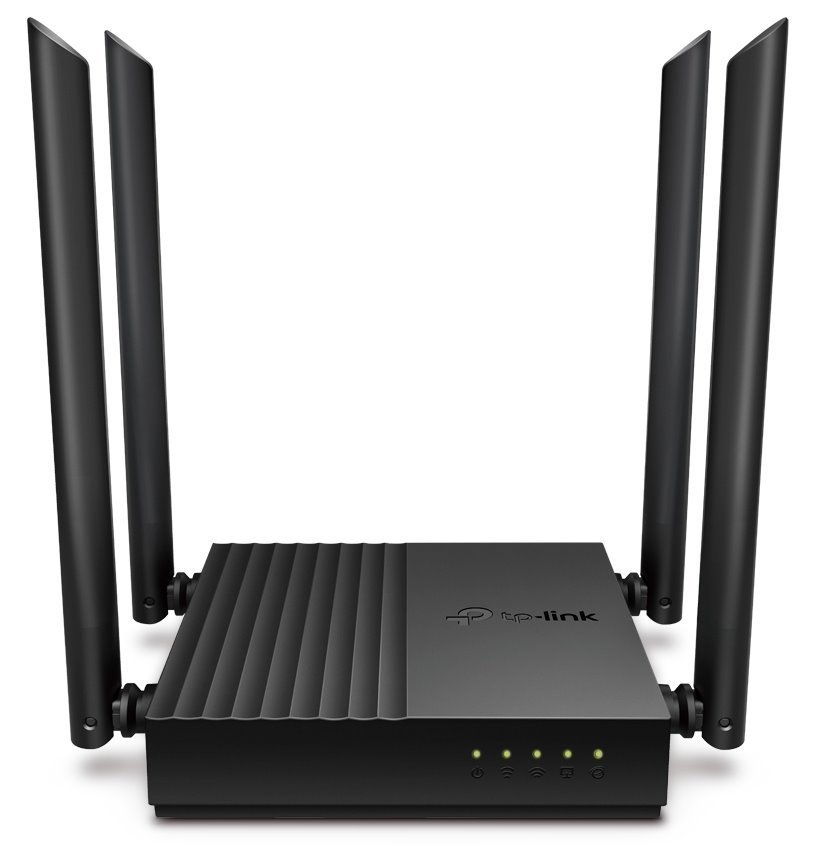
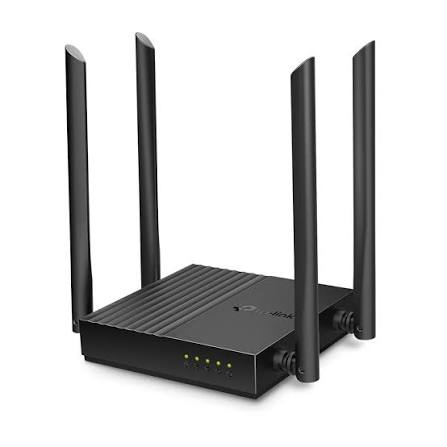
The TP-Link Archer C64 AC1200 Wireless MU-MIMO Wi-Fi Router is a full-Gigabit dual-band Wi-Fi 5 router designed for homes, apartments, home offices and small businesses that need faster wired networking and stronger wireless performance than entry-level Fast Ethernet routers. It delivers theoretical wireless speeds of 867Mbps on 5GHz and 400Mbps on 2.4GHz.
Unlike the Archer C24, the Archer C64 features full Gigabit Ethernet connectivity, with one Gigabit WAN port and four Gigabit LAN ports. This makes it far better suited to modern fibre and Starlink connections above 100Mbps. Four external antennas, Beamforming and MU-MIMO help provide stronger coverage and more efficient simultaneous connections to multiple compatible devices.
The Archer C64 also supports Access Point mode, Smart Connect, Airtime Fairness, TP-Link Tether management, parental controls, IPv6, IPTV features and WPA3 security on current regional specifications. Some current hardware/firmware versions additionally support EasyMesh, enabling the router to participate in compatible whole-home mesh networks.
TP-Link Archer C64 Key Features
| Feature | Specification |
|---|---|
| Model | TP-Link Archer C64 |
| Product Type | AC1200 Wireless MU-MIMO Wi-Fi Router |
| Wi-Fi Generation | Wi-Fi 5 / 802.11ac Wave 2 |
| Wireless Class | AC1200 |
| 5GHz Speed | Up to 867Mbps |
| 2.4GHz Speed | Up to 400Mbps |
| Bands | Dual-band |
| Antennas | 4 external antennas |
| MU-MIMO | Supported |
| Beamforming | Supported |
| Smart Connect | Supported |
| Airtime Fairness | Supported |
| WAN Port | 1 × Gigabit |
| LAN Ports | 4 × Gigabit |
| Router Mode | Supported |
| Access Point Mode | Supported |
| EasyMesh | Supported on current compatible versions |
| WPA3 | Supported on current regional versions |
| Guest Network | Supported |
| Parental Controls | Supported |
| IPv6 | Supported |
| IPTV | Supported |
| Management | TP-Link Tether / Web Interface |
TP-Link positions the Archer C64 as an affordable entry point into full-Gigabit AC1200 networking, with considerably more wired capacity than Fast Ethernet AC750 models.
AC1200 Dual-Band Wi-Fi
The Archer C64 operates simultaneously on 2.4GHz and 5GHz.
| Wi-Fi Band | Maximum Theoretical Speed | Typical Use |
|---|---|---|
| 2.4GHz | 400Mbps | Browsing, phones, IoT and longer-range connections |
| 5GHz | 867Mbps | Streaming, gaming, downloads and video calls |
| Combined Wireless Class | AC1200 | Dual-band network capacity |
The 2.4GHz band provides broader compatibility and typically better penetration through walls, while the 5GHz band offers higher speed and generally experiences less congestion.
The AC1200 rating is theoretical and does not mean a single device will achieve 1,200Mbps. Real-world performance depends on the client device, interference, distance, channel conditions, internet connection and network traffic.
867Mbps 5GHz Wi-Fi
The 5GHz band provides theoretical speeds of up to 867Mbps.
This makes it particularly useful for bandwidth-intensive activities such as HD and 4K streaming, online meetings, cloud applications, gaming and large downloads.
Because the Archer C64 has Gigabit Ethernet rather than Fast Ethernet, users are not restricted by a 100Mbps WAN port when connecting faster fibre or Starlink services.
400Mbps 2.4GHz Wi-Fi
The Archer C64 provides up to 400Mbps theoretical wireless speed on 2.4GHz.
TP-Link highlighted this 400Mbps 2.4GHz capability when launching the model, distinguishing it from many older AC1200 routers rated at 300Mbps on 2.4GHz.
This band is useful for general browsing, smart-home devices, mobile phones and equipment positioned farther away from the router.
Full Gigabit Ethernet Ports
One of the Archer C64's biggest advantages is full Gigabit wired connectivity.
| Interface | Quantity |
|---|---|
| Gigabit WAN | 1 |
| Gigabit LAN | 4 |
| Total Ethernet Ports | 5 |
TP-Link states that the Gigabit Ethernet interfaces can operate up to ten times faster than traditional 100Mbps Fast Ethernet connections.
This makes the Archer C64 much better suited to high-speed internet than entry-level models such as the Archer C24.
Typical Wired Setup
Fibre / Starlink → Archer C64 → PC / Smart TV / NVR / Gaming Console / Switch
Gigabit LAN ports are particularly beneficial when transferring files between wired devices or connecting high-speed internet services.
Four External Antennas
The Archer C64 uses four external antennas to distribute its dual-band Wi-Fi signal around the home or office.
TP-Link combines these antennas with Beamforming, which helps concentrate wireless communication toward connected devices rather than broadcasting energy indiscriminately in every direction.
Actual coverage depends on building materials, router location, neighbouring networks and interference. Thick concrete walls and multiple floors may require additional access points or a mesh system.
MU-MIMO Technology
The Archer C64 supports MU-MIMO, allowing it to communicate with multiple compatible devices more efficiently.
TP-Link describes the C64 as capable of communicating with up to two compatible devices simultaneously, improving efficiency compared with routers that sequentially serve wireless clients.
This can improve performance in homes where multiple people are simultaneously using phones, laptops, TVs and other wireless equipment.
Beamforming
Beamforming technology helps the router focus wireless communication toward connected devices.
This can contribute to better signal stability and more effective coverage, particularly for devices located away from the router. TP-Link includes Beamforming among the Archer C64's principal wireless features.
Smart Connect
The Archer C64 supports Smart Connect, which can automatically direct compatible clients toward the more appropriate wireless band.
Instead of manually deciding whether each device should use 2.4GHz or 5GHz, Smart Connect can help steer clients according to network conditions.
This simplifies Wi-Fi management for households with many connected devices.
Airtime Fairness
The Archer C64 also supports Airtime Fairness.
This technology helps prevent slower wireless clients from consuming a disproportionate amount of transmission time, improving overall network efficiency when devices with different capabilities are connected.
EasyMesh Support
Current TP-Link UK specifications list the Archer C64 as EasyMesh-compatible. This allows compatible hardware versions and firmware to form a mesh network with other EasyMesh devices.
A mesh deployment can help provide more consistent coverage across a larger home.
A typical configuration might be:
Main Archer C64 → EasyMesh-Compatible Device → Extended Wi-Fi Coverage
Because TP-Link identifies multiple hardware revisions for the C64, confirm the exact hardware version and firmware if EasyMesh is a requirement.
Access Point Mode
The Archer C64 can operate as an Access Point instead of functioning as the main router.
A typical installation is:
Main Router → Ethernet → Archer C64 → Dual-Band Wi-Fi
This is useful when an existing router already handles internet routing but additional Wi-Fi coverage is required elsewhere in the building.
A wired access-point connection generally provides better performance than a conventional wireless extender because the connection between the main router and C64 is carried over Gigabit Ethernet.
TP-Link Archer C64 for Fibre Internet
The Archer C64 is a much better option for modern fibre connections than entry-level routers using 100Mbps Ethernet.
Typical installation:
Fibre ONT → Archer C64 Gigabit WAN → Wi-Fi + Gigabit LAN
Its Gigabit WAN port means internet packages above 100Mbps are not automatically restricted by the router's Ethernet interface.
For example:
| Fibre Speed | Archer C64 Suitability |
|---|---|
| 20Mbps | Excellent |
| 50Mbps | Excellent |
| 100Mbps | Excellent |
| 200Mbps | Very suitable |
| 300Mbps | Very suitable |
| 500Mbps | Suitable |
| 1Gbps | Wired interface supports Gigabit class; actual routing/Wi-Fi performance varies |
Users requiring sustained multi-Gigabit internet should instead choose a router with 2.5GbE or 10GbE ports.
TP-Link Archer C64 for Starlink
The TP-Link Archer C64 can be used with Starlink where the Starlink installation provides an Ethernet connection.
Typical architecture:
Starlink → Archer C64 → Home or Office Network
Because the Archer C64 has a Gigabit WAN port, it is significantly more appropriate for Starlink than routers restricted to 100Mbps Fast Ethernet.
It can also be installed behind an existing gateway in Access Point mode where the objective is simply to provide additional wireless coverage.
For larger Starlink installations requiring VLANs, multi-WAN failover or sophisticated business routing, an Omada gateway such as the ER605 plus dedicated access points is a better architecture.
Archer C64 for Small Offices
The Archer C64 is suitable for smaller businesses that need straightforward Wi-Fi and Gigabit Ethernet without requiring a full enterprise networking platform.
A typical small-office network might be:
Fibre / Starlink → Archer C64 → Computers + Printer + Smart TV + Wi-Fi Devices
It can provide:
-
Dual-band Wi-Fi
-
Gigabit wired networking
-
Guest Wi-Fi
-
Parental/access controls
-
QoS
-
IPv6
-
IPTV support
-
Tether app management
For larger offices requiring VLAN segmentation, multiple WAN providers, centralized AP management or site-to-site VPNs, Omada networking equipment is more suitable.
Archer C64 for Streaming and Smart TVs
The 5GHz band's theoretical 867Mbps capacity makes the Archer C64 suitable for streaming media where the client device has a good 5GHz signal.
Smart TVs can also be connected directly to one of the four Gigabit LAN ports for a stable wired connection.
Wired Ethernet is particularly useful for televisions, desktop computers, game consoles and network storage devices that remain in fixed locations.
Archer C64 for CCTV
The Archer C64 can provide wired connectivity to an NVR or CCTV network where advanced business routing is not required.
For example:
Internet → Archer C64 → NVR
or:
Archer C64 → Gigabit Switch → CCTV System
For larger surveillance installations involving many IP cameras, PoE, VLANs and remote management, a dedicated business gateway and managed PoE switch are preferable.
Guest Wi-Fi
The Archer C64 supports guest networking, allowing visitors to access the internet without using the primary household Wi-Fi network credentials.
This can be useful in:
| Environment | Application |
|---|---|
| Homes | Visitor Wi-Fi |
| Airbnb units | Guest internet |
| Small offices | Visitor connectivity |
| Shops | Customer Wi-Fi |
| Reception areas | Temporary internet access |
Guest-network implementation and available controls depend on firmware and operating mode.
WPA3 Wi-Fi Security
Current TP-Link product information lists WPA3 among the Archer C64's wireless security capabilities. TP-Link highlights stronger Wi-Fi password protection and improved resistance to brute-force attacks compared with older wireless-security standards.
Keeping the router's firmware current remains important for network security.
Parental Controls
The Archer C64 includes parental-control functionality for managing internet use.
TP-Link describes controls that can restrict inappropriate content and apply daily time limits.
These features make the router useful for family homes where parents want basic control over children's internet access.
IPTV Support
Current TP-Link specifications include IPTV support through functionality such as IGMP Proxy, IGMP Snooping, Bridge and Tag VLAN.
This can assist with ISP television services that require multicast or VLAN configuration.
Exact configuration depends on the internet provider.
IPv6 Support
The Archer C64 supports IPv6, helping provide compatibility with modern internet networks alongside traditional IPv4 addressing.
TP-Link Tether App
The C64 can be set up and managed using the TP-Link Tether app on compatible Android and iOS devices.
TP-Link also provides a conventional web management interface.
This makes setup straightforward for home and small-office users who do not need enterprise network-management software.
Archer C64 vs Archer C24
| Feature | Archer C24 | Archer C64 |
|---|---|---|
| Wireless Class | AC750 | AC1200 |
| Wi-Fi Generation | Wi-Fi 5 | Wi-Fi 5 |
| 5GHz | 433Mbps | 867Mbps |
| 2.4GHz | 300Mbps | 400Mbps |
| Antennas | 4 | 4 |
| WAN | 100Mbps | Gigabit |
| LAN | 4 × 100Mbps | 4 × Gigabit |
| MU-MIMO | Model/version dependent | Yes |
| Beamforming | Basic/model dependent | Yes |
| Best For | Basic internet | Faster fibre/Starlink |
For anyone using internet above approximately 100Mbps, the Archer C64 is the significantly better option because it removes the Fast Ethernet bottleneck of the C24.
Archer C64 vs Archer C6
The Archer C64 and Archer C6 both occupy TP-Link's AC1200 Gigabit segment, but features vary by hardware generation and region.
Both are designed for dual-band Wi-Fi and Gigabit networking, so selection should be based on the exact hardware revision, firmware functionality, EasyMesh requirements and current pricing rather than simply the AC1200 rating.
Archer C64 vs Archer AX10
| Feature | Archer C64 | Archer AX10 |
|---|---|---|
| Wi-Fi Generation | Wi-Fi 5 | Wi-Fi 6 |
| Wireless Class | AC1200 | AX1500 |
| 5GHz | 867Mbps | Up to 1201Mbps class |
| Ethernet | Gigabit | Gigabit |
| OFDMA | No | Yes |
| Best For | Affordable Gigabit Wi-Fi | Newer Wi-Fi 6 networks |
The Archer C64 remains attractive where price matters, while the AX10 gives customers a newer Wi-Fi generation.
Archer C64 vs Archer AX55
| Feature | Archer C64 | Archer AX55 |
|---|---|---|
| Wi-Fi Generation | Wi-Fi 5 | Wi-Fi 6 |
| Wireless Class | AC1200 | AX3000 |
| 5GHz | 867Mbps | 2402Mbps theoretical |
| 2.4GHz | 400Mbps | 574Mbps |
| Gigabit Ethernet | Yes | Yes |
| 160MHz Channels | No | Yes |
| Best For | Value Gigabit Wi-Fi | Higher-performance modern networks |
The Archer AX55 is substantially more capable, while the Archer C64 offers a lower-cost entry into Gigabit dual-band Wi-Fi.
Advantages and Limitations
| Advantages | Limitations |
|---|---|
| Full Gigabit WAN | Wi-Fi 5 rather than Wi-Fi 6 |
| 4 × Gigabit LAN | No 2.5GbE |
| AC1200 dual-band Wi-Fi | Not intended for large enterprise networks |
| 867Mbps 5GHz | Real Wi-Fi speed lower than theoretical rating |
| 400Mbps 2.4GHz | Coverage depends on building construction |
| MU-MIMO | No built-in PoE |
| Beamforming | No dedicated 6GHz band |
| 4 external antennas | Hardware revisions vary |
| Smart Connect | Some newer features depend on firmware/version |
| Airtime Fairness | — |
| Access Point mode | — |
| EasyMesh on compatible versions | — |
| WPA3 on current versions | — |
| Tether app | — |
Who Should Buy the TP-Link Archer C64?
The Archer C64 is a strong choice for customers who want affordable full-Gigabit networking without paying for a higher-end Wi-Fi 6 router.
It is particularly suitable for homes, apartments, home offices, small businesses, Airbnb units, fibre users, Starlink users and customers upgrading from Fast Ethernet routers such as the Archer C24.
Customers installing a new network with many modern devices or expecting several years of future upgrades may prefer a Wi-Fi 6 model such as an Archer AX-series router.
What Is Included in the Box?
Standard regional Archer C64 packages typically include the router, power adapter, Ethernet cable and installation documentation. Exact package contents may differ between regions and hardware revisions, so the contents of the supplied unit should be checked before purchase.
TP-Link currently maintains separate V1 and V2 hardware branches, highlighting why the hardware-version label should be checked before downloading firmware.
Detailed TP-Link Archer C64 Specifications
| Specification | Details |
|---|---|
| Model | TP-Link Archer C64 |
| Product Type | AC1200 Wireless MU-MIMO Wi-Fi Router |
| Wi-Fi Generation | Wi-Fi 5 |
| 5GHz Standard | IEEE 802.11ac/n/a |
| 2.4GHz Standard | IEEE 802.11n/b/g |
| 5GHz Speed | Up to 867Mbps |
| 2.4GHz Speed | Up to 400Mbps |
| Wireless Class | AC1200 |
| Antennas | 4 external antennas |
| MU-MIMO | Supported |
| Beamforming | Supported |
| Smart Connect | Supported |
| Airtime Fairness | Supported |
| WAN | 1 × Gigabit |
| LAN | 4 × Gigabit |
| Router Mode | Supported |
| Access Point Mode | Supported |
| EasyMesh | Supported on current compatible firmware/hardware |
| WPA3 | Supported on current regional versions |
| Guest Network | Supported |
| Parental Controls | Supported |
| IPv6 | Supported |
| IPTV | Supported |
| Management | TP-Link Tether / Web |
| Hardware Versions | Multiple regional revisions including V1 and V2 |
TP-Link warns that model and hardware-version availability varies by region, so firmware and feature support should always be matched to the version printed on the device label.
TP-Link Archer C64 Price in Kenya
Recent Kenyan listings show a broad range depending on retailer, seller and promotion. A recent Jumia listing showed the Archer C64 at KES 6,450, while Kenyatronics listed it at KES 5,500. Senetic Kenya recently showed approximately KES 4,745 gross, while broader Jumia results included several offers around KES 6,450–7,700 and some substantially higher marketplace listings.
| Kenya Market Reference | Recent Listed Price |
|---|---|
| Senetic Kenya | Approx. KES 4,745 gross |
| Kenyatronics | KES 5,500 |
| Jumia Kenya | KES 6,450 |
| Jumia category offers | Around KES 6,450–7,700 commonly seen |
Marketplace prices can change quickly and may differ by hardware revision, warranty, VAT treatment and seller.
For the Orbitlink Solutions website, use:
Price: Contact Orbitlink Solutions for the current TP-Link Archer C64 price in Kenya and stock availability.
Why Buy TP-Link Archer C64 from Orbitlink Solutions?

Orbitlink Solutions supplies networking equipment for homes, SMEs and larger projects across Kenya. Customers can get guidance on choosing the right TP-Link router according to internet speed, number of users, Wi-Fi coverage requirements, fibre or Starlink connectivity and future network expansion.
Orbitlink can also help customers compare the Archer C64 with Archer C24, Archer AX-series Wi-Fi 6 routers, Deco mesh systems, Omada gateways, access points and networking switches.
For larger projects, Orbitlink Solutions can assist with equipment selection, BOQ requirements, Nairobi pickup, nationwide delivery and technical support.
Watch: TP-Link Archer C64 AC1200
The TP-Link Archer C64 is particularly attractive for customers moving from an older Fast Ethernet router to a modern Gigabit internet connection. Its one Gigabit WAN port and four Gigabit LAN ports mean fibre or Starlink connections above 100Mbps are no longer automatically restricted by a Fast Ethernet interface.
Its dual-band Wi-Fi provides up to 867Mbps on 5GHz and 400Mbps on 2.4GHz theoretically, while MU-MIMO and Beamforming improve the way compatible devices communicate with the router. Smart Connect and Airtime Fairness further help manage devices across the two Wi-Fi bands.
The Archer C64 remains a Wi-Fi 5 product, so customers buying specifically for newer Wi-Fi 6 devices may prefer an Archer AX-series router. However, for users who need an affordable AC1200 router with full Gigabit Ethernet, four antennas and straightforward TP-Link management, the C64 remains a practical option where it is available. TP-Link currently marks the model End of Life on its UK product page, while regional availability varies.
Frequently Asked Questions About TP-Link Archer C64
What is the TP-Link Archer C64?
The Archer C64 is an AC1200 dual-band Wi-Fi 5 MU-MIMO router featuring four external antennas and full Gigabit Ethernet connectivity.
What is the speed of the Archer C64?
It provides theoretical wireless speeds of up to 867Mbps on 5GHz and 400Mbps on 2.4GHz.
Is Archer C64 dual-band?
Yes. It operates simultaneously on the 2.4GHz and 5GHz Wi-Fi bands.
Does Archer C64 have Gigabit Ethernet?
Yes. It has one Gigabit WAN port and four Gigabit LAN ports.
Is Archer C64 better than Archer C24?
For higher-speed internet, yes. The C64 offers Gigabit Ethernet and AC1200 Wi-Fi, while the C24 uses 100Mbps Fast Ethernet and AC750 wireless.
Can Archer C64 handle 200Mbps fibre?
Yes. Its Gigabit WAN interface avoids the 100Mbps Ethernet bottleneck found on entry-level routers. Actual internet and Wi-Fi performance will still depend on the network and client devices.
Can Archer C64 work with Starlink?
Yes. It can be connected downstream of Starlink where Ethernet connectivity is available, and its Gigabit WAN port makes it much better suited to Starlink than Fast Ethernet routers.
Does Archer C64 support MU-MIMO?
Yes. TP-Link states that MU-MIMO allows the C64 to communicate with up to two compatible devices simultaneously.
Does Archer C64 have Beamforming?
Yes. Beamforming is included among its wireless features.
Does Archer C64 support Smart Connect?
Yes. Smart Connect can direct devices toward the less congested Wi-Fi band.
Does Archer C64 support Access Point mode?
Yes. It can be changed from Router mode to Access Point mode.
Does Archer C64 support EasyMesh?
Current TP-Link regional specifications list EasyMesh compatibility, but support should be verified against the exact hardware version and current firmware.
Does Archer C64 support WPA3?
Current TP-Link regional information lists WPA3 support. Feature availability can depend on firmware and hardware revision.
Does Archer C64 support parental controls?
Yes. TP-Link provides parental controls for restricting content and applying internet-use limits.
Can I configure the Archer C64 using my phone?
Yes. The TP-Link Tether app can be used to configure and manage the router.
Is Archer C64 Wi-Fi 6?
No. It is a Wi-Fi 5 / IEEE 802.11ac router.
Is the Archer C64 suitable for a large house?
It can provide good coverage in smaller and medium-sized homes, but large, multi-storey or reinforced-concrete houses may benefit more from Deco mesh or multiple access points.
Is Archer C64 discontinued?
TP-Link's current UK page labels the Archer C64 End of Life, but the company notes that model and hardware availability varies by region, and the router remains available through Kenyan retailers.
What is the TP-Link Archer C64 price in Kenya?
Recent Kenyan references place many listings around KES 4,745–7,700, although marketplace prices vary considerably.
Buy TP-Link Archer C64 AC1200 in Kenya
/product/03/7226623/1.jpg?8863)
The TP-Link Archer C64 AC1200 Wireless MU-MIMO Wi-Fi Router is a strong step up from basic Fast Ethernet routers. With 867Mbps 5GHz Wi-Fi, 400Mbps 2.4GHz Wi-Fi, four external antennas, MU-MIMO, Beamforming and full Gigabit WAN/LAN ports, it is well suited to homes and smaller businesses using modern fibre or Starlink connections.
Its combination of Gigabit networking and affordable Wi-Fi 5 performance makes it especially useful for customers who do not yet need the additional capabilities of Wi-Fi 6. For new installations with many Wi-Fi 6 devices or heavier bandwidth requirements, it is also worth comparing the Archer C64 against models such as the Archer AX10 or AX55.
Contact Orbitlink Solutions
Orbitlink Solutions
Address: Lyric House, Kimathi Street, Nairobi
Phone: +254 743 720 551
Email: info@orbitlinksolutions.co.ke
Opening Hours: Monday–Saturday, 9:00 AM–6:00 PM
Availability: Nairobi pickup and nationwide delivery
Contact Orbitlink Solutions for the current TP-Link Archer C64 price in Kenya, TP-Link routers, Wi-Fi 6 upgrades, Deco mesh systems, Starlink and fibre networking, access points, switches and professional networking solutions.
Need Help Choosing? Ask a Technician
Get guidance on setup, compatibility, stock, and delivery before buying for your project.