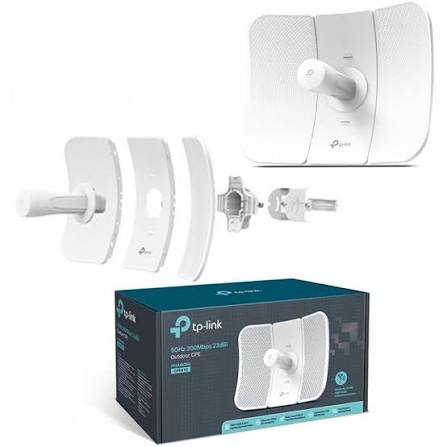
TP-Link CPE510
Buy TP-Link CPE510 in Kenya from Orbitlink Solutions. Get 5GHz N300 wireless, 13dBi directional antenna, Passive PoE and long-range 15km+ connectivity.
TP-Link CPE510 5GHz 300Mbps 13dBi Outdoor CPE
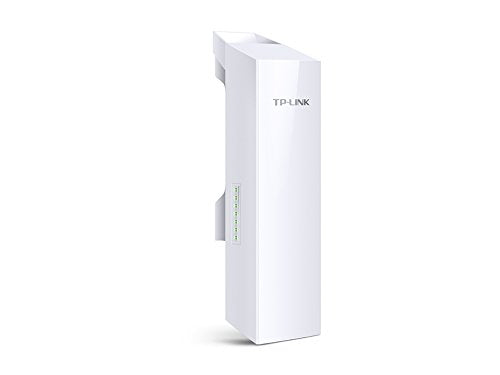
The TP-Link CPE510 is a 5GHz 300Mbps outdoor wireless CPE designed for long-distance point-to-point, point-to-multipoint and outdoor wireless networking. It combines a built-in 13dBi 2×2 dual-polarized directional MIMO antenna, Passive PoE, TP-Link Pharos management and MAXtream TDMA technology in a weather-resistant outdoor enclosure.
TP-Link positions the CPE510 for wireless transmission beyond 15km under appropriate conditions. That makes it useful for connecting offices, warehouses, schools, farms, CCTV sites, gatehouses, construction sites, remote buildings and Starlink or fibre networks where trenching physical cable would be difficult or expensive.
The CPE510 operates in the 5GHz band, which is often preferable to 2.4GHz for long-distance outdoor links because it can provide cleaner spectrum and greater available channel capacity. However, the CPE510 uses a 10/100Mbps Ethernet interface, so its real-world network throughput is limited well below the advertised 300Mbps wireless PHY rate.
TP-Link CPE510 Key Features
| Feature | Specification |
|---|---|
| Model | TP-Link CPE510 |
| Product Type | Outdoor Wireless CPE |
| Frequency | 5GHz |
| Wireless Standards | IEEE 802.11a/n |
| Maximum Wireless Rate | Up to 300Mbps |
| Antenna | Built-in 13dBi directional antenna |
| MIMO | 2×2 |
| Polarization | Dual-polarized |
| Long-Range Positioning | More than 15km |
| Ethernet | 10/100Mbps Fast Ethernet |
| PoE | Passive PoE |
| PoE Deployment | Up to 60m / 200ft |
| MAXtream TDMA | Supported |
| Pharos Control | Supported |
| PharOS | Supported |
| Point-to-Point | Supported |
| Point-to-Multipoint | Supported |
| Outdoor Wi-Fi Coverage | Supported |
| Lightning Protection | 6kV |
| ESD Protection | 15kV |
| Weather Rating | IPX5 on referenced hardware |
| Mounting | Pole mounting |
TP-Link's current product information confirms the 13dBi 2×2 directional antenna, 300Mbps radio, Passive PoE, 15km+ system optimization and Pharos/MAXtream features.
5GHz 300Mbps Outdoor Wireless
The CPE510 uses IEEE 802.11a/n on 5GHz and supports several selectable channel widths.
| Channel Width | Maximum Theoretical Rate |
|---|---|
| 40MHz | Up to 300Mbps |
| 20MHz | Up to 144.4Mbps |
| 10MHz | Up to 72.2Mbps |
| 5MHz | Up to 36.1Mbps |
Selectable narrower channels can be useful in noisy environments where maximizing stability and spectral efficiency matters more than peak link rate.
The quoted 300Mbps is a theoretical wireless link rate, not a guaranteed internet speed. In addition, the Fast Ethernet interface means wired throughput cannot exceed the nominal 100Mbps port rate.
Built-In 13dBi Directional Antenna
The CPE510 uses a 13dBi 2×2 dual-polarized directional MIMO antenna.
A directional antenna concentrates wireless energy toward a specific location rather than spreading signal equally in all directions. This makes the CPE510 appropriate for building-to-building wireless bridges and long-distance outdoor links.
TP-Link documentation lists a beamwidth of approximately 45° horizontally and 30° vertically for the referenced hardware.
Typical applications include:
-
Office-to-office wireless links
-
Warehouse connectivity
-
CCTV backhaul
-
School-campus networking
-
Farm connectivity
-
Remote gatehouses
-
Starlink distribution
-
WISP networks
More Than 15km Long-Range Wireless
TP-Link describes the CPE510 as having system-level optimizations for wireless transmission beyond 15km.
This does not mean that every installation will reliably reach 15km.
A successful long-distance link depends on:
| Factor | Importance |
|---|---|
| Clear line of sight | Critical |
| Fresnel-zone clearance | Critical |
| Antenna alignment | Critical |
| Mounting height | High |
| Channel interference | High |
| Noise floor | High |
| Legal transmit-power limits | High |
| Cable quality | Moderate |
| Weather conditions | Moderate |
A properly aligned 5km link can perform far better than a poorly designed 1km installation.
TP-Link CPE510 for Point-to-Point Wireless

Two CPE510 units can form a long-distance wireless bridge.
Typical Connection
Main Network → CPE510 )))))) CPE510 → Remote Network
For example:
Starlink / Fibre → Router → CPE510 )))))) CPE510 → Switch → Wi-Fi Access Point
The first CPE is connected to the source network, while the second CPE receives the wireless bridge and hands the connection to equipment at the remote site.
How Many CPE510 Units Do You Need?
A normal point-to-point installation typically requires:
| Location | Equipment |
|---|---|
| Site A | 1 × CPE510 |
| Site B | 1 × CPE510 |
| Total | 2 × CPE510 units |
One CPE510 by itself normally cannot create a complete point-to-point bridge unless compatible equipment is already installed at the other site.
TP-Link CPE510 for Point-to-Multipoint
The CPE510 also supports point-to-multipoint deployments.
A central CPE or compatible Pharos base station can connect to several client locations.
Main Site → Remote Site A
Main Site → Remote Site B
Main Site → Remote Site C
This makes the CPE510 suitable for:
-
Farms
-
Schools
-
Housing compounds
-
CCTV networks
-
Business campuses
-
WISP deployments
-
Remote staff quarters
TP-Link's MAXtream technology is specifically designed to improve compatible point-to-multipoint network efficiency.
Pharos MAXtream TDMA Technology
The CPE510 supports TP-Link Pharos MAXtream TDMA.
In conventional wireless PtMP environments, several client radios can compete for airtime and cause collisions, hidden-node problems and reduced throughput.
MAXtream uses a time-division approach intended to improve:
-
Throughput
-
Capacity
-
Latency
-
Multi-client efficiency
-
Network scalability
TP-Link specifically positions MAXtream for compatible point-to-multipoint deployments.
Pharos Control Centralized Management
The CPE510 supports Pharos Control, TP-Link's centralized management platform for compatible Pharos outdoor wireless devices.
Network administrators can use it for:
-
Device discovery
-
Status monitoring
-
Firmware upgrades
-
Network maintenance
-
Centralized management
This becomes particularly useful when several CPE radios are deployed across one farm, school, estate or business network.
PharOS Web Management
The CPE510 also runs PharOS, TP-Link's web-based management interface for Pharos outdoor radios.
Useful tools include:
-
Signal-strength monitoring
-
Noise monitoring
-
Transmit CCQ
-
Throughput monitoring
-
Client monitoring
-
Spectrum Analyzer
-
Speed Test
-
Ping
-
Traceroute
-
SSH
-
SNMP
-
Ping Watchdog
These tools are particularly useful during antenna alignment and link troubleshooting.
Multiple Operating Modes
Depending on hardware revision and firmware, the CPE510 supports modes including:
| Operating Mode | Purpose |
|---|---|
| Access Point | Broadcasts the outdoor wireless network |
| Client | Connects to another AP |
| Bridge | Bridges network segments |
| Repeater | Repeats a wireless connection |
| AP Router | Wireless AP with routing |
| AP Client Router / WISP | Uses wireless as WAN |
Current product pages prominently list AP, Client, AP Router and AP Client Router, while TP-Link datasheets also document Bridge and Repeater modes.
Adjustable Transmission Power
Current TP-Link regional specifications generally list adjustable CPE510 transmit power of around 23dBm / 200mW, although some older documentation and hardware versions cite different maximum values.
This is one reason the exact hardware revision and local regulatory domain should always be checked before deployment.
Maximum transmit power can also vary by channel and country.
More transmit power does not automatically create a better wireless bridge. Correct antenna alignment, clear line of sight and a clean channel are often more important.
10/100Mbps Fast Ethernet
One of the most important CPE510 limitations is its Ethernet interface.
TP-Link lists:
1 × 10/100Mbps shielded Ethernet port with Passive PoE input.
That means the port itself can constrain network throughput.
Practical Suitability
| Required Network Speed | CPE510 |
|---|---|
| 20Mbps | Very suitable |
| 50Mbps | Suitable |
| 80Mbps | Suitable |
| Around 100Mbps | Near interface limit |
| 150Mbps | Fast Ethernet becomes a bottleneck |
| 200Mbps+ | Consider a Gigabit outdoor bridge |
This is particularly important for modern Starlink and fibre connections.
If the objective is to transport the full capacity of a 200Mbps or faster internet service, a newer Gigabit-equipped point-to-point radio would usually be preferable.
Passive PoE
The CPE510 uses Passive Power over Ethernet.
TP-Link specifies a Passive PoE input range of approximately 16–27V DC on referenced versions, with a 24V adapter supplied with the device.
Typical installation:
Router/Switch → Passive PoE Adapter → Outdoor Ethernet Cable → CPE510
This allows the CPE to be installed high on a mast or rooftop without requiring a mains socket beside the radio.
Up to 60m PoE Deployment
TP-Link states that the Passive PoE adapter can support cable deployment of up to approximately 60 metres / 200 feet and can provide remote-reset functionality.
This is useful when mounting the CPE510 on:
-
Rooftops
-
Towers
-
Poles
-
Masts
-
External walls
Good-quality outdoor-rated Ethernet cable should be used for professional installations.
Outdoor Weather Protection
TP-Link lists the CPE510 with outdoor-focused protection including:
-
Weather-resistant enclosure
-
IPX5 rating on referenced hardware
-
15kV ESD protection
-
6kV lightning protection
-
Grounding terminal
The device still requires proper installation, grounding and surge-protection practices.
Outdoor-rated does not mean the CPE should be submerged or installed without appropriate cable protection.
TP-Link CPE510 for Starlink
The CPE510 can extend a Starlink network between physically separated buildings.
For example:
Starlink → Router → CPE510 )))))) CPE510 → Remote Router/AP
This can be useful for:
-
Guest houses
-
Warehouses
-
Security gates
-
Staff quarters
-
Farm buildings
-
Remote offices
-
Workshops
-
CCTV sites
However, the CPE510's 100Mbps Ethernet interface can restrict faster Starlink connections.
For applications where preserving speeds above 100Mbps matters, consider a Gigabit point-to-point solution instead.
TP-Link CPE510 for CCTV
The CPE510 is useful for wireless CCTV backhaul.
Example
Remote Cameras → PoE Switch → CPE510 )))))) CPE510 → Main LAN → NVR
This can eliminate the need to trench fibre or Ethernet between the remote CCTV location and the main building.
Before installation, calculate the combined video bitrate of the cameras to ensure the link has adequate usable bandwidth.
TP-Link CPE510 for Farms
The 5GHz CPE510 can link separate farm locations such as:
-
Farmhouse
-
Main office
-
Greenhouses
-
Dairy unit
-
Security gate
-
Worker accommodation
-
Workshops
-
CCTV poles
-
Irrigation-control stations
Where buildings have clear line of sight, a wireless bridge can provide a practical alternative to laying kilometres of cable.
TP-Link CPE510 for Schools and Campuses
Schools can use CPE510 links between:
-
Administration blocks
-
Libraries
-
Computer labs
-
Dormitories
-
Staff quarters
-
Security gates
-
Remote classrooms
Internet and LAN traffic can then be transported between separated buildings using a single network connection.
TP-Link CPE510 for Warehouses and Offices
Commercial and industrial users can deploy the CPE510 for:
-
Internet extension
-
CCTV
-
VoIP
-
Network printers
-
ERP terminals
-
Access control
-
Basic internal LAN connectivity
The Fast Ethernet limit should be considered before using it for bandwidth-intensive enterprise applications.
Line of Sight Is Critical
Reliable long-distance 5GHz wireless works best with clear line of sight.
The two radios should ideally be free from:
-
Buildings
-
Hills
-
Trees
-
Metal structures
-
Large obstructions
Adequate Fresnel-zone clearance is also important.
Obstructions can cause:
-
Packet loss
-
Low throughput
-
Higher latency
-
Unstable connections
-
Link drops
This becomes increasingly important as distance increases.
Antenna Alignment
Because the CPE510 uses a directional 13dBi antenna, accurate alignment is essential.
Installers should monitor:
-
Signal strength
-
Noise floor
-
Signal-to-noise ratio
-
CCQ
-
Throughput
-
Channel utilisation
PharOS provides several diagnostic tools to assist with alignment and troubleshooting.
CPE510 vs CPE210
| Feature | CPE210 | CPE510 |
|---|---|---|
| Frequency | 2.4GHz | 5GHz |
| Wireless Rate | 300Mbps | 300Mbps |
| Antenna Gain | 9dBi | 13dBi |
| MIMO | 2×2 | 2×2 |
| TP-Link Range Positioning | 5km+ | 15km+ |
| Ethernet | 10/100Mbps | 10/100Mbps |
| Passive PoE | Yes | Yes |
| MAXtream | Yes | Yes |
| Best For | Lower-cost 2.4GHz links | Longer 5GHz PtP links |
The CPE510 is generally preferable where a clear 5GHz path is available and longer-distance directional performance is required.
CPE510 vs CPE710
| Feature | CPE510 | CPE710 |
|---|---|---|
| Frequency | 5GHz | 5GHz |
| Wireless Standard | 802.11n | 802.11ac |
| Wireless Rate | 300Mbps | 867Mbps |
| Antenna | 13dBi | 23dBi |
| Ethernet | Fast Ethernet | Gigabit-class platform |
| Best For | Affordable long-range links | Higher-capacity long-range links |
For a new installation requiring substantially more throughput, CPE710 or newer Gigabit outdoor wireless equipment is generally the stronger choice.
Advantages and Limitations
| Advantages | Limitations |
|---|---|
| 5GHz outdoor wireless | Fast Ethernet bottleneck |
| 300Mbps theoretical wireless | No Gigabit Ethernet |
| 13dBi directional antenna | Older 802.11n technology |
| 2×2 MIMO | Requires good line of sight |
| 15km+ manufacturer positioning | Published range is not guaranteed |
| MAXtream TDMA | Requires accurate alignment |
| Point-to-point | Passive PoE must be matched correctly |
| Point-to-multipoint | 5GHz can be blocked by obstacles |
| Pharos Control | Actual frequencies vary by region |
| Passive PoE | — |
| 15kV ESD protection | — |
| 6kV lightning protection | — |
Who Should Buy the TP-Link CPE510?
The TP-Link CPE510 is a good choice for customers who need an affordable long-distance 5GHz outdoor wireless bridge and do not require more than Fast Ethernet-class throughput.
It is especially suitable for:
-
Building-to-building networks
-
Farms
-
CCTV backhaul
-
Schools
-
Warehouses
-
Remote gatehouses
-
Construction sites
-
WISP installations
-
Moderate-speed Starlink extensions
-
Point-to-multipoint networks
Customers requiring consistent throughput above 100Mbps should consider newer Gigabit outdoor wireless solutions.
What Is Included with the TP-Link CPE510?
TP-Link lists the package contents as:
| Package Item | Included |
|---|---|
| TP-Link CPE510 | Yes |
| Passive PoE Adapter | Yes |
| Power Cord | Yes |
| Pole-Mounting Straps | Yes |
| Installation Guide | Yes |
Detailed TP-Link CPE510 Specifications
| Specification | Details |
|---|---|
| Model | TP-Link CPE510 |
| Product | 5GHz 300Mbps 13dBi Outdoor CPE |
| Processor | Qualcomm Atheros 560MHz CPU on referenced hardware |
| Memory | 64MB DDR2 |
| Flash | 8MB |
| Wireless Standards | IEEE 802.11a/n |
| Frequency | Approx. 5.15–5.85GHz, regional restrictions apply |
| Maximum Wireless Rate | 300Mbps |
| Channel Width | 5 / 10 / 20 / 40MHz |
| Antenna | 13dBi 2×2 dual-polarized directional |
| Beamwidth | Approx. 45° H / 30° E |
| Ethernet | 1 × 10/100Mbps shielded Ethernet |
| Power | Passive PoE |
| PoE Voltage | 16–27VDC on referenced hardware |
| Adapter Output | 24V DC |
| PoE Distance | Up to 60m |
| ESD Protection | 15kV |
| Lightning Protection | 6kV |
| Weather Protection | IPX5 on referenced hardware |
| Dimensions | Approx. 224 × 79 × 60mm |
| Management | PharOS / Pharos Control |
| MAXtream TDMA | Supported |
| Operating Temperature | -30°C to 70°C on referenced version |
Hardware versions and regulatory-region settings can change transmit power, available channels and certain hardware details, so the exact revision should be verified when replacing adapters or upgrading firmware.
TP-Link CPE510 Price in Kenya
Recent Kenyan listings show the CPE510 at around KES 7,885–11,000, depending on seller and promotion. A current TDK listing shows KES 8,400 excluding VAT, while recent Jumia listings range from approximately KES 7,885 to KES 11,000.
| Recent Kenya Market Reference | Approximate Price |
|---|---|
| Jumia promotional listing | KES 7,885 |
| Jumia listing | KES 8,300 |
| TDK | KES 8,400 ex VAT |
| Jumia listing | KES 8,500 |
| Higher Jumia listing | KES 11,000 |
These are market-reference prices, not Orbitlink Solutions' fixed price.
For your website, use:
Price: Contact Orbitlink Solutions for the current TP-Link CPE510 price in Kenya.
Why Buy TP-Link CPE510 from Orbitlink Solutions?
| Why Orbitlink Solutions? | Benefit |
|---|---|
| Genuine networking products | Reliable sourcing |
| TP-Link CPE range | Multiple outdoor wireless options |
| Technical guidance | Better equipment selection |
| Installer pricing | Suitable for technicians |
| Project pricing | Multi-unit deployments |
| BOQ support | Better project planning |
| Outdoor network equipment | Complete installations |
| Ethernet cabling | Reliable CPE connections |
| Starlink integration | Building-to-building internet |
| CCTV networking | Wireless camera backhaul |
| Nairobi pickup | Convenient collection |
| Nationwide delivery | Supply across Kenya |
| Warranty support | After-sales assistance |
Orbitlink Solutions can also help customers compare the CPE510 with CPE210, CPE610, CPE710 and newer Gigabit outdoor wireless options.
Watch: TP-Link CPE510 Setup and Installation
The TP-Link CPE510 combines a 5GHz 300Mbps 802.11n radio with a built-in 13dBi directional antenna, making it a practical choice for long-distance outdoor links. TP-Link positions the device for wireless transmission beyond 15km under suitable conditions, but actual link performance depends on line of sight, interference, Fresnel-zone clearance, antenna height and alignment.
For a point-to-point bridge, two compatible CPE510 units are usually installed facing one another. One radio connects to the source network, while the second delivers the connection at the remote building. The same platform can also be used for point-to-multipoint networks, with MAXtream TDMA helping improve compatible multi-client Pharos installations.
The CPE510 remains useful for CCTV backhaul, schools, farms, warehouses, remote offices and moderate-speed Starlink extensions, but buyers should understand its Fast Ethernet limitation. If the objective is to transport more than about 100Mbps between locations, a newer Gigabit point-to-point solution will provide better long-term performance.
Frequently Asked Questions About TP-Link CPE510
What is the TP-Link CPE510?
The CPE510 is a 5GHz 300Mbps outdoor CPE with a built-in 13dBi directional antenna designed for long-distance wireless networking.
How fast is the CPE510?
Its maximum theoretical wireless rate is 300Mbps using a 40MHz channel.
What frequency does it use?
The CPE510 operates in the 5GHz band, subject to regional frequency restrictions.
What antenna does it have?
It has a 13dBi 2×2 dual-polarized directional MIMO antenna.
What is the TP-Link CPE510 range?
TP-Link positions it for more than 15km wireless transmission under appropriate conditions.
Does the CPE510 have Gigabit Ethernet?
No. Current referenced versions use 10/100Mbps Fast Ethernet.
Can CPE510 provide 300Mbps internet?
Not through its Fast Ethernet port. The 300Mbps figure is the theoretical radio-link rate, while the Ethernet interface is nominally limited to 100Mbps.
Does CPE510 support Passive PoE?
Yes. TP-Link specifies Passive PoE and up to 60 metres / 200 feet of PoE deployment.
Can CPE510 work with Starlink?
Yes. It can extend Starlink between buildings, but its Fast Ethernet interface can restrict faster Starlink connections.
Can I connect two buildings with CPE510?
Yes. Two compatible CPE510 radios can create a point-to-point wireless bridge.
How many CPE510 units are required?
A typical point-to-point bridge requires two CPE510 units, one at each site.
Can CPE510 carry CCTV traffic?
Yes. It is suitable for CCTV backhaul provided the combined camera bitrate stays within the practical throughput of the link.
Does CPE510 support point-to-multipoint?
Yes. TP-Link supports PtMP applications and provides MAXtream TDMA for compatible Pharos deployments.
Is CPE510 weatherproof?
The referenced hardware is rated IPX5 and designed for outdoor installation.
Does it have lightning protection?
Yes. TP-Link lists 6kV lightning protection and 15kV ESD protection.
Is CPE510 better than CPE210?
For many clear-line-of-sight long-distance links, yes. CPE510 operates at 5GHz, uses a 13dBi antenna and is positioned for 15km+ transmission, while CPE210 is 2.4GHz with a 9dBi antenna.
Is CPE710 better than CPE510?
For higher-performance installations, yes. CPE710 uses 802.11ac, offers up to 867Mbps theoretical wireless speed and uses a higher-gain directional antenna.
What is the TP-Link CPE510 price in Kenya?
Current market listings are roughly KES 7,885–11,000, although actual prices change with stock, seller and VAT treatment.
Buy TP-Link CPE510 in Kenya
The TP-Link CPE510 5GHz 300Mbps 13dBi Outdoor CPE provides a cost-effective platform for point-to-point wireless bridges, point-to-multipoint networks, CCTV backhaul, farms, schools, warehouses and building-to-building internet extension. Its 5GHz directional antenna, Passive PoE, Pharos MAXtream and long-range design make it useful for professional outdoor wireless projects.
For reliable results, installations should be designed around clear line of sight, Fresnel-zone clearance, antenna alignment, channel conditions and correct mounting height. For connections requiring more than Fast Ethernet-class throughput, customers should compare newer Gigabit outdoor radios before choosing the CPE510.
Contact Orbitlink Solutions
Orbitlink Solutions
Address: Lyric House, Kimathi Street, Nairobi
Phone: +254 743 720 551
Email: info@orbitlinksolutions.co.ke
Opening Hours: Monday–Saturday, 9:00 AM–6:00 PM
Availability: Nairobi pickup and nationwide delivery
Contact Orbitlink Solutions for the current TP-Link CPE510 price in Kenya, CPE stock availability, point-to-point wireless links, Starlink building-to-building connectivity, CCTV wireless backhaul, Ethernet cabling and outdoor network installations.
Need Help Choosing? Ask a Technician
Get guidance on setup, compatibility, stock, and delivery before buying for your project.