
TP-Link Deco X10 Wi-Fi 6 (3-Pack)
Buy TP-Link Deco X10 3-Pack in Kenya from Orbitlink Solutions. Get AX1500 Wi-Fi 6, Gigabit Ethernet, 520m² mesh coverage, WPA3 and seamless roaming.
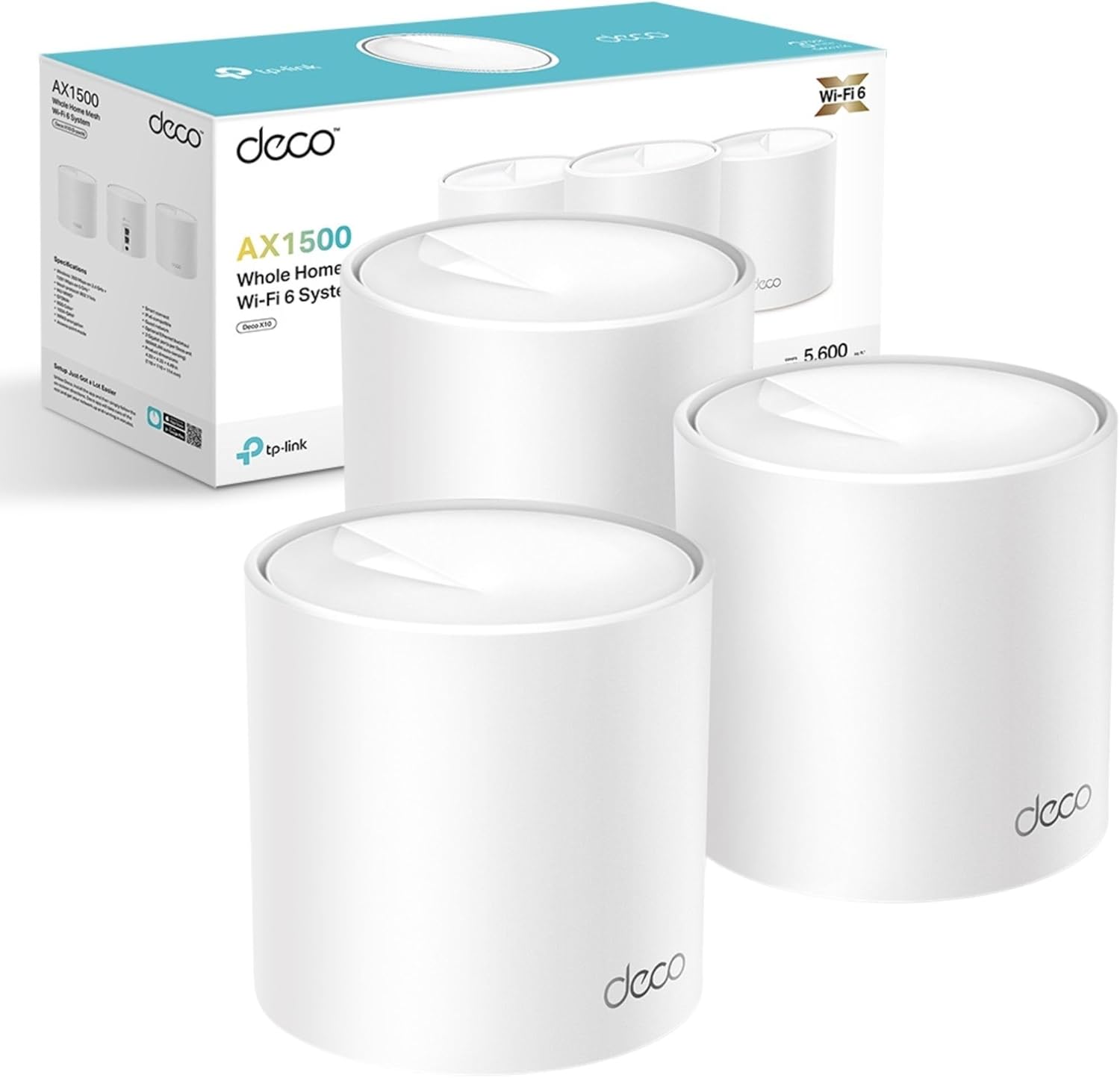
TP-Link Deco X10 Wi-Fi 6 (3-Pack) AX1500 Whole Home Mesh Wi-Fi System
The TP-Link Deco X10 Wi-Fi 6 (3-Pack) is an AX1500 Whole Home Mesh Wi-Fi 6 System built for larger homes, maisonettes, apartments and small offices that need stronger wireless coverage without creating separate Wi-Fi networks in every room. The three Deco X10 units work together as one unified network and automatically coordinate connections as compatible devices move around the property.
Unlike older Wi-Fi 5 Deco systems such as the M4 and M5, the Deco X10 uses Wi-Fi 6 / IEEE 802.11ax. It delivers theoretical wireless rates of up to 1,201Mbps on 5GHz and 300Mbps on 2.4GHz, giving an AX1500-class combined rate. Wi-Fi 6 technologies including OFDMA, MU-MIMO and 1024-QAM help it serve multiple compatible devices more efficiently.
For the three-pack, TP-Link advertises coverage of up to 5,600 square feet / 520m², support for up to 120 connected devices, and suitability for approximately 3–5 bedroom homes. Each Deco X10 also provides two Gigabit Ethernet WAN/LAN ports, making it suitable for fibre and Starlink installations where internet speeds can exceed 100Mbps.
TP-Link Deco X10 3-Pack Key Features
| Feature | Specification |
|---|---|
| Model | TP-Link Deco X10 |
| Package | 3-Pack |
| Product Type | Whole Home Mesh Wi-Fi System |
| Wi-Fi Generation | Wi-Fi 6 |
| Wi-Fi Class | AX1500 |
| 2.4GHz Speed | Up to 300Mbps |
| 5GHz Speed | Up to 1,201Mbps |
| Combined Wireless Rate | Up to 1,501Mbps theoretical |
| Coverage | Up to 5,600 sq. ft. / 520m² |
| Recommended Home Size | Approximately 3–5 bedrooms |
| Connected Devices | Up to 120 |
| Frequency Bands | 2.4GHz + 5GHz |
| Mesh Technology | TP-Link Deco Mesh |
| OFDMA | Supported |
| MU-MIMO | 2×2 MU-MIMO |
| Beamforming | Supported |
| Streams | 4 |
| Ethernet | 2 × Gigabit WAN/LAN per Deco |
| Ethernet Backhaul | Supported |
| WPA3 | Supported |
| Guest Network | Supported |
| Parental Controls | Supported |
| QoS | Device-based QoS |
| Router Mode | Supported |
| Access Point Mode | Supported |
| IPv6 | Supported |
| Management | TP-Link Deco App |
| Dimensions | 110 × 110 × 114mm per unit |
TP-Link's current specification confirms AX1500 Wi-Fi 6, two internal antennas per Deco, OFDMA, 2×2 MU-MIMO, beamforming, four streams and two Gigabit ports per unit.
AX1500 Wi-Fi 6 Performance
The Deco X10 is significantly more modern than older Wi-Fi 5 Deco systems.
| Frequency Band | Maximum Theoretical Rate |
|---|---|
| 2.4GHz | 300Mbps |
| 5GHz | 1,201Mbps |
| Wi-Fi Class | AX1500 |
The 5GHz band is where the Deco X10 delivers its strongest performance, reaching a theoretical PHY rate of 1,201Mbps for compatible Wi-Fi 6 devices.
The 2.4GHz band delivers up to 300Mbps and remains useful for longer-range connectivity, smart-home devices, CCTV equipment and older wireless clients.
TP-Link makes clear that these are theoretical wireless rates. Actual internet throughput depends on your ISP, client hardware, Ethernet link speed, interference, walls and other environmental factors.
Why Wi-Fi 6 Makes Deco X10 Different
Wi-Fi 6 introduces several improvements over traditional Wi-Fi 5 mesh systems.
The Deco X10 supports OFDMA, allowing one transmission channel to be divided so that multiple compatible clients can be served more efficiently. This can be particularly useful in homes with smartphones, televisions, laptops, CCTV cameras, smart devices and other equipment all connected simultaneously.
It also supports MU-MIMO, allowing the Deco to communicate with multiple compatible devices at the same time instead of handling every device strictly one after another.
TP-Link also uses 1024-QAM on compatible Wi-Fi 6 links, allowing more information to be encoded within each wireless transmission symbol.
OFDMA for Multi-Device Homes
OFDMA is one of the key reasons to consider Deco X10 over older M4 and M5 systems.
A typical modern household may have:
| Device | Typical Activity |
|---|---|
| Smart TV | Netflix / YouTube |
| Laptop | Zoom / Teams |
| Smartphone | Social media |
| Tablet | Streaming |
| CCTV cameras | Continuous network traffic |
| Smart speakers | Cloud connectivity |
| Smart plugs | IoT traffic |
| Gaming console | Online gaming |
Instead of treating every small packet of data as an entirely separate wireless transmission, OFDMA can use channel resources more efficiently across compatible Wi-Fi 6 clients.
This does not automatically make every device faster, but it can improve efficiency and responsiveness when many devices are connected.
Up to 120 Connected Devices
TP-Link advertises the Deco X10 as supporting up to 120 connected devices under its testing conditions.
This makes the three-pack suitable for modern connected households using multiple smartphones, laptops, smart TVs, cameras, smart-home equipment and other IoT devices.
The 120-device figure is a capacity guideline rather than a promise that all 120 devices can simultaneously receive maximum-speed internet. Actual performance depends on network activity and available bandwidth.
Three Deco X10 Units, One Network
The Deco X10 3-Pack contains three coordinated mesh units.
A typical installation could be:
| Deco Unit | Suggested Placement |
|---|---|
| Deco X10 No. 1 | Living room / internet connection |
| Deco X10 No. 2 | Upstairs hallway |
| Deco X10 No. 3 | Bedroom, office or far end of property |
All three units can broadcast the same Wi-Fi network rather than forcing users to connect manually to different extenders.
TP-Link describes the Deco X10 as one unified network that automatically selects a suitable connection as users move around the home.
Seamless AI-Driven Mesh
TP-Link markets the Deco X10 around AI-Driven Mesh, where multiple Deco units coordinate to improve whole-home coverage.
Compatible client devices can move between Decos while maintaining the same network name.
TP-Link's documentation notes that roaming features depend partly on client support for standards such as 802.11k/v/r, so roaming behaviour may vary from one phone or laptop to another.
This is particularly helpful for:
-
WhatsApp calls while moving between rooms
-
Zoom or Teams meetings
-
Streaming
-
Video calls
-
Mobile gaming
-
Home-office use
-
Smart-home connectivity
Up to 5,600 sq. ft. / 520m² Coverage
TP-Link advertises the following approximate Deco X10 coverage figures:
| Pack Size | Published Coverage |
|---|---|
| 1-Pack | Up to 2,100 sq. ft. / 190m² |
| 2-Pack | Up to 3,900 sq. ft. / 360m² |
| 3-Pack | Up to 5,600 sq. ft. / 520m² |
The three-pack is recommended for approximately 3–5 bedroom homes.
These are manufacturer test figures rather than guaranteed real-world coverage.
| Building Factor | Possible Effect |
|---|---|
| Reinforced concrete | Significant signal reduction |
| Multiple floors | Can weaken mesh links |
| Metal structures | Can block or reflect Wi-Fi |
| Thick masonry walls | Lower 5GHz penetration |
| Neighboring Wi-Fi | Additional interference |
| Deco positioning | Major performance factor |
| Ethernet backhaul | Can improve inter-node performance |
For Kenyan maisonettes and concrete-built homes, careful placement of the three units is particularly important.
Beamforming
The Deco X10 supports beamforming, which helps concentrate wireless signal toward connected clients.
TP-Link lists two internal antennas per Deco arranged to provide coverage in multiple directions, with beamforming helping improve signal delivery toward connected devices.
This can help improve usable coverage, although distance, walls and client hardware still determine real-world results.
2× Gigabit Ethernet Ports per Deco
Each Deco X10 includes:
2 × Gigabit WAN/LAN auto-sensing ports.
| Wired Feature | Deco X10 |
|---|---|
| Ports per Unit | 2 |
| Port Speed | Gigabit |
| WAN/LAN | Auto-sensing |
| Ethernet Backhaul | Supported |
| Total Physical Ports in 3-Pack | 6 |
This is important because it allows the Deco X10 to handle internet connections above the 100Mbps range that can bottleneck systems using Fast Ethernet.
Ethernet Backhaul
The Deco X10 supports optional Ethernet backhaul between nodes.
Wireless Mesh
Internet → Deco X10 1 )))) Deco X10 2 )))) Deco X10 3
This is easier where installing cable is difficult.
Ethernet Backhaul
Internet → Deco X10 1 → Ethernet → Deco X10 2 → Ethernet → Deco X10 3
Wired backhaul can provide more predictable performance in homes with concrete walls or several floors.
It also prevents inter-node communication from relying entirely on the same wireless spectrum used by client devices.
TP-Link Deco X10 for Starlink
The Deco X10 3-Pack is a strong option for extending Starlink internet throughout a larger property.
A typical configuration could be:
Starlink → Main Deco X10 → Deco X10 No. 2 → Deco X10 No. 3
Its Gigabit Ethernet ports mean the main Deco does not introduce the 100Mbps wired bottleneck found on entry-level Deco E4 systems.
Wi-Fi 6 is also useful where newer smartphones, tablets and laptops support 802.11ax.
For customers who want even higher wireless performance, models such as Deco X20 and X50 should also be considered.
Deco X10 for Fibre Internet
The X10 is also well suited to fibre connections.
Its Gigabit Ethernet ports make it appropriate for common fibre packages up to the practical limits of Gigabit Ethernet, although real-world performance still depends on router configuration, cabling and client capabilities.
For homes where fibre enters one room but Wi-Fi is poor elsewhere, the three Deco nodes can distribute coverage more evenly.
Router Mode and Access Point Mode
The Deco X10 supports both:
| Mode | Purpose |
|---|---|
| Router Mode | Deco X10 acts as the primary router |
| Access Point Mode | Deco provides mesh Wi-Fi behind another router |
TP-Link officially lists both operating modes.
Access Point Mode can be particularly useful where a Starlink router, firewall or existing ISP gateway already handles routing.
WPA3 Wi-Fi Security
The Deco X10 supports:
WPA-Personal, WPA2-Personal and WPA3-Personal.
WPA3 is the newer wireless security standard and provides improved protections compared with older WPA2-only systems when compatible client devices are used.
This is another advantage of moving from older Wi-Fi 5 Deco models to a newer Wi-Fi 6 platform.
SPI Firewall and Access Control
TP-Link lists both SPI Firewall and Access Control under the Deco X10's network-security features.
These functions help control traffic and device access when Deco is operating as the router.
The system also supports separate guest Wi-Fi networks.
Guest Wi-Fi
The Deco X10 can create:
| Guest Network | Support |
|---|---|
| 2.4GHz Guest Wi-Fi | Yes |
| 5GHz Guest Wi-Fi | Yes |
This allows visitors to connect to the internet without joining the primary household wireless network.
Parental Controls
The Deco X10 includes parental-control features through the Deco platform.
TP-Link lists options such as custom profiles, content filtering, bedtime, offline periods, family time, internet pause and usage reports.
The exact interface and available functions may change as TP-Link updates the Deco App and firmware.
Quality of Service
The X10 supports device-based Quality of Service.
This allows users to prioritize an important client device when several devices share the same internet connection.
For example, a home-office laptop can be given higher priority while other household devices are streaming or downloading files.
IPv6 Support
The Deco X10 supports both:
IPv4 and IPv6.
This helps make the platform suitable for modern ISP networks and future network deployments.
VLAN and IPTV Support
Current TP-Link specifications list support for:
IGMP Proxy, IGMP Snooping, Bridge mode and Tag VLAN under IPTV functionality.
This can be useful when integrating Deco with ISPs that require VLAN configuration for internet or IPTV services.
Deco App Management
The Deco X10 is configured primarily through the TP-Link Deco App.
The app guides users through initial installation and provides ongoing network-management functions.
Users can manage connected clients, Wi-Fi settings, parental controls, QoS, guest Wi-Fi and firmware updates from the Deco platform.
TP-Link Deco X10 for 3–5 Bedroom Homes
TP-Link categorizes the Deco X10 3-Pack for approximately 3–5 bedroom houses.
A practical arrangement could be:
| Property Area | Deco |
|---|---|
| Ground-floor living room | Main Deco |
| Upper-floor hallway | Second Deco |
| Home office / distant bedroom | Third Deco |
The system can then create one unified wireless network throughout the property.
TP-Link Deco X10 for Maisonettes
The 3-Pack is particularly attractive for multi-floor maisonettes.
Instead of relying on a single router downstairs, one Deco can remain near the internet source while the other two are distributed upstairs and toward weak-signal rooms.
Where Ethernet cabling is available between floors, wired backhaul can further improve reliability.
Deco X10 for Home Offices
The Deco X10 is suitable for home-office applications including:
-
Microsoft Teams
-
Zoom
-
VoIP
-
Cloud applications
-
Large downloads
-
Web applications
-
Remote desktop
-
Starlink connectivity
-
Fibre internet
Wi-Fi 6 and Gigabit Ethernet make it considerably better suited to modern work-from-home environments than entry-level Wi-Fi 5 mesh systems.
TP-Link Deco X10 (3-Pack) Price in Kenya
Current Kenyan marketplace pricing varies by seller and availability.
Recent Jumia Kenya listings show examples ranging from approximately KES 25,700 to KES 31,999, with several listings around KES 28,500–30,500.
| Current Market Example | Approximate Price |
|---|---|
| Jumia listing | KES 25,700 |
| Jumia listing | KES 28,500 |
| Jumia listing | KES 29,000 |
| Jumia listing | KES 30,000 |
| Jumia listing | KES 30,500 |
| Jumia listing | KES 31,999 |
Prices can change according to seller, stock, VAT treatment, promotions and hardware revision.
For Orbitlink's website, use:
Price: Contact Orbitlink Solutions for the current TP-Link Deco X10 Wi-Fi 6 3-Pack price in Kenya.
TP-Link Deco X10 vs Deco M4
| Feature | Deco M4 | Deco X10 |
|---|---|---|
| Wi-Fi Generation | Wi-Fi 5 | Wi-Fi 6 |
| Wi-Fi Class | AC1200 | AX1500 |
| 2.4GHz | 300Mbps | 300Mbps |
| 5GHz | 867Mbps | 1,201Mbps |
| Ethernet | Gigabit | Gigabit |
| OFDMA | No | Yes |
| WPA3 | Version dependent | Yes |
| Device Capacity | Around 100 | Up to 120 |
| Best For | Affordable mesh | Modern Wi-Fi 6 homes |
The X10 is the more modern choice, particularly where newer phones and laptops support Wi-Fi 6.
TP-Link Deco X10 vs Deco M5
| Feature | Deco M5 | Deco X10 |
|---|---|---|
| Wi-Fi Generation | Wi-Fi 5 | Wi-Fi 6 |
| Class | AC1300 | AX1500 |
| 2.4GHz | 400Mbps | 300Mbps |
| 5GHz | 867Mbps | 1,201Mbps |
| Ethernet | Gigabit | Gigabit |
| OFDMA | No | Yes |
| WPA3 | Revision/firmware dependent | Yes |
| Best For | Feature-rich Wi-Fi 5 | Modern Wi-Fi 6 deployment |
Although the M5 has a higher theoretical 2.4GHz figure, the X10's Wi-Fi 6 platform offers better modern-client efficiency and a faster 5GHz link.
TP-Link Deco X10 vs Deco X20
| Feature | Deco X10 | Deco X20 |
|---|---|---|
| Wi-Fi Generation | Wi-Fi 6 | Wi-Fi 6 |
| Wi-Fi Class | AX1500 | AX1800 |
| 2.4GHz | 300Mbps | 574Mbps |
| 5GHz | 1,201Mbps | 1,201Mbps |
| Ethernet | Gigabit | Gigabit |
| OFDMA | Yes | Yes |
| MU-MIMO | Yes | Yes |
| Best For | Value Wi-Fi 6 | Higher overall wireless capacity |
The X20 is particularly attractive where more 2.4GHz capacity is needed.
TP-Link Deco X10 vs Deco X50
| Feature | Deco X10 | Deco X50 |
|---|---|---|
| Wi-Fi Standard | Wi-Fi 6 | Wi-Fi 6 |
| Wi-Fi Class | AX1500 | AX3000 |
| 2.4GHz | 300Mbps | 574Mbps |
| 5GHz | 1,201Mbps | 2,402Mbps |
| 160MHz | No | Yes |
| Ethernet | 2 × Gigabit | Common X50: 3 × Gigabit |
| Best For | General Wi-Fi 6 mesh | Higher-speed fibre and Starlink |
The X50 is the better option where performance takes priority over budget.
Advantages and Limitations
| Advantages | Limitations |
|---|---|
| Wi-Fi 6 / 802.11ax | No 6GHz band |
| AX1500 wireless | No multi-gigabit Ethernet |
| Three mesh units | Dual-band rather than tri-band |
| Up to 520m² published coverage | Wireless backhaul shares available spectrum |
| Up to 120 connected devices | Real-world coverage depends on building |
| Gigabit Ethernet | 2.4GHz rate is 300Mbps |
| OFDMA | — |
| MU-MIMO | — |
| WPA3 | — |
| Beamforming | — |
| Ethernet backhaul | — |
| Router and AP modes | — |
| Deco App management | — |
Who Should Buy TP-Link Deco X10 3-Pack?
The Deco X10 3-Pack is particularly suitable for customers who want Wi-Fi 6 without moving into more expensive AX3000 or Wi-Fi 6E systems.
It is a strong fit for 3–5 bedroom homes, maisonettes, larger apartments, home offices, Starlink users, fibre users, smart homes and households with many connected devices.
It is also a logical upgrade for customers currently using Deco E4, M4 or similar Wi-Fi 5 mesh systems.
What Is Included in the Deco X10 3-Pack?
TP-Link lists the following contents:
| Package Item | Quantity |
|---|---|
| Deco X10 Units | 3 |
| Power Adapters | 3 |
| RJ45 Ethernet Cable | 1 |
| Quick Installation Guide | 1 |
The official current specification confirms this package configuration.
Detailed TP-Link Deco X10 Specifications
| Specification | Details |
|---|---|
| Model | TP-Link Deco X10 |
| Pack | 3-Pack |
| Wi-Fi Generation | Wi-Fi 6 |
| Wi-Fi Standards | IEEE 802.11ax/ac/n/a, 802.11n/b/g |
| Wi-Fi Class | AX1500 |
| 5GHz | Up to 1,201Mbps |
| 2.4GHz | Up to 300Mbps |
| Antennas | 2 internal antennas per unit |
| Streams | 4 |
| MU-MIMO | 2×2 |
| OFDMA | Yes |
| Beamforming | Yes |
| Ethernet | 2 × Gigabit WAN/LAN per unit |
| Ethernet Backhaul | Yes |
| Router Mode | Yes |
| Access Point Mode | Yes |
| WPA3 | Yes |
| SPI Firewall | Yes |
| Guest Networks | 2.4GHz + 5GHz |
| IPv4 | Yes |
| IPv6 | Yes |
| QoS | By device |
| Port Forwarding | Supported |
| UPnP | Supported |
| VLAN | Supported |
| Management | Deco App |
| Dimensions | 110 × 110 × 114mm |
| Operating Temperature | 0°C–40°C |
| Operating Humidity | 10%–90%, non-condensing |
TP-Link's 2026 datasheet reiterates that Wi-Fi 6 features such as OFDMA, MU-MIMO, 1024-QAM and BSS Color depend on compatible client hardware, and that actual network performance can also be constrained by Ethernet, cabling and ISP conditions.
Why Buy TP-Link Deco X10 from Orbitlink Solutions?
| Why Orbitlink Solutions? | Benefit |
|---|---|
| Genuine networking products | Reliable sourcing |
| TP-Link Deco systems | Multiple mesh options |
| Technical guidance | Correct mesh selection |
| Installer pricing | Suitable for network installers |
| Project pricing | Multi-unit network deployments |
| BOQ support | Better network planning |
| Routers and switches | Complete connectivity solutions |
| Ethernet cabling | Wired backhaul installations |
| Starlink integration | Whole-property mesh networking |
| Nairobi pickup | Convenient collection |
| Nationwide delivery | Delivery across Kenya |
| Warranty support | After-sales assistance |
Orbitlink Solutions can also help customers compare the Deco X10 against X20, X50, M4, M5 and other TP-Link networking equipment.
Watch: TP-Link Deco X10 Wi-Fi 6 (3-Pack)
The TP-Link Deco X10 3-Pack represents an important step up from older Wi-Fi 5 mesh systems because it combines three-node whole-home coverage with Wi-Fi 6 technologies such as OFDMA, MU-MIMO and 1024-QAM. TP-Link advertises up to 5,600 square feet / 520m² of coverage and positions the three-pack for approximately 3–5 bedroom homes. It also supports up to 120 connected devices under TP-Link test conditions.
Wireless performance reaches a theoretical 1,201Mbps on 5GHz and 300Mbps on 2.4GHz, giving the system its AX1500 classification. The Wi-Fi 6 platform is especially valuable in homes where many newer smartphones, laptops, smart TVs and IoT devices are simultaneously connected. Two Gigabit WAN/LAN ports on each unit also make the system suitable for Starlink and fibre connections that can exceed 100Mbps.
For Kenyan customers who want modern whole-home Wi-Fi without moving into the higher price range of AX3000 or tri-band mesh systems, the Deco X10 offers a useful balance. Compared with M4 and M5, it brings Wi-Fi 6 and OFDMA; compared with X50, it trades some maximum wireless performance for a lower purchase cost. For larger homes, Starlink installations and everyday fibre networks, the 3-Pack is therefore a strong mid-range mesh option.
Frequently Asked Questions About TP-Link Deco X10 Wi-Fi 6 (3-Pack)
What is TP-Link Deco X10?
The Deco X10 is an AX1500 Whole Home Mesh Wi-Fi 6 system available in 1-, 2- and 3-Pack configurations.
Is Deco X10 Wi-Fi 6?
Yes. It uses IEEE 802.11ax Wi-Fi 6 on compatible devices.
What speed does Deco X10 support?
It offers theoretical wireless rates of 1,201Mbps on 5GHz and 300Mbps on 2.4GHz.
How much area does the Deco X10 3-Pack cover?
TP-Link advertises coverage of up to 5,600 sq. ft. / 520m² under its test conditions.
Is Deco X10 suitable for a 3–5 bedroom home?
Yes. TP-Link specifically categorizes the three-pack for approximately 3–5 bedroom houses.
How many devices can Deco X10 support?
TP-Link advertises support for up to 120 devices under test conditions.
Does Deco X10 support OFDMA?
Yes. OFDMA is one of the main Wi-Fi 6 technologies supported by the X10.
Does Deco X10 support MU-MIMO?
Yes. It supports 2×2 MU-MIMO.
Does Deco X10 have Gigabit Ethernet?
Yes. Each Deco X10 has two Gigabit WAN/LAN ports.
Does Deco X10 support Ethernet backhaul?
Yes. TP-Link officially supports optional Ethernet backhaul between Deco units.
Does Deco X10 support WPA3?
Yes. WPA3-Personal is supported alongside WPA and WPA2 Personal.
Can Deco X10 work with Starlink?
Yes. The Gigabit Ethernet interface and mesh architecture make it suitable for extending Starlink internet around a home or office.
Can Deco X10 work with fibre internet?
Yes. It is suitable for fibre connections and provides Gigabit WAN/LAN connectivity.
Can Deco X10 operate as an access point?
Yes. It supports Router Mode and Access Point Mode.
Does Deco X10 support guest Wi-Fi?
Yes. Separate guest networks are available for both 2.4GHz and 5GHz.
Does Deco X10 support IPv6?
Yes. IPv4 and IPv6 are both supported.
Can I add more Deco units later?
Yes. Deco systems are designed to allow additional compatible Deco units to be added when more coverage is required.
Is Deco X10 better than Deco M4?
For modern devices, yes. X10 adds Wi-Fi 6, OFDMA, WPA3 and a faster 5GHz theoretical rate, while both provide Gigabit Ethernet.
Is Deco X10 better than Deco X20?
X20 provides a higher AX1800 rating, mainly because of its faster 2.4GHz band. X10 remains a good value-oriented Wi-Fi 6 option.
Is Deco X50 better than Deco X10?
X50 is substantially faster at AX3000 and supports a 2,402Mbps 5GHz theoretical rate. X10 is more suitable where budget is a higher priority.
What is the TP-Link Deco X10 3-Pack price in Kenya?
Current marketplace listings are roughly KES 25,700–31,999, although prices change with seller, stock and promotions.
Where can I buy TP-Link Deco X10 3-Pack in Kenya?
You can source the TP-Link Deco X10 Wi-Fi 6 3-Pack through Orbitlink Solutions, together with Ethernet cabling, switches, routers and other network equipment.
Buy TP-Link Deco X10 Wi-Fi 6 (3-Pack) in Kenya

The TP-Link Deco X10 AX1500 Whole Home Mesh Wi-Fi 6 System 3-Pack is a strong upgrade for customers moving from conventional routers, repeaters or older Wi-Fi 5 mesh systems. It combines three coordinated Deco units, Wi-Fi 6, OFDMA, MU-MIMO, WPA3, Gigabit Ethernet, Ethernet backhaul and coverage of up to 520m² under TP-Link test conditions.
Compared with Deco M4 and M5, the X10's biggest advantage is its Wi-Fi 6 platform, which is better designed for newer client devices and increasingly busy smart homes. Customers requiring even higher throughput can consider Deco X20 or X50, but the X10 offers a strong balance between price, coverage and modern networking capability.
Contact Orbitlink Solutions
Orbitlink Solutions
Address: Lyric House, Kimathi Street, Nairobi
Phone: +254 743 720 551
Email: info@orbitlinksolutions.co.ke
Opening Hours: Monday–Saturday, 9:00 AM–6:00 PM
Availability: Nairobi pickup and nationwide delivery
Contact Orbitlink Solutions for the current TP-Link Deco X10 Wi-Fi 6 3-Pack price in Kenya, availability, Starlink Wi-Fi extension, fibre networking, Deco mesh systems, Ethernet cabling, routers, switches and complete home or office network solutions.
Need Help Choosing? Ask a Technician
Get guidance on setup, compatibility, stock, and delivery before buying for your project.


