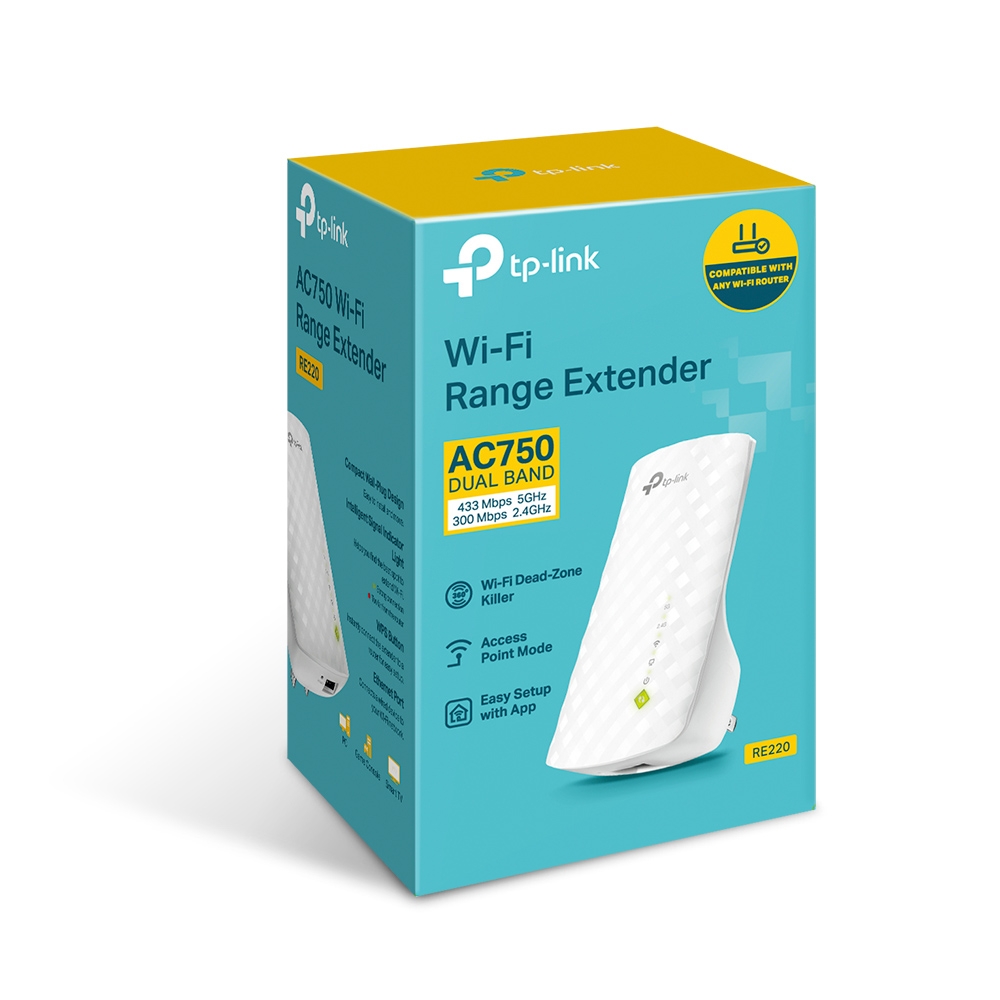
TP-Link RE220
Buy TP-Link RE220 AC750 Wi-Fi Range Extender in Kenya from Orbitlink Solutions. Extend dual-band Wi-Fi, reduce dead zones and connect wired devices through Ethernet.
TP-Link RE220 AC750 Wi-Fi Range Extender in Kenya
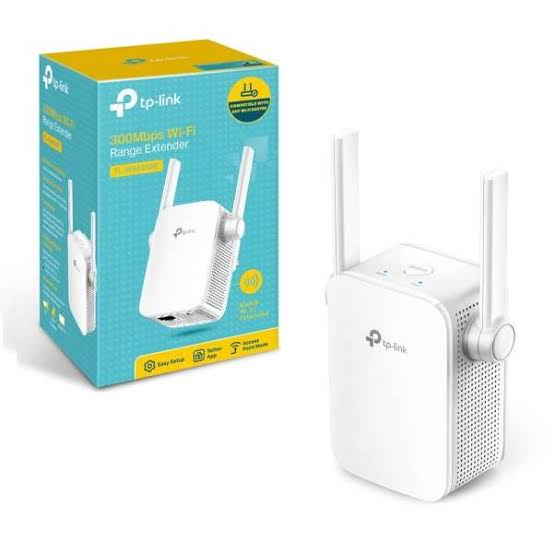
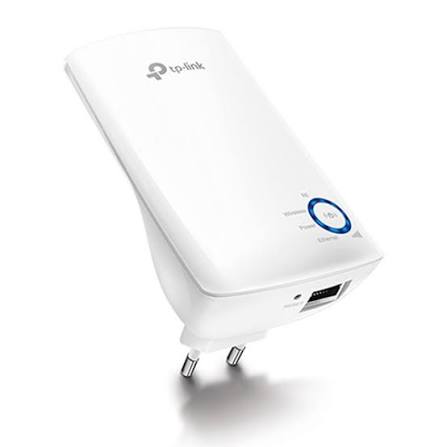
The TP-Link RE220 AC750 Wi-Fi Range Extender is a compact dual-band wireless extender designed to improve Wi-Fi coverage in rooms and areas where the main router signal is weak. It supports up to 300Mbps on 2.4GHz and 433Mbps on 5GHz, giving a combined AC750-class wireless rate of up to 750Mbps.
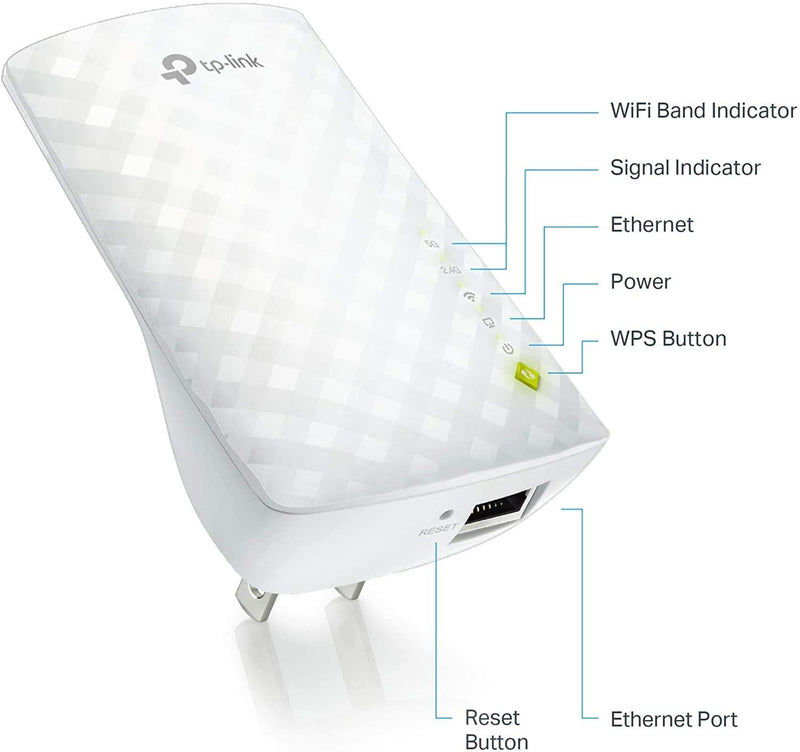
The RE220 works in both Range Extender Mode and Access Point Mode and includes a 10/100Mbps Ethernet port that can also connect wired equipment such as a desktop computer, smart TV or game console to the wireless network.
Its wall-plug design, three internal antennas, signal indicator, WPS setup and TP-Link Tether app support make it a practical Wi-Fi coverage upgrade for homes, apartments, small offices, fibre internet and Starlink installations.
TP-Link RE220 Key Features
| Feature | Specification |
|---|---|
| Model | TP-Link RE220 |
| Product Type | AC750 Wi-Fi Range Extender |
| Wi-Fi Standard | Wi-Fi 5 / IEEE 802.11ac |
| 2.4GHz Speed | Up to 300Mbps |
| 5GHz Speed | Up to 433Mbps |
| Combined Wireless Class | AC750 |
| Frequency Bands | 2.4GHz + 5GHz |
| Working Modes | Range Extender / Access Point |
| Ethernet Port | 1 × 10/100Mbps RJ45 |
| Antennas | 3 internal |
| WPS | Supported |
| Signal Indicator | Supported |
| TP-Link Tether App | Supported |
| Input Power | 100–240V, 50/60Hz |
| Max. Power Consumption | About 6.5W on current product page |
| Dimensions | Approx. 110 × 65.8 × 75.2mm on current product page |
| Installation | Direct wall plug |
TP-Link documentation varies slightly between hardware revisions, especially for dimensions and power consumption. The current regional product pages list approximately 6.5W maximum consumption, while an older V2 datasheet lists 7W.
Dual-Band AC750 Wi-Fi
The RE220 operates on both 2.4GHz and 5GHz.
2.4GHz
The 2.4GHz band provides up to 300Mbps and is generally useful where better wall penetration and longer indoor range are required.
Typical uses include:
-
Web browsing
-
Messaging
-
Smart-home devices
-
Email
-
Basic streaming
-
IoT equipment
5GHz
The 5GHz band supports up to 433Mbps and is better suited to higher-bandwidth activities when the client is relatively close to the extender.
Typical uses include:
-
HD streaming
-
Video meetings
-
Online gaming
-
Larger downloads
-
Smart TVs
-
Laptops
The advertised 300Mbps and 433Mbps figures are Wi-Fi physical link rates rather than guaranteed internet throughput. Actual performance varies with distance, interference, building materials, router capability and client equipment.
Extend Wi-Fi into Weak-Signal Areas
The main purpose of the RE220 is to extend the router's existing Wi-Fi signal into locations that previously had poor coverage.
A typical arrangement is:
Main Router → RE220 → Weak Wi-Fi Area
For example:
Living Room Router → RE220 in Hallway → Bedroom
or:
Office Router → RE220 → Meeting Room
TP-Link recommends placing the extender between the main router and the area that needs better coverage rather than positioning it directly inside a location where the router signal is already unusable. The built-in signal indicator helps with placement.
Smart Signal Indicator
The RE220 includes a signal indicator that helps identify a suitable installation position.
A good extender location should still receive a strong connection from the main router.
A poor layout is:
Router → Very weak/no signal → RE220
A better layout is:
Router → Good/usable signal → RE220 → Weak area
This is important because an extender cannot create bandwidth that it cannot first receive from the main router.
Simple WPS Setup
The RE220 can be connected using WPS where the router supports it.
A typical setup is:
-
Plug in the RE220 near the router.
-
Press the WPS button on the router.
-
Press the RE button on the RE220.
-
Allow the devices to connect.
-
Move the RE220 to a suitable location.
TP-Link also supports setup through the Tether app or web interface where WPS is unavailable.
TP-Link Tether App Support
The RE220 can be configured and managed through the TP-Link Tether app on compatible Android and iOS devices.
The app can help with:
-
Initial setup
-
Network configuration
-
Extender management
-
Monitoring the extended network
-
Repositioning and troubleshooting
This makes the extender easier to manage than products that rely exclusively on a browser-based setup interface.
Range Extender Mode
In Range Extender Mode, the RE220 receives the main router's wireless signal and rebroadcasts it farther.
Typical topology:
Fibre / Starlink → Router → Wi-Fi → RE220 → Wireless Devices
This mode is useful for:
-
Bedrooms
-
Home offices
-
Upstairs rooms
-
Shops
-
Reception areas
-
Apartments
-
Small businesses
Access Point Mode
The RE220 also supports Access Point Mode.
In this mode, a wired Ethernet network connection is converted into Wi-Fi.
Example:
Router → Ethernet Cable → RE220 → Wi-Fi
This can be useful if a room already has Ethernet cabling but needs wireless coverage.
However, the Ethernet interface is limited to 10/100Mbps Fast Ethernet, so wired throughput through that port cannot exceed the Fast Ethernet class.
10/100Mbps Ethernet Port
The RE220 includes 1 × 10/100Mbps RJ45 Ethernet port.
The port can be used to connect equipment such as:
-
Desktop PCs
-
Smart TVs
-
Game consoles
-
Printers
-
Other Ethernet devices
The RE220 can therefore function as a wireless bridge for equipment that only has wired Ethernet connectivity.
Important Ethernet Limitation
The port is Fast Ethernet rather than Gigabit Ethernet.
That means its nominal wired link ceiling is 100Mbps.
For a very fast fibre or Starlink installation where more than 100Mbps wired throughput is needed, a newer extender with a Gigabit Ethernet port may be a better choice.
Three Internal Antennas
The RE220 uses three internal antennas according to current TP-Link specifications.
The integrated design keeps the extender compact and eliminates external antennas protruding from the unit.
This makes it suitable for:
-
Hallways
-
Bedrooms
-
Offices
-
Apartments
-
Living rooms
-
Reception areas
Universal Router Compatibility
TP-Link states that the RE220 is designed to work with standard Wi-Fi routers and access points.
It is therefore not limited to TP-Link routers.
It can generally be used with:
-
ISP routers
-
Fibre routers
-
Starlink Wi-Fi networks
-
Other compatible Wi-Fi routers
-
Wireless access points
TP-Link does caution that compatibility can be affected by modified, outdated or non-standard router firmware.
OneMesh Support on Selected RE220 Versions
Selected RE220 hardware revisions support TP-Link OneMesh when paired with a compatible OneMesh router. TP-Link's Nordic V2/V3 product page specifically lists OneMesh capability.
OneMesh can provide a more unified home Wi-Fi experience than using completely independent router and extender networks.
Because features can vary by hardware revision and market, buyers who specifically need OneMesh should confirm the exact RE220 hardware version before purchase.
TP-Link RE220 for Starlink
The RE220 can be used to improve wireless coverage where the Starlink router does not adequately reach another room.
Typical topology:
Starlink → Starlink Router → Wi-Fi → RE220 → Remote Room
This can help extend Starlink connectivity into:
-
Bedrooms
-
Small offices
-
Upstairs rooms
-
Reception areas
-
Nearby indoor spaces
However, the RE220 does not increase the actual Starlink internet speed.
It only extends the Wi-Fi signal.
For a large building or an installation requiring consistently high throughput, wired access points or a mesh Wi-Fi system may offer better performance.
TP-Link RE220 for Fibre Internet
The RE220 can also be installed with a standard fibre router:
Fibre ONT → Router → Wi-Fi → RE220
It is suitable where the fibre connection works well near the router but Wi-Fi coverage weakens farther away.
| Fibre Speed | RE220 Suitability |
|---|---|
| 10Mbps | Very suitable |
| 20Mbps | Very suitable |
| 50Mbps | Suitable |
| 100Mbps | Suitable |
| 200Mbps+ | Extender may become performance limitation |
| 500Mbps+ | Newer Wi-Fi 6/Gigabit extender preferable |
This does not mean the RE220 cannot work with faster internet packages. Rather, its Wi-Fi 5 AC750 design and Fast Ethernet interface mean it may not fully exploit very high broadband speeds.
TP-Link RE220 for Smart TVs
A weak Wi-Fi connection can cause buffering on a smart TV located far from the main router.
The RE220 can help by either:
Router → Wi-Fi → RE220 → Wi-Fi → Smart TV
or:
Router → Wi-Fi → RE220 → Ethernet → Smart TV
The second option can be useful if the TV has an Ethernet port.
Remember that the RE220 Ethernet interface is limited to 100Mbps.
TP-Link RE220 for Gaming
The RE220 can improve connectivity in a room where a gaming console receives a weak Wi-Fi signal.
Possible configuration:
Router → RE220 → Ethernet → Game Console
This can provide a stable local link to the extender.
However, an extender introduces another wireless hop between the console and the main router. For competitive gaming where minimum latency is important, direct Ethernet cabling or a properly designed wired access point network is generally preferable.
TP-Link RE220 for Home Offices
The RE220 can be useful for home workers whose office is located away from the main router.
Typical uses include:
-
Email
-
Cloud applications
-
Video meetings
-
Web browsing
-
Remote desktop
-
File access
For ordinary productivity and conferencing, AC750 may be adequate where the incoming signal is strong.
For demanding multi-user environments or very high-speed broadband, a Wi-Fi 6 extender or mesh system may be better.
TP-Link RE220 vs RE200
Both products belong to TP-Link's AC750 range extender category and provide dual-band 2.4GHz and 5GHz Wi-Fi.
The exact differences depend heavily on hardware revision and region.
For buyers choosing between them, the important features to check are:
| Comparison Area | What to Check |
|---|---|
| Wi-Fi Class | AC750 |
| Ethernet | Fast Ethernet |
| Mesh Support | Hardware/revision dependent |
| Tether App | Supported |
| Access Point Mode | Supported on relevant versions |
| Hardware Revision | Must be confirmed |
Since RE200 and RE220 have existed in multiple revisions, buyers should compare the specific units offered rather than assuming every revision has identical functionality.
TP-Link RE220 vs RE315
The RE315 is a newer AC1200-class range extender and generally offers a higher wireless class than the RE220.
| Feature | RE220 | RE315 |
|---|---|---|
| Wi-Fi Class | AC750 | AC1200 |
| 2.4GHz | 300Mbps | Higher-class dual-band platform |
| 5GHz | 433Mbps | Higher-class dual-band platform |
| Ethernet | 10/100Mbps | Model-specific Ethernet capability |
| Best For | Basic coverage extension | Higher-demand home networks |
| Internet Packages | Basic/moderate | Better suited to faster broadband |
For basic Wi-Fi dead-zone coverage, the RE220 remains practical.
For more demanding networks, the newer RE315 or a Wi-Fi 6 extender can provide more performance headroom.
TP-Link RE220 vs Wi-Fi 6 Extender
| Feature | RE220 | Wi-Fi 6 Extender |
|---|---|---|
| Wireless Generation | Wi-Fi 5 | Wi-Fi 6 |
| Wireless Class | AC750 | Often AX1500+ |
| 5GHz Rate | 433Mbps | Usually significantly higher |
| Ethernet | Fast Ethernet | Often Gigabit |
| Many Devices | Basic/moderate | Better |
| Modern Fibre | Limited | Better |
| Starlink | Suitable for coverage | Better for higher throughput |
| Cost | Usually lower | Usually higher |
The RE220 is a good budget-oriented option for coverage.
A Wi-Fi 6 extender is better where performance and future-proofing matter more.
TP-Link RE220 vs Mesh Wi-Fi
| Feature | RE220 Extender | Mesh Wi-Fi System |
|---|---|---|
| Cost | Lower | Higher |
| Setup | Simple | Simple to moderate |
| One weak room | Excellent use case | Often unnecessary |
| Several dead zones | Limited | Better |
| Multiple floors | Possible | Usually better |
| Seamless roaming | Limited/model dependent | Stronger |
| Whole-home coverage | Basic | Designed for it |
| Expansion | Individual extender | Additional mesh nodes |
Choose the RE220 when the main problem is one or two weak areas.
Consider mesh Wi-Fi when the goal is broad, consistent coverage across a large house, multiple floors or several rooms.
Best Placement for TP-Link RE220
Correct placement matters significantly.
The extender should be installed where it can still receive a usable signal from the main router.
Recommended
Router → Strong/Moderate Signal → RE220 → Dead Zone
Avoid
Router → Almost No Signal → RE220
Walls made from concrete, stone or metal can significantly weaken Wi-Fi.
Other sources of interference can include:
-
Microwave ovens
-
Bluetooth devices
-
Neighbouring Wi-Fi networks
-
Thick reinforced walls
-
Metal cabinets
TP-Link notes that actual range and throughput vary with environmental conditions, network traffic and client-device limitations.
Advantages and Limitations
| Advantages | Limitations |
|---|---|
| Dual-band Wi-Fi | Older Wi-Fi 5 generation |
| AC750 performance | 433Mbps maximum 5GHz link |
| 300Mbps 2.4GHz | Fast Ethernet only |
| 433Mbps 5GHz | No Gigabit Ethernet |
| Range Extender Mode | Not ideal for >100Mbps wired access |
| Access Point Mode | Repeating Wi-Fi can reduce effective throughput |
| Tether app | No 6GHz |
| WPS setup | Not Wi-Fi 6 |
| Signal indicator | Not Wi-Fi 7 |
| Three internal antennas | Large buildings may need mesh/APs |
| Compact wall-plug design | Mesh support varies by revision |
| Universal compatibility | — |
Who Should Buy the TP-Link RE220?
The RE220 is particularly suitable for users who need an affordable way to improve Wi-Fi in one or two weak areas.
It is a good fit for:
-
Apartments
-
Bedrooms
-
Small homes
-
Home offices
-
Small businesses
-
Smart TVs
-
Streaming devices
-
Fibre internet
-
Starlink
-
Older routers
-
Basic dual-band networks
For large buildings, fast business networks or internet packages significantly above 100Mbps where high throughput is required throughout the property, consider a Wi-Fi 6 extender, mesh system or wired access-point installation.
Detailed TP-Link RE220 Specifications
| Specification | Details |
|---|---|
| Model | TP-Link RE220 |
| Product Type | AC750 Wi-Fi Range Extender |
| Wireless Standards | IEEE 802.11a/n/ac 5GHz; IEEE 802.11b/g/n 2.4GHz |
| 2.4GHz Rate | Up to 300Mbps |
| 5GHz Rate | Up to 433Mbps |
| Frequency | 2.4GHz and 5GHz |
| Working Modes | Range Extender / Access Point |
| Ethernet Interface | 1 × 10/100Mbps RJ45 |
| Antennas | 3 internal |
| Buttons | RE/WPS + Reset |
| Wireless Security | WEP, WPA/WPA2-PSK on documented versions |
| WMM | Supported |
| Input Power | 100–240V, 50/60Hz |
| Max Power Consumption | Approx. 6.5W current product page |
| Dimensions | Approx. 110 × 65.8 × 75.2mm current product page |
| Operating Temperature | 0°C–40°C |
| Storage Temperature | -40°C–70°C |
| Operating Humidity | 10%–90%, non-condensing |
| Storage Humidity | 5%–90%, non-condensing |
TP-Link has sold multiple RE220 revisions, so dimensions, power figures, plug type and mesh features can differ slightly by hardware version and region.
What's Included in the Box?
Official TP-Link documentation lists:
| Package Item | Included |
|---|---|
| TP-Link RE220 AC750 Range Extender | Yes |
| Quick Installation Guide | Yes |
TP-Link RE220 Price in Kenya
The TP-Link RE220 price in Kenya varies according to supplier, stock availability, hardware revision and VAT treatment.
For the Orbitlink Solutions website, use:
Price: Contact Orbitlink Solutions for the current TP-Link RE220 price in Kenya and stock availability.
This avoids presenting a third-party marketplace price as Orbitlink Solutions' actual selling price.
Why Buy TP-Link RE220 from Orbitlink Solutions?
Orbitlink Solutions supplies TP-Link Wi-Fi extenders, routers, adapters, mesh systems, access points and network switches for homes and businesses across Kenya.
Customers can get assistance selecting the right solution according to:
-
Internet speed
-
Router model
-
Size of the property
-
Number of dead zones
-
Fibre or Starlink connection
-
Required Wi-Fi generation
-
Ethernet requirements
-
Mesh compatibility
For larger homes and businesses, Orbitlink Solutions can also recommend whether a Deco mesh system or wired access-point installation would provide better coverage than a conventional range extender.
Watch the TP-Link RE220 Video
The TP-Link RE220 is aimed at one of the most common home-networking problems: a router that works well in one part of a building but leaves another room with weak Wi-Fi. Its dual-band AC750 platform provides up to 300Mbps on 2.4GHz and 433Mbps on 5GHz, allowing users to extend both bands without replacing their main router.
Its flexibility is strengthened by the Ethernet port and Access Point Mode. The Ethernet interface can connect a TV, gaming console or desktop to the Wi-Fi network, while Access Point Mode can turn an existing wired Ethernet connection into a wireless access point. The main limitation is that this Ethernet interface is Fast Ethernet at 100Mbps rather than Gigabit.
For a small home, apartment or individual room with weak Wi-Fi, the RE220 remains a simple and practical solution. Where several rooms, multiple floors or very high broadband speeds need consistent coverage, however, a newer Wi-Fi 6 extender, TP-Link Deco mesh system or wired access-point design may provide better long-term performance.
Frequently Asked Questions About TP-Link RE220
What is the TP-Link RE220?
The RE220 is an AC750 dual-band Wi-Fi range extender designed to improve wireless coverage in areas where the router signal is weak.
What speed does the RE220 support?
It supports up to 300Mbps on 2.4GHz and 433Mbps on 5GHz.
Is the RE220 dual-band?
Yes. It operates on both 2.4GHz and 5GHz.
Is the RE220 Wi-Fi 6?
No. It is a Wi-Fi 5 / 802.11ac-class extender.
Does the RE220 have Ethernet?
Yes. It has one 10/100Mbps RJ45 port.
Is the Ethernet port Gigabit?
No. It is Fast Ethernet with a nominal maximum link rate of 100Mbps.
Can the RE220 work as an access point?
Yes. TP-Link lists Range Extender and Access Point as supported working modes.
Can the RE220 connect a smart TV by Ethernet?
Yes. TP-Link specifically positions the Ethernet port for wired equipment such as TVs, desktops and game consoles.
Does the RE220 work with Starlink?
Yes. It can extend the Wi-Fi broadcast by a compatible Starlink router.
Can the RE220 work with fibre internet?
Yes. It connects to the Wi-Fi router rather than directly to the fibre line.
Does the RE220 increase internet speed?
No. It extends wireless coverage. It can improve usable performance in a weak-signal area, but it cannot make the ISP connection itself faster.
Does RE220 work with non-TP-Link routers?
TP-Link states that it works with standard Wi-Fi routers and access points, subject to compatibility considerations.
Does the RE220 support WPS?
Yes.
Can I set it up with my phone?
Yes. It supports the TP-Link Tether app on compatible Android and iOS devices.
Does the RE220 have external antennas?
No. It uses three internal antennas.
Does the RE220 support OneMesh?
Selected hardware revisions do. Confirm the exact version if OneMesh is specifically required.
Where should I place the RE220?
Place it between the main router and the weak-signal area while ensuring it still receives a sufficiently strong router signal.
Is the RE220 good for gaming?
It can improve coverage where the existing Wi-Fi signal is weak, but direct Ethernet or a wired access point generally offers lower and more consistent latency.
Is the RE220 suitable for a large house?
It can help with individual dead zones, but a mesh Wi-Fi system is generally better for several rooms or multiple floors.
What is the TP-Link RE220 price in Kenya?
Contact Orbitlink Solutions for the current exact-model price and availability.
Buy TP-Link RE220 in Kenya

The TP-Link RE220 AC750 Wi-Fi Range Extender is a practical option for extending Wi-Fi into bedrooms, home offices and other areas where the main router signal becomes weak. Its dual-band 300Mbps + 433Mbps wireless capability, Range Extender Mode, Access Point Mode, Ethernet port, Tether app support and compact wall-plug design make it easy to deploy in ordinary home and small-office networks.
The RE220 is best suited to basic and moderate broadband networks. For very fast fibre, higher-performance Starlink deployments or large properties, a Wi-Fi 6 extender, Deco mesh system or wired access point may provide more capacity and better coverage.
Contact Orbitlink Solutions
Orbitlink Solutions
Address: Lyric House, Kimathi Street, Nairobi
Phone: +254 743 720 551
Email: info@orbitlinksolutions.co.ke
Opening Hours: Monday–Saturday, 9:00 AM–6:00 PM
Availability: Nairobi pickup and nationwide delivery
Contact Orbitlink Solutions for the current TP-Link RE220 price in Kenya, TP-Link Wi-Fi extenders, adapters, routers, Deco mesh systems, access points and complete fibre or Starlink networking solutions.
Need Help Choosing? Ask a Technician
Get guidance on setup, compatibility, stock, and delivery before buying for your project.