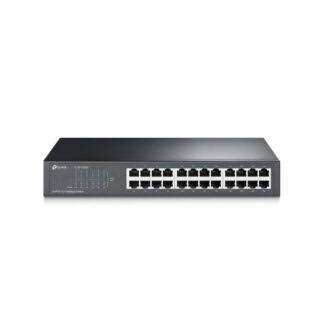
TP-Link TL-SF1008D
Buy TP-Link TL-SF1008D in Kenya from Orbitlink Solutions. Get 8× 10/100Mbps ports, plug-and-play setup, fanless operation and reliable wired networking.
TP-Link TL-SF1008D 8-Port Fast Ethernet Switch in Kenya
The TP-Link TL-SF1008D 8-Port 10/100Mbps Desktop Switch is a compact unmanaged Fast Ethernet switch designed for homes, small offices, retail businesses and workgroups that need additional wired network connections. It provides 8 × 10/100Mbps Auto-Negotiation RJ45 ports, with Auto MDI/MDIX supported across all ports.
The TL-SF1008D is designed for simple plug-and-play network expansion. There is no controller, IP configuration or management software required. Connect the switch to your router, attach the Ethernet devices and the switch automatically handles traffic between them.
Its main consideration is speed. The TL-SF1008D uses Fast Ethernet, meaning each port supports a nominal maximum of 100Mbps in each direction. It is therefore suitable for printers, POS terminals, basic PCs and other modest-bandwidth devices, while modern Starlink, fast fibre, NAS and higher-bandwidth networks are generally better served by a Gigabit switch.
TP-Link TL-SF1008D Key Features
| Feature | Specification |
|---|---|
| Model | TP-Link TL-SF1008D |
| Product Type | 8-Port Fast Ethernet Desktop Switch |
| Switch Type | Unmanaged |
| Ethernet Ports | 8 × 10/100Mbps RJ45 |
| Maximum Link Rate | 100Mbps per direction |
| Full-Duplex Capability | 200Mbps aggregate per link |
| Switching Capacity | 1.6Gbps on documented V8 |
| Auto-Negotiation | Yes |
| Auto MDI/MDIX | Yes |
| Flow Control | IEEE 802.3x |
| Back Pressure | Supported |
| Transmission Method | Store-and-Forward |
| Jumbo Frame | 2KB on V11 |
| Buffer Size | 768Kb on V11 |
| Fan | Fanless |
| PoE | No |
| Management | Unmanaged |
| Configuration | Plug-and-play |
| Green Technology | Supported |
| Dimensions | 135 × 79 × 23mm on V11 |
| Maximum Power Consumption | 2W on V11 |
TP-Link's V11 specifications confirm the eight Fast Ethernet ports, fanless operation, 768Kb buffer, 2KB Jumbo Frames, 2W maximum power consumption and compact 135 × 79 × 23mm enclosure.
8 Fast Ethernet Ports
The TP-Link TL-SF1008D provides eight 10/100Mbps RJ45 Ethernet ports. Every port supports both Auto-Negotiation and Auto MDI/MDIX.
This allows the switch to automatically determine whether the connected device operates at 10Mbps or 100Mbps.
| Connected Device | Typical Negotiated Link |
|---|---|
| Legacy Ethernet device | 10Mbps |
| Fast Ethernet PC | 100Mbps |
| Network printer | Up to 100Mbps |
| POS terminal | Up to 100Mbps |
| Basic NVR | Up to 100Mbps |
| Smart TV | Up to 100Mbps |
| Gigabit PC | Negotiates down to 100Mbps |
| Gigabit router | Negotiates down to 100Mbps |
A Gigabit-capable device can therefore connect to the TL-SF1008D, but it cannot establish a Gigabit link through this switch.
Auto-Negotiation
Each port automatically detects the capabilities of the connected equipment and establishes the appropriate Ethernet connection.
For example:
10Mbps device → 10Mbps
100Mbps device → 100Mbps
1Gbps-capable device → 100Mbps maximum
This makes the TL-SF1008D useful for networks containing a mixture of legacy and newer Ethernet equipment.
Auto MDI/MDIX
All eight ports support Auto MDI/MDIX, eliminating the traditional requirement to select crossover or straight-through Ethernet cables for ordinary connections.
There is also no dedicated uplink port.
Any appropriate Ethernet port can normally be used to connect the switch to a router or another switch.
Plug-and-Play Network Expansion
The TL-SF1008D is an unmanaged switch, so it requires no switch configuration.
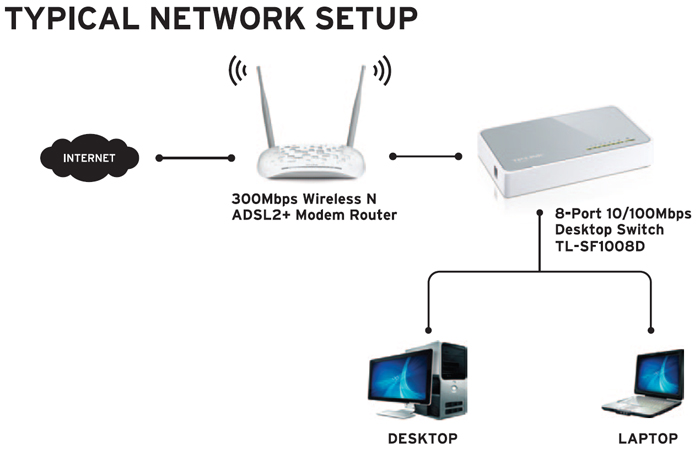
A typical network topology is:
Internet → Router → TL-SF1008D → Ethernet Devices
For example:
Router → TL-SF1008D → PCs + Printer + POS + Smart TV + NVR
The router continues handling DHCP, NAT, firewalling and internet routing, while the TL-SF1008D expands the number of available Ethernet connections.
This makes the switch particularly useful for customers who need more wired ports without the complexity of a managed network switch.
1.6Gbps Switching Capacity
TP-Link's documented V8 datasheet lists a 1.6Gbps switching capacity for the TL-SF1008D.
This figure represents the switch's aggregate internal switching capacity and should not be confused with the speed available to one connected device.
Each individual port still operates at:
10Mbps or 100Mbps
The 1.6Gbps figure comes from the ability to accommodate traffic across eight 100Mbps full-duplex Ethernet connections.
Up to 200Mbps Full-Duplex Explained
TP-Link documentation describes the TL-SF1008D as capable of up to 200Mbps Full Duplex.
This does not mean a connected computer gets a 200Mbps internet connection.
Full Duplex means the port can theoretically transmit and receive simultaneously:
100Mbps transmit + 100Mbps receive = 200Mbps aggregate bidirectional capacity
The nominal link rate in either individual direction remains 100Mbps.
This distinction is important when comparing the TL-SF1008D with a Gigabit switch.
Non-Blocking Switching Architecture
TP-Link describes the TL-SF1008D as using a non-blocking switching architecture designed to forward and filter Ethernet packets at full wire speed within the capabilities of its Fast Ethernet interfaces.
This helps the switch efficiently process traffic moving between multiple connected devices.
The primary network limitation remains the 100Mbps speed of each Ethernet port.
Store-and-Forward Switching
The TL-SF1008D uses the Store-and-Forward transmission method.
In this architecture, the switch receives an Ethernet frame before forwarding it to the appropriate destination.
This provides straightforward and reliable Ethernet switching without requiring any user configuration.
IEEE 802.3x Flow Control
The TL-SF1008D supports IEEE 802.3x flow control for Full Duplex communication and back pressure for Half Duplex operation.
These technologies help manage temporary traffic congestion when connected devices cannot process incoming data at the same rate.
The result is more reliable communication between devices on a busy small LAN.
2KB Jumbo Frame Support
TP-Link's V11 product page specifies 2KB Jumbo Frame support.
Larger Ethernet frames can reduce processing overhead for certain types of local network traffic.
However, Jumbo Frames do not change the fundamental 100Mbps limitation of the TL-SF1008D.
For frequent large file transfers, a Gigabit switch remains a much better choice.
Fanless Operation
The TP-Link TL-SF1008D uses a fanless cooling design.
This allows the switch to operate without cooling-fan noise.
| Installation Area | Benefit |
|---|---|
| Home | Quiet operation |
| Small office | No fan noise |
| Reception | Discreet networking |
| Retail shop | Quiet POS connectivity |
| TV cabinet | Suitable for living areas |
| Study | Minimal disturbance |
Fanless operation also eliminates a mechanical fan as a potential maintenance point.
Compact Desktop Design
The V11 TL-SF1008D measures approximately 135 × 79 × 23mm.
Its compact plastic enclosure can be positioned:
-
Beside a router
-
On an office desk
-
Near a network printer
-
Behind a television
-
At a POS counter
-
In a small network area
The eight-port design also provides considerably more expansion room than a five-port desktop switch without moving to a large rackmount unit.
Low Power Consumption
The V11 specification lists a maximum power consumption of approximately 2W and maximum heat dissipation of 7.0 BTU/h.
This makes the TL-SF1008D economical for continuous operation in small networks.
TP-Link also incorporates Green Technology to reduce unnecessary energy consumption. Earlier hardware documentation states power-saving potential of up to 60% under specified conditions; actual savings depend on hardware revision, network activity and operating conditions.
TP-Link TL-SF1008D for Home Networks
The TL-SF1008D can expand a home router when there are not enough LAN ports.
A typical installation might be:
Router → TL-SF1008D → TV + Decoder + PC + Printer + NVR + Other Devices
This can be useful where wired Ethernet is preferred for reliability.
However, if the home internet connection exceeds 100Mbps, a Gigabit switch such as the TP-Link TL-SG1008D will make better use of the available bandwidth.
TP-Link TL-SF1008D for Small Offices
The TL-SF1008D is designed for SOHO and workgroup environments, according to TP-Link.
A small-office installation could be:
Router → TL-SF1008D → PCs + Printers + POS + Other Office Devices
For email, web browsing, printing, basic cloud applications and other light network activities, Fast Ethernet may provide adequate bandwidth.
For large file transfers, NAS storage or faster internet services, Gigabit Ethernet is preferable.
TP-Link TL-SF1008D for POS Systems
The TL-SF1008D can be a practical switch for POS installations because typical point-of-sale transaction traffic requires relatively little network bandwidth.
A retail setup could include:
Router → TL-SF1008D → POS 1 + POS 2 + Printer + Office PC
Suitable environments include:
-
Retail shops
-
Pharmacies
-
Restaurants
-
Cafés
-
Salons
-
Small supermarkets
-
Reception areas
Eight ports also provide more expansion capacity than the five-port TL-SF1005D.
TP-Link TL-SF1008D for Network Printers
Network printers generally do not require Gigabit bandwidth for ordinary office printing.
The TL-SF1008D can therefore connect multiple PCs and network printers economically.
For example:
Router → TL-SF1008D → Printer + PCs
This makes it useful for small offices where reliable wired connectivity matters more than very high LAN transfer speeds.
TP-Link TL-SF1008D for CCTV
The TL-SF1008D can carry Ethernet traffic for basic IP surveillance installations.
Example:
Router → TL-SF1008D → NVR + IP Cameras
However, there are two important limitations.
First, the TL-SF1008D is Fast Ethernet, so higher-resolution multi-camera deployments may benefit from Gigabit switching.
Second, the TL-SF1008D does not provide PoE, so PoE cameras need separate injectors, power adapters or a dedicated PoE switch.
TP-Link TL-SF1008D for Fibre Internet
The TL-SF1008D can be connected behind a fibre router:
Fibre ONT → Router → TL-SF1008D → Devices
However, the 100Mbps Ethernet interfaces determine how much bandwidth a device connected through the switch can access.
| Fibre Package | TL-SF1008D Suitability |
|---|---|
| 10Mbps | Excellent |
| 20Mbps | Excellent |
| 50Mbps | Very suitable |
| 80Mbps | Suitable |
| 100Mbps | Near Fast Ethernet limit |
| 200Mbps | Gigabit recommended |
| 500Mbps | Gigabit strongly recommended |
| 1Gbps | Gigabit required for meaningful full-speed use |
Real application throughput on a 100Mbps Ethernet link will usually be somewhat below the nominal line rate because of protocol overhead.
TP-Link TL-SF1008D for Starlink
The TL-SF1008D can technically operate downstream of a Starlink router or gateway when an Ethernet connection is available.
Typical topology:
Starlink → Router/Gateway → TL-SF1008D → Wired Devices
However, the TL-SF1008D can become a bottleneck whenever Starlink throughput exceeds 100Mbps.
For most new Starlink networks, an 8-port Gigabit switch such as the TL-SG1008D is therefore the better option.
The TL-SF1008D remains useful for a low-bandwidth network segment containing devices such as POS terminals, printers or older equipment.
TP-Link TL-SF1008D vs TL-SF1005D
| Feature | TL-SF1005D | TL-SF1008D |
|---|---|---|
| Ports | 5 | 8 |
| Ethernet Type | Fast Ethernet | Fast Ethernet |
| Maximum Link Rate | 100Mbps | 100Mbps |
| Auto MDI/MDIX | Yes | Yes |
| Plug-and-Play | Yes | Yes |
| PoE | No | No |
| Management | Unmanaged | Unmanaged |
| Typical Endpoint Ports* | 4 | 7 |
| Best For | Very small LAN | Larger basic LAN |
*Assuming one port connects upstream to the router.
Choose the TL-SF1008D if you need more physical Ethernet connections while remaining within Fast Ethernet performance requirements.
TP-Link TL-SF1008D vs TL-SG1008D
The most important alternative is the TP-Link TL-SG1008D 8-Port Gigabit Switch.
| Feature | TL-SF1008D | TL-SG1008D |
|---|---|---|
| Ports | 8 | 8 |
| Ethernet Type | Fast Ethernet | Gigabit Ethernet |
| Maximum Port Link | 100Mbps | 1,000Mbps |
| Relative Capacity | 1× | 10× |
| Plug-and-Play | Yes | Yes |
| Fibre >100Mbps | Limited | Better |
| Starlink | Can bottleneck | Better |
| NAS | Limited | Much better |
| Modern APs | Limited | Better |
| Large File Transfers | Slower | Much faster |
| Future Network Growth | Limited | Better |
A useful TP-Link naming distinction is:
SF = Fast Ethernet
SG = Gigabit Ethernet
For most new high-speed networks, the TL-SG1008D is the more future-ready choice.
Fast Ethernet vs Gigabit Ethernet
| Feature | Fast Ethernet | Gigabit Ethernet |
|---|---|---|
| Nominal Link Rate | 100Mbps | 1,000Mbps |
| Relative Link Capacity | 1× | 10× |
| POS | Suitable | Suitable |
| Printer | Suitable | Suitable |
| 50Mbps Fibre | Suitable | Suitable |
| 200Mbps Fibre | Bottleneck | Better |
| Starlink | Can bottleneck | Better |
| NAS | Limited | Recommended |
| Large File Transfers | Slower | Much faster |
| Modern AP Backhaul | Limited | Better |
Fast Ethernet still makes sense where equipment has modest bandwidth requirements. Gigabit is generally preferable for new high-performance installations.
Does TP-Link TL-SF1008D Support PoE?
No. The TL-SF1008D is a standard Ethernet switch and does not provide Power over Ethernet.
It cannot directly power:
-
IP cameras
-
Wireless access points
-
VoIP phones
-
Other PoE-powered equipment
For those applications, use compatible PoE injectors or a suitable TP-Link PoE switch.
Is TP-Link TL-SF1008D Managed?
No.
The TL-SF1008D is an unmanaged switch.
It does not provide configurable:
-
VLANs
-
ACLs
-
Port monitoring
-
Layer 3 routing
-
Omada controller management
This is intentional: the TL-SF1008D is designed for users who need straightforward Ethernet expansion without configuration.
Does TP-Link TL-SF1008D Provide Wi-Fi?
No.
The TL-SF1008D is a wired network switch.
Wi-Fi must be provided separately by a:
-
Wireless router
-
Wireless access point
-
Mesh Wi-Fi system
Does TL-SF1008D Increase Internet Speed?
No.
A network switch does not increase the internet speed supplied by your ISP.
It expands the number of wired connections available.
Because the TL-SF1008D is limited to 100Mbps Ethernet, it can actually become a bottleneck when the internet service is faster than 100Mbps.
Does TL-SF1008D Need a Router?
For normal internet sharing, it is typically connected downstream of a router.
Internet → Router → TL-SF1008D → Devices
The router handles functions such as DHCP, NAT, firewalling and internet routing.
The TL-SF1008D handles Ethernet switching between the connected devices.
Advantages and Limitations
| Advantages | Limitations |
|---|---|
| 8 Ethernet ports | Maximum 100Mbps per port |
| Affordable network expansion | Not Gigabit |
| Plug-and-play | No PoE |
| Auto-Negotiation | No configurable VLANs |
| Auto MDI/MDIX | No Omada management |
| IEEE 802.3x flow control | No SFP ports |
| Store-and-Forward | Can bottleneck Starlink |
| Non-blocking architecture | Can bottleneck fast fibre |
| Fanless | Limited for NAS |
| Low power consumption | Limited future-proofing |
| Compact desktop design | No 2.5G or 10G |
Who Should Buy the TP-Link TL-SF1008D?
The TL-SF1008D is suitable for customers who need multiple affordable wired Ethernet connections without requiring Gigabit speeds, PoE or advanced management.
Typical applications include:
-
POS terminals
-
Network printers
-
Basic office PCs
-
Smart TVs
-
Legacy Ethernet devices
-
Light CCTV networking
-
Small home networks
-
Small retail networks
-
Basic office workgroups
Customers using high-speed fibre, Starlink, NAS storage, modern access points or high-resolution CCTV should generally consider a Gigabit or Gigabit PoE switch instead.
Detailed TP-Link TL-SF1008D Specifications
| Specification | Details |
|---|---|
| Model | TP-Link TL-SF1008D |
| Product Type | 8-Port 10/100Mbps Desktop Switch |
| Switch Type | Unmanaged |
| Interfaces | 8 × 10/100Mbps RJ45 |
| Auto-Negotiation | Yes |
| Auto MDI/MDIX | Yes |
| Standards | IEEE 802.3, IEEE 802.3u, IEEE 802.3x |
| Protocol | CSMA/CD |
| Data Rate Half Duplex | 10/100Mbps |
| Data Rate Full Duplex | 20/200Mbps aggregate |
| Buffer Size | 768Kb on V11 |
| Jumbo Frame | 2KB on V11 |
| Flow Control | IEEE 802.3x |
| Back Pressure | Yes |
| Transmission | Store-and-Forward |
| Fan | Fanless |
| PoE | No |
| Power Input | 100–240VAC, 50/60Hz |
| Adapter Output | 9VDC / 0.6A on V11 |
| Maximum Power | 2W on V11 |
| Heat Dissipation | 7.0 BTU/h |
| Dimensions | 135 × 79 × 23mm |
| Operating Temperature | 0°C–40°C |
| Operating Humidity | 10%–90%, non-condensing |
| Green Technology | Yes |
These figures primarily reflect TP-Link's V11 specifications. TP-Link's current support pages list several hardware revisions, including V15, V12.x, V11 and earlier versions, and explicitly note that hardware-version availability varies by region.
What's Included in the Box?
| Package Item | Included |
|---|---|
| TP-Link TL-SF1008D Switch | Yes |
| Power Adapter | Yes |
| User/Installation Guide | Yes |
TP-Link lists the switch, power adapter and user guide as the standard V11 package contents.
TP-Link TL-SF1008D Price in Kenya
The TP-Link TL-SF1008D price in Kenya can vary depending on hardware revision, supplier, VAT treatment and current availability.
For the Orbitlink Solutions website, use:
Price: Contact Orbitlink Solutions for the current TP-Link TL-SF1008D price in Kenya and stock availability.
This prevents an outdated third-party marketplace price from being presented as Orbitlink Solutions' current selling price.
Why Buy TP-Link TL-SF1008D from Orbitlink Solutions?
Orbitlink Solutions supplies TP-Link switches, routers, gateways, wireless access points and related networking equipment for homes, SMEs and larger network installations across Kenya.
Customers can get assistance selecting between Fast Ethernet, Gigabit, PoE, Omada managed, 2.5G and 10G switches based on internet speed, number of devices, CCTV requirements, access points and expected network growth.
For larger installations, customers can also send their BOQ for equipment recommendations and project pricing.
Watch the TP-Link TL-SF1008D Video
The TP-Link TL-SF1008D is built around straightforward network expansion. Its eight 10/100Mbps Ethernet ports provide significantly more physical connectivity than a typical home router, while Auto-Negotiation and Auto MDI/MDIX remove much of the manual setup traditionally associated with Ethernet switching.
For a small office, shop or home network, the TL-SF1008D can connect PCs, printers, POS terminals, smart TVs and other wired devices through one compact switch. Its fanless construction, small 135 × 79 × 23mm footprint and low power consumption also make it easy to deploy in areas where space and noise matter.
The key buying consideration is bandwidth. Fast Ethernet is still adequate for many low-bandwidth devices, but the 100Mbps port ceiling can restrict modern Starlink, fibre and LAN performance. For a new network expected to carry high-speed internet, NAS traffic or larger file transfers, the Gigabit TL-SG1008D is generally the stronger long-term choice.
Frequently Asked Questions About TP-Link TL-SF1008D
What is the TP-Link TL-SF1008D?
The TL-SF1008D is an 8-port unmanaged 10/100Mbps Fast Ethernet desktop switch designed for home, SOHO and workgroup network expansion.
How many ports does the TL-SF1008D have?
It provides eight 10/100Mbps RJ45 Ethernet ports.
Is the TL-SF1008D Gigabit?
No. It is a Fast Ethernet switch with a nominal maximum of 100Mbps in either direction on each port.
Why does TP-Link mention 200Mbps Full Duplex?
A 100Mbps Full Duplex link can simultaneously transmit at 100Mbps and receive at 100Mbps, giving 200Mbps of theoretical aggregate bidirectional capacity. It does not mean one-way internet speed of 200Mbps.
Does the TL-SF1008D require configuration?
No. It is an unmanaged plug-and-play switch.
Does TL-SF1008D support Auto MDI/MDIX?
Yes. All eight ports support Auto MDI/MDIX.
Is the TL-SF1008D fanless?
Yes. TP-Link lists it as fanless.
Does TL-SF1008D support Jumbo Frames?
The V11 specification lists 2KB Jumbo Frame support.
What is the buffer size?
TP-Link lists 768Kb for the V11 hardware.
Does TL-SF1008D support PoE?
No. It does not provide Power over Ethernet.
Can I connect IP cameras?
Yes for network data, but cameras requiring PoE need separate power, PoE injectors or a PoE switch.
Can I use TL-SF1008D with fibre internet?
Yes, but the switch limits individual Ethernet links to the 100Mbps class.
Can I use TL-SF1008D with Starlink?
Yes, but it can become a bottleneck when Starlink throughput exceeds 100Mbps.
Does TL-SF1008D provide Wi-Fi?
No. It is a wired Ethernet switch.
Is TL-SF1008D managed?
No. It is an unmanaged switch.
Does it support configurable VLANs?
No. Customers requiring VLAN configuration should choose a suitable TP-Link Easy Smart, Easy Managed, Smart or Omada managed switch.
Can I connect another switch to TL-SF1008D?
Yes. However, the connection through the TL-SF1008D remains limited to Fast Ethernet.
How many devices can I connect?
There are eight ports. If one port is used for the router uplink, seven remain for endpoint devices.
Is TL-SF1008D suitable for POS systems?
Yes. Typical POS transaction traffic requires relatively little bandwidth, making Fast Ethernet suitable for many POS deployments.
What is the difference between TL-SF1008D and TL-SG1008D?
The TL-SF1008D supports up to 100Mbps per port, while the TL-SG1008D supports Gigabit Ethernet at up to 1,000Mbps per port.
What is the TP-Link TL-SF1008D price in Kenya?
Pricing varies according to supplier, hardware revision, VAT treatment and stock. Contact Orbitlink Solutions for the current TL-SF1008D price and availability.
Buy TP-Link TL-SF1008D in Kenya
The TP-Link TL-SF1008D 8-Port Fast Ethernet Desktop Switch provides a simple and economical way to expand a small wired network. Its eight 10/100Mbps ports, Auto-Negotiation, Auto MDI/MDIX, IEEE 802.3x flow control, fanless design and plug-and-play operation make it particularly suitable for homes, shops, POS installations and small offices.
For customers who need faster connectivity for Starlink, fibre internet, NAS storage, modern PCs or high-bandwidth access points, Orbitlink Solutions can also supply Gigabit, PoE and Omada managed TP-Link switches.
Contact Orbitlink Solutions
Orbitlink Solutions
Address: Lyric House, Kimathi Street, Nairobi
Phone: +254 743 720 551
Email: info@orbitlinksolutions.co.ke
Opening Hours: Monday–Saturday, 9:00 AM–6:00 PM
Availability: Nairobi pickup and nationwide delivery
Contact Orbitlink Solutions for the current TP-Link TL-SF1008D price in Kenya, TP-Link Fast Ethernet switches, Gigabit switches, PoE switches, Omada managed switches, routers, access points and complete fibre or Starlink networking solutions.
Need Help Choosing? Ask a Technician
Get guidance on setup, compatibility, stock, and delivery before buying for your project.