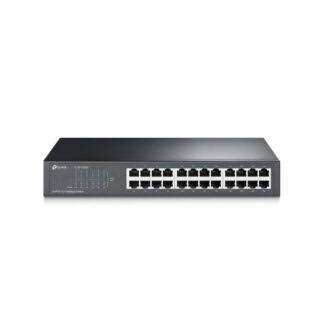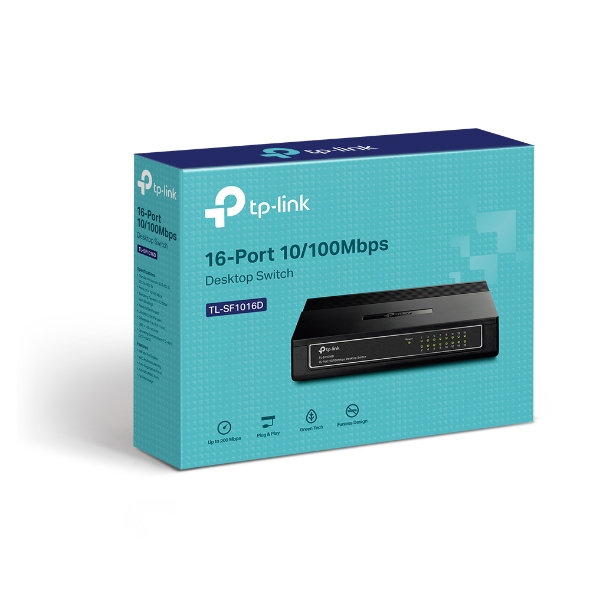
TP-Link TL-SF1016D
Buy TP-Link TL-SF1016D 16-Port Fast Ethernet Switch in Kenya from Orbitlink Solutions. Get 16× 10/100Mbps ports, plug-and-play setup, fanless operation and reliable wired networking.
TP-Link TL-SF1016D 16-Port Fast Ethernet Switch in Kenya
The TP-Link TL-SF1016D 16-Port 10/100Mbps Desktop Switch is an unmanaged Fast Ethernet switch designed for homes, SOHO offices, schools, retail environments and workgroups that need to connect multiple wired devices without complex configuration. It provides 16 × 10/100Mbps Auto-Negotiation RJ45 ports, and every port supports Auto MDI/MDIX for easier cabling.
The TL-SF1016D uses a simple plug-and-play design, so there is no controller, switch IP address or configuration interface required for normal deployment. TP-Link also includes IEEE 802.3x flow control, Store-and-Forward transmission, Green Ethernet technology, fanless operation and desktop or wall-mount installation.
Its main limitation is bandwidth. Each Ethernet port operates at a maximum nominal link speed of 100Mbps, making the TL-SF1016D best suited to printers, POS terminals, basic office PCs and other modest-bandwidth devices. For modern Starlink, fast fibre, NAS storage, high-resolution CCTV or high-performance access points, a 16-port Gigabit switch is generally the better choice.
TP-Link TL-SF1016D Key Features
| Feature | Specification |
|---|---|
| Model | TP-Link TL-SF1016D |
| Product Type | 16-Port Fast Ethernet Desktop Switch |
| Switch Type | Unmanaged |
| Ethernet Ports | 16 × 10/100Mbps RJ45 |
| Maximum Port Link Rate | 100Mbps |
| Full-Duplex Aggregate per Port | Up to 200Mbps bidirectional |
| Auto-Negotiation | Yes |
| Auto MDI/MDIX | Yes |
| Flow Control | IEEE 802.3x |
| Transmission Method | Store-and-Forward |
| MAC Address Table | 2K on current V7 page |
| Fan | Fanless |
| PoE | No |
| Management | Unmanaged |
| Mounting | Desktop / Wall |
| Power Adapter Output | 5V DC / 0.6A on V7 |
| Maximum Power Consumption | 3.2W |
| Dimensions | 200 × 142 × 40mm |
| Green Ethernet | Supported |
TP-Link's current US V7 page lists a 2K MAC address table, 3.2W maximum power consumption, 11 BTU/h maximum heat dissipation, fanless operation and 200 × 142 × 40mm dimensions.
16 Fast Ethernet Ports
The biggest advantage of the TL-SF1016D over smaller desktop switches is port count. It provides 16 Fast Ethernet interfaces, making it suitable where a five-port or eight-port switch cannot accommodate enough devices.
| Connected Equipment | Typical Negotiated Link |
|---|---|
| Legacy Ethernet device | 10Mbps |
| Fast Ethernet PC | 100Mbps |
| Printer | Up to 100Mbps |
| POS terminal | Up to 100Mbps |
| Smart TV | Up to 100Mbps |
| Basic NVR | Up to 100Mbps |
| Gigabit PC | Negotiates down to 100Mbps |
| Gigabit router | Negotiates down to 100Mbps |
A Gigabit-capable device can connect to the switch, but the TL-SF1016D itself cannot establish a 1Gbps link.
Auto-Negotiation
Each port automatically detects whether the attached device supports 10Mbps or 100Mbps Ethernet and configures the link accordingly.
For example:
10Mbps device → 10Mbps
100Mbps device → 100Mbps
1Gbps-capable device → 100Mbps maximum through the switch
This allows older and newer Ethernet devices to coexist on the same basic LAN.
Auto MDI/MDIX
All 16 ports support Auto MDI/MDIX, which removes the traditional requirement to distinguish between straight-through and crossover Ethernet cables.
There is also no dedicated uplink port, so any suitable port can normally be used to connect the switch to a router or another switch.
Plug-and-Play Networking
The TL-SF1016D is designed to work without configuration.
A normal deployment looks like:
Internet → Router → TL-SF1016D → Wired Devices
For example:
Router → TL-SF1016D → PCs + Printers + POS + TVs + NVR
The router handles functions such as DHCP, NAT, internet routing and firewalling, while the TL-SF1016D simply expands the number of wired Ethernet connections.
TP-Link specifically describes the switch as plug-and-play with no configuration required.
Up to 200Mbps Full-Duplex Explained
TP-Link's datasheet describes the TL-SF1016D as supporting up to 200Mbps full-duplex bandwidth.
This does not mean one connected device receives 200Mbps internet speed.
It refers to simultaneous sending and receiving on a 100Mbps Ethernet link:
100Mbps transmit + 100Mbps receive = 200Mbps aggregate bidirectional capacity
The nominal link speed in either direction remains 100Mbps.
This distinction is important when comparing Fast Ethernet and Gigabit switches.
IEEE 802.3x Flow Control
The TL-SF1016D supports IEEE 802.3x flow control in Full Duplex mode and back pressure in Half Duplex operation.
Flow control helps manage congestion when one connected device temporarily receives traffic faster than it can process it.
This contributes to stable operation in small office and workgroup networks containing several different types of Ethernet equipment.
Store-and-Forward Switching
TP-Link lists Store-and-Forward as the transmission method for the TL-SF1016D.
In this method, the switch receives an Ethernet frame before forwarding it to the destination port.
This provides reliable packet handling while maintaining the simple unmanaged operation expected from the TL-SF1016D.
Green Ethernet Technology
The TL-SF1016D includes TP-Link's energy-efficient Ethernet technology.
TP-Link's current product page states that power consumption is automatically adjusted according to factors such as link status and cable length, while some official datasheets describe savings of up to 80% under specified test conditions.
Actual savings depend on network usage, connected ports, cable characteristics and hardware revision.
Fanless Operation
The TL-SF1016D uses a fanless design, allowing it to operate quietly.
This makes it suitable for:
| Installation Area | Benefit |
|---|---|
| Small office | No fan noise |
| Reception | Quiet deployment |
| Retail shop | Suitable near POS systems |
| Home office | Silent networking |
| Classroom | Minimal disturbance |
| Small workgroup | Low-maintenance operation |
The lack of a fan also means fewer moving parts inside the switch.
Desktop and Wall-Mount Installation
TP-Link specifies a plastic case with desktop or wall-mounting installation for the TL-SF1016D.
Its current V7 dimensions are approximately:
200 × 142 × 40mm
This makes it larger than five-port and eight-port desktop switches but still compact enough for many small-office installations.
TP-Link TL-SF1016D for Small Offices
The TL-SF1016D is specifically positioned by TP-Link for SOHO and workgroup users.
A typical deployment could be:
Router → TL-SF1016D → PCs + Printers + POS + Other Office Equipment
The 16-port design makes it practical for businesses that have outgrown smaller desktop switches but do not yet require a large managed network.
For web browsing, printing, email, POS transactions and other modest-bandwidth applications, Fast Ethernet may still be sufficient.
TP-Link TL-SF1016D for Schools
The TL-SF1016D can be used in smaller classrooms, labs and administrative offices where many wired devices need basic network access.
For example:
Router → TL-SF1016D → PCs + Printer + Admin Devices
Its 16-port capacity is useful where several computers need connectivity from one central switch.
For computer labs transferring large files or using internet connections above 100Mbps, a Gigabit switch is preferable.
TP-Link TL-SF1016D for POS Networks
The switch is particularly useful for retail and POS environments because point-of-sale traffic typically requires relatively little network bandwidth.
Example:
Router → TL-SF1016D → POS Terminals + Printers + Office PCs
Suitable environments include:
-
Supermarkets
-
Pharmacies
-
Restaurants
-
Retail stores
-
Hotels
-
Salons
-
Reception areas
A 16-port model also gives room to add more POS terminals without replacing the switch immediately.
TP-Link TL-SF1016D for Network Printers
Network printers normally consume relatively little bandwidth compared with storage servers or video systems.
The TL-SF1016D can therefore connect multiple office computers and printers through a single unmanaged switch.
Example:
Router → TL-SF1016D → PCs + Network Printers
For ordinary printing and office documents, Fast Ethernet is typically sufficient.
TP-Link TL-SF1016D for CCTV
The TL-SF1016D can carry network traffic for basic IP surveillance systems.
Typical layout:
Router → TL-SF1016D → NVR + IP Cameras
However, two limitations matter.
First, it is Fast Ethernet, so aggregate CCTV traffic can become significant when many high-resolution cameras are active.
Second, the TL-SF1016D does not provide PoE, meaning PoE cameras need injectors, separate power supplies or a PoE-enabled switch.
For larger CCTV installations, a Gigabit PoE switch is generally more appropriate.
TP-Link TL-SF1016D for Fibre Internet
The switch can be installed downstream of a fibre router:
Fibre ONT → Router → TL-SF1016D → Devices
The main consideration is the 100Mbps Ethernet limit.
| Fibre Package | TL-SF1016D Suitability |
|---|---|
| 10Mbps | Excellent |
| 20Mbps | Excellent |
| 50Mbps | Very suitable |
| 80Mbps | Suitable |
| 100Mbps | Near Fast Ethernet ceiling |
| 200Mbps | Gigabit recommended |
| 500Mbps | Gigabit strongly recommended |
| 1Gbps | Gigabit switch recommended |
Real-world application throughput will normally be below the nominal 100Mbps Ethernet rate because of network overhead.
TP-Link TL-SF1016D for Starlink
The TL-SF1016D can technically be used downstream of Starlink where Ethernet connectivity is available.
Typical setup:
Starlink → Router/Gateway → TL-SF1016D → Wired Devices
However, the TL-SF1016D can become a bandwidth bottleneck if Starlink delivers more than 100Mbps.
For most new Starlink installations, a 16-Port Gigabit Ethernet switch is the stronger choice.
The TL-SF1016D remains useful where many low-bandwidth devices such as POS terminals, printers or legacy equipment need connectivity.
TP-Link TL-SF1016D vs TL-SF1008D
| Feature | TL-SF1008D | TL-SF1016D |
|---|---|---|
| Ethernet Ports | 8 | 16 |
| Port Speed | 100Mbps | 100Mbps |
| Management | Unmanaged | Unmanaged |
| Auto MDI/MDIX | Yes | Yes |
| PoE | No | No |
| Typical Endpoint Ports* | 7 | 15 |
| Best For | Small LAN | Larger basic LAN |
*Assuming one port is used as the upstream router connection.
The TL-SF1016D is the better option when more physical Ethernet connections are required but Gigabit performance is not necessary.
TP-Link TL-SF1016D vs 16-Port Gigabit Switch
| Feature | TL-SF1016D | 16-Port Gigabit Switch |
|---|---|---|
| Ports | 16 | 16 |
| Ethernet Type | Fast Ethernet | Gigabit Ethernet |
| Maximum Link Rate | 100Mbps | 1,000Mbps |
| Relative Port Capacity | 1× | 10× |
| Fibre >100Mbps | Limited | Better |
| Starlink | Can bottleneck | Recommended |
| NAS | Limited | Much better |
| Modern APs | Limited | Better |
| High-Resolution CCTV | Limited | Better |
| Large File Transfers | Slower | Much faster |
For most new office installations, Gigabit Ethernet is the more future-ready choice.
Fast Ethernet remains appropriate where cost is the main concern and connected equipment has low bandwidth requirements.
Does the TL-SF1016D Support PoE?
No.
The TP-Link TL-SF1016D does not supply Power over Ethernet.
It cannot directly power:
-
IP cameras
-
Wireless access points
-
VoIP phones
-
Other PoE devices
For those installations, use compatible PoE injectors or a PoE-enabled TP-Link switch.
Is the TL-SF1016D Managed?
No.
The TL-SF1016D is an unmanaged switch.
It does not provide configurable:
-
VLANs
-
ACLs
-
Port monitoring
-
Omada controller integration
-
Layer 3 routing
-
Advanced traffic policies
Its advantage is simplicity: connect the equipment and the switch operates automatically.
Does TL-SF1016D Provide Wi-Fi?
No.
The TL-SF1016D is a wired Ethernet switch.
Wi-Fi must be provided separately by a:
-
Wireless router
-
Access point
-
Mesh system
Does TL-SF1016D Increase Internet Speed?
No.
A switch does not increase the speed provided by your ISP.
It expands the number of Ethernet connections available on the LAN.
Because the TL-SF1016D is limited to 100Mbps per port, it may actually restrict faster internet connections.
Does TL-SF1016D Need a Router?
For ordinary internet sharing, it is normally connected downstream of a router.
Internet → Router → TL-SF1016D → Devices
The router handles internet access, DHCP, NAT and firewall functions.
The TL-SF1016D simply provides additional wired ports.
Advantages and Limitations
| Advantages | Limitations |
|---|---|
| 16 Ethernet ports | Maximum 100Mbps per port |
| Plug-and-play | Not Gigabit |
| Auto-Negotiation | No PoE |
| Auto MDI/MDIX | No configurable VLANs |
| IEEE 802.3x flow control | No Omada management |
| Store-and-Forward | No SFP ports |
| Fanless | Can bottleneck Starlink |
| Desktop/wall mount | Can bottleneck fast fibre |
| Low power consumption | Limited for NAS |
| Green Ethernet | Limited future headroom |
Who Should Buy the TP-Link TL-SF1016D?
The TL-SF1016D is a practical choice for users who need many Ethernet connections but do not require Gigabit speed, PoE or switch management.
Typical applications include:
-
Small offices
-
Retail stores
-
POS networks
-
Network printers
-
Schools
-
Basic office PCs
-
Smart TVs
-
Legacy equipment
-
Reception areas
-
Light CCTV networks
Customers building a new network around Starlink, high-speed fibre, NAS storage, modern access points or high-resolution CCTV should generally select a Gigabit alternative.
Detailed TP-Link TL-SF1016D Specifications
| Specification | Details |
|---|---|
| Model | TP-Link TL-SF1016D |
| Product Type | 16-Port 10/100Mbps Desktop Switch |
| Switch Type | Unmanaged |
| Interfaces | 16 × 10/100Mbps RJ45 |
| Auto-Negotiation | Yes |
| Auto MDI/MDIX | Yes |
| MAC Address Table | 2K on current V7 page |
| Flow Control | IEEE 802.3x |
| Transmission Method | Store-and-Forward |
| Fan | Fanless |
| PoE | No |
| Power Adapter Output | 5V DC / 0.6A |
| Maximum Power Consumption | 3.2W |
| Maximum Heat Dissipation | 11.0 BTU/h |
| Dimensions | 200 × 142 × 40mm |
| Operating Temperature | 0°C–40°C |
| Storage Temperature | -40°C–60°C |
| Operating Humidity | 10%–90%, non-condensing |
| Storage Humidity | 5%–90%, non-condensing |
| Certifications | FCC, CE, RoHS |
| Green Technology | Yes |
These figures reflect TP-Link's current V7 product page. TP-Link currently lists hardware revisions V1 through V7 and notes that model and revision availability differs by region.
What's Included in the Box?
| Package Item | Included |
|---|---|
| TP-Link TL-SF1016D Switch | Yes |
| Power Adapter | Yes |
| User Guide | Yes |
TP-Link lists these as standard package contents on the current product page.
TP-Link TL-SF1016D Price in Kenya
Recent Kenyan listings place the TP-Link TL-SF1016D around KES 3,990–7,020, depending on seller and listing, while TDK currently shows examples around KES 4,200–4,500 excluding VAT.
| Kenya Market Reference | Recent Listed Price |
|---|---|
| TDK Networks | Approx. KES 4,200–4,500 ex VAT |
| Jumia Kenya | Approx. KES 3,990–7,020 |
These are third-party market references, not Orbitlink Solutions' fixed selling price.
For the Orbitlink website, use:
Price: Contact Orbitlink Solutions for the current TP-Link TL-SF1016D price in Kenya and stock availability.
Why Buy TP-Link TL-SF1016D from Orbitlink Solutions?
Orbitlink Solutions supplies TP-Link switches, routers, gateways, wireless access points and related networking equipment for homes, SMEs and larger projects across Kenya.
Customers can get assistance choosing between Fast Ethernet, Gigabit, PoE, Omada managed, 2.5G and 10G switches based on internet speed, device count, CCTV requirements, access points and future network expansion.
For larger installations, customers can also send their BOQ for suitable equipment recommendations and project pricing.
Watch the TP-Link TL-SF1016D Video
The TP-Link TL-SF1016D is particularly useful where port count matters more than raw bandwidth. Its 16 Ethernet interfaces provide substantially more wired connectivity than five-port and eight-port desktop models, allowing small offices, schools, shops and other workgroups to connect many low-bandwidth devices from one compact switch.
Its unmanaged architecture keeps deployment simple. Auto-Negotiation automatically selects 10Mbps or 100Mbps, Auto MDI/MDIX simplifies cabling, and plug-and-play operation eliminates the need for a management interface or controller. The current V7 model is also fanless and consumes a maximum of only 3.2W according to TP-Link.
The main consideration is the 100Mbps port limit. The TL-SF1016D remains practical for printers, POS systems and legacy office equipment, but it is less suitable for modern high-speed LANs. For Starlink, fibre above 100Mbps, NAS storage, modern access points or heavier CCTV installations, Orbitlink Solutions should generally recommend a 16-port Gigabit or Gigabit PoE switch.
Frequently Asked Questions About TP-Link TL-SF1016D
What is the TP-Link TL-SF1016D?
The TL-SF1016D is a 16-port unmanaged 10/100Mbps Fast Ethernet desktop switch designed for SOHO and workgroup network expansion.
How many ports does TL-SF1016D have?
It provides 16 × 10/100Mbps RJ45 Ethernet ports.
Is the TL-SF1016D Gigabit?
No. It is a Fast Ethernet switch with a nominal maximum link speed of 100Mbps per port.
Why does TP-Link mention 200Mbps?
TP-Link refers to full-duplex aggregate bandwidth: 100Mbps transmitting and 100Mbps receiving simultaneously. It does not mean a 200Mbps one-way connection.
Does TL-SF1016D require configuration?
No. It is an unmanaged plug-and-play switch.
Does it support Auto MDI/MDIX?
Yes. All 16 ports support Auto MDI/MDIX.
Is TL-SF1016D fanless?
Yes. The current V7 specifications list fanless operation.
What is the MAC address table size?
TP-Link's current V7 specification lists a 2K MAC address table.
Does TL-SF1016D support PoE?
No. It does not supply Power over Ethernet.
Can I connect IP cameras?
Yes for network data, but cameras requiring PoE need separate power, injectors or a PoE switch.
Can I use TL-SF1016D with fibre internet?
Yes, but each connected device is limited by the switch's Fast Ethernet ports.
Can I use TL-SF1016D with Starlink?
Yes, but it can become a bottleneck if Starlink throughput exceeds 100Mbps.
Does TL-SF1016D provide Wi-Fi?
No. It is a wired Ethernet switch.
Is TL-SF1016D managed?
No. It is unmanaged.
Does it support configurable VLANs?
No. For VLAN configuration, use a suitable TP-Link Easy Smart, Easy Managed, Smart or Omada managed switch.
Can I connect another switch?
Yes. Another switch can be connected to one of the ports, although the inter-switch link through the TL-SF1016D remains limited to 100Mbps.
How many endpoint devices can I connect?
The switch provides 16 ports. If one port is used for the router uplink, 15 ports remain for endpoint devices.
Is TL-SF1016D good for POS systems?
Yes. POS systems generally need relatively little bandwidth, making Fast Ethernet suitable for many retail deployments.
Is TL-SF1016D suitable for NAS?
It can work, but Gigabit Ethernet is strongly preferred for NAS storage and large local file transfers.
What is the difference between TL-SF1016D and a Gigabit 16-port switch?
The TL-SF1016D is limited to 100Mbps per port, while a Gigabit model supports up to 1,000Mbps per port.
What is the TP-Link TL-SF1016D price in Kenya?
Recent market listings are approximately KES 3,990–7,020, with some current Kenyan supplier listings around KES 4,200–4,500 excluding VAT. Contact Orbitlink Solutions for the current exact-model quote.
Buy TP-Link TL-SF1016D in Kenya
The TP-Link TL-SF1016D 16-Port Fast Ethernet Desktop Switch is an affordable solution for expanding basic wired networks that need many Ethernet connections. Its 16 × 10/100Mbps ports, Auto-Negotiation, Auto MDI/MDIX, IEEE 802.3x flow control, fanless design, Green Ethernet technology and plug-and-play installation make it well suited to shops, small offices, schools, POS networks and legacy Ethernet environments.
For customers requiring faster connections for Starlink, fibre internet, NAS storage, high-resolution CCTV or modern access points, Orbitlink Solutions can also supply suitable Gigabit, PoE and Omada managed TP-Link switches.
Contact Orbitlink Solutions
Orbitlink Solutions
Address: Lyric House, Kimathi Street, Nairobi
Phone: +254 743 720 551
Email: info@orbitlinksolutions.co.ke
Opening Hours: Monday–Saturday, 9:00 AM–6:00 PM
Availability: Nairobi pickup and nationwide delivery
Contact Orbitlink Solutions for the current TP-Link TL-SF1016D price in Kenya, TP-Link Fast Ethernet switches, Gigabit switches, PoE switches, Omada managed switches, routers, access points and complete fibre or Starlink networking solutions.
Need Help Choosing? Ask a Technician
Get guidance on setup, compatibility, stock, and delivery before buying for your project.