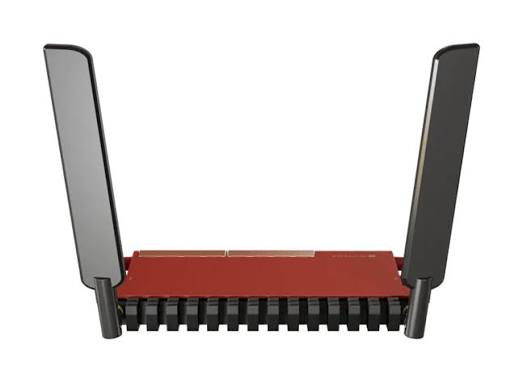
MikroTik L009UiGS-2HaxD-IN
Buy MikroTik L009UiGS-2HaxD-IN in Kenya from Orbitlink Solutions. 8 Gigabit ports, 2.5G-capable SFP, 2.4GHz WiFi 6, PoE, USB 3.0 and RouterOS v7.
MikroTik L009UiGS-2HaxD-IN WiFi 6 Router in Kenya
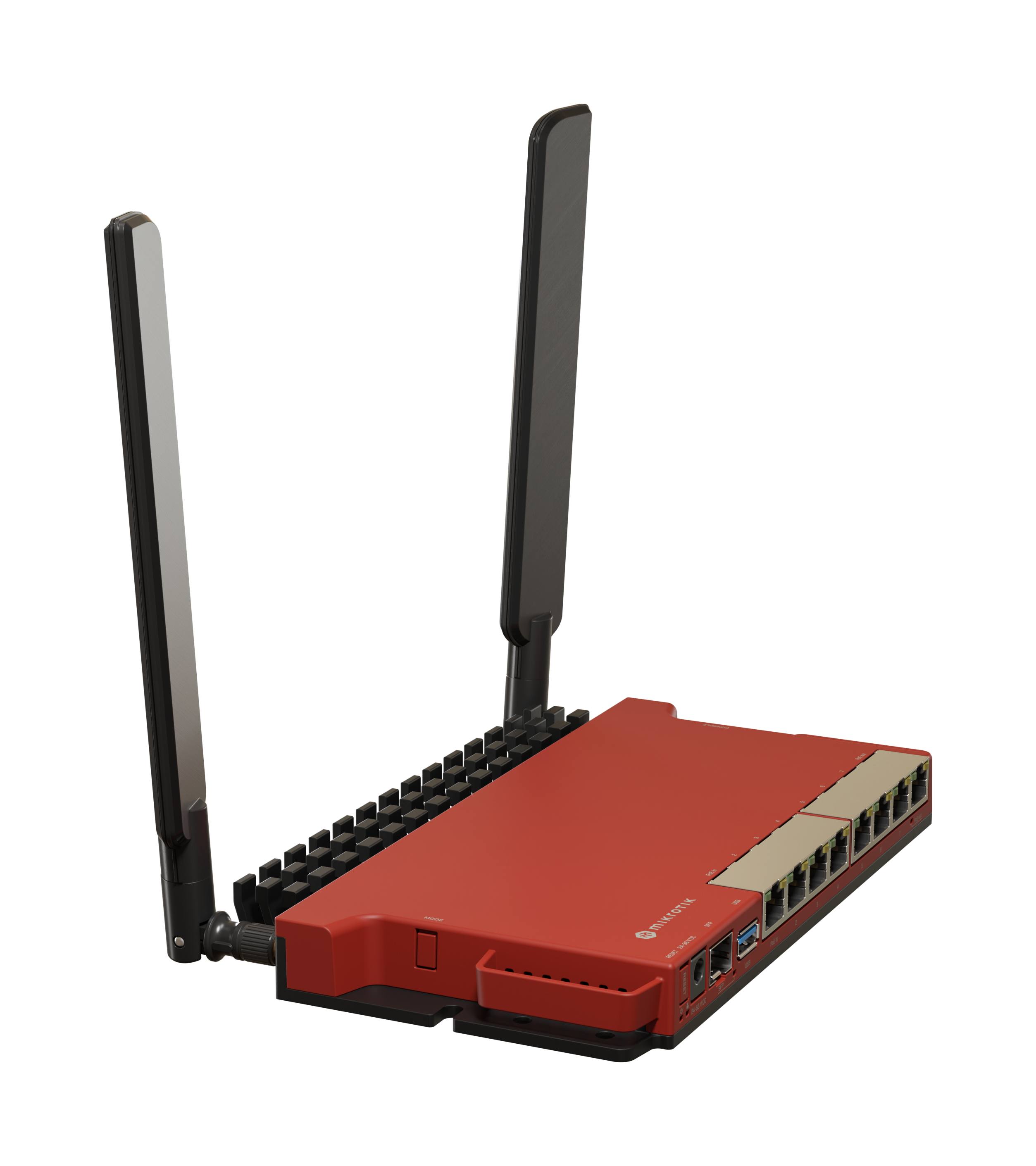
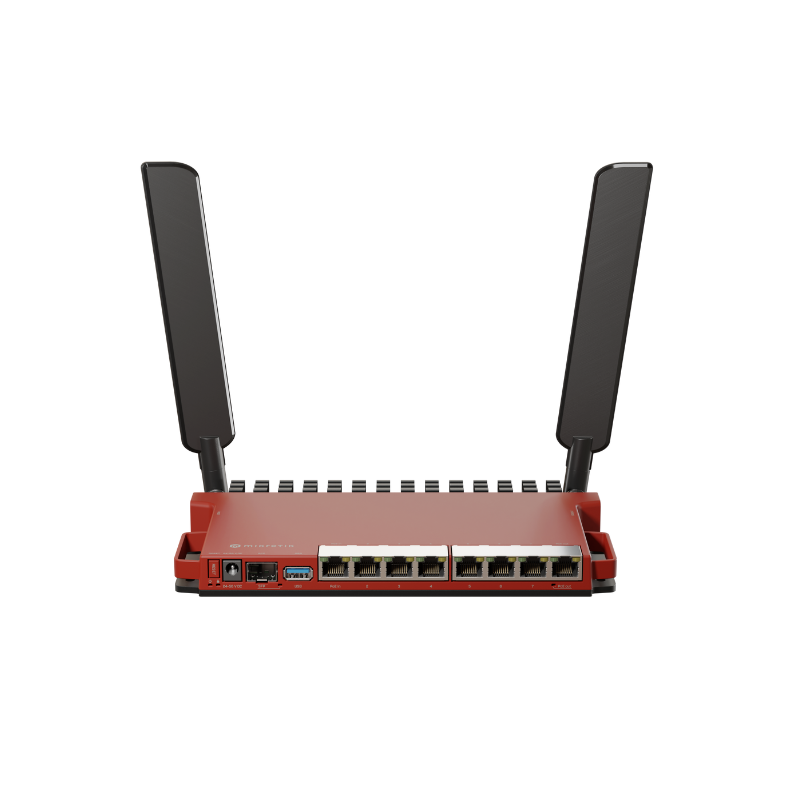
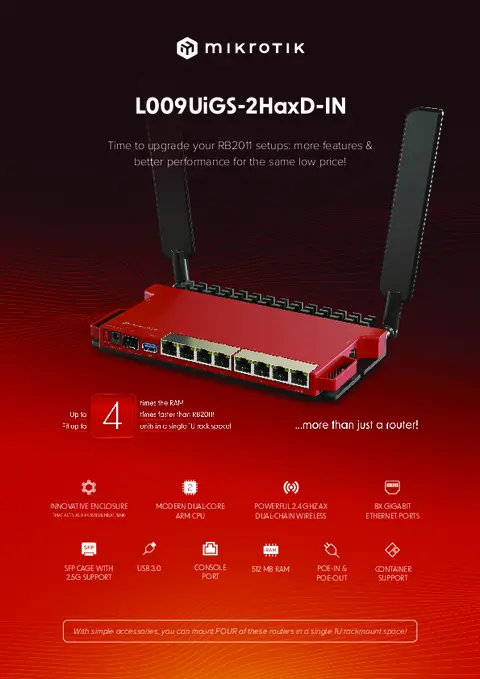
The MikroTik L009UiGS-2HaxD-IN is a versatile RouterOS v7 router designed as a modern successor to the popular RB2011 generation. It combines eight Gigabit Ethernet ports, a 2.5G-capable SFP cage, 2.4GHz dual-chain WiFi 6, PoE input and output, USB 3.0, 512MB RAM and a dual-core ARM processor in a compact indoor enclosure. MikroTik says the L009 platform can be up to four times faster than the RB2011 in many configurations.
Unlike many wired MikroTik gateways, this particular L009UiGS-2HaxD-IN variant includes wireless connectivity. However, an important distinction is that its built-in WiFi 6 radio operates on 2.4GHz only; it is not a dual-band 2.4/5GHz WiFi 6 router.
That combination makes the L009 useful for small and medium offices, fibre internet, Starlink gateway deployments, CCTV networks, VLANs, VPNs, hotspot networks and multi-WAN configurations where RouterOS flexibility is more important than having high-performance dual-band Wi-Fi built directly into the router.
MikroTik L009UiGS-2HaxD-IN Key Features
| Feature | Specification |
|---|---|
| Product Code | L009UiGS-2HaxD-IN |
| CPU | IPQ-5018 |
| CPU Cores | 2 |
| CPU Frequency | 800MHz |
| Architecture | ARM |
| RAM | 512MB DDR3L |
| Storage | 128MB NAND |
| Gigabit Ethernet | 8 × 10/100/1000 |
| SFP | 1 × SFP, up to 2.5G supported |
| Wi-Fi | 2.4GHz 802.11b/g/n/ax |
| Wi-Fi Generation | WiFi 6 / 802.11ax |
| Wireless Chains | 2 |
| Antenna Gain | 4dBi |
| Antenna Connectors | RP-SMA female |
| USB | USB 3.0 Type-A |
| PoE-In | Ether1 |
| PoE-Out | Ether8 |
| Serial Console | RJ45 |
| Switch Chip | Marvell 88E6190 |
| RouterOS | RouterOS v7 |
| Licence | Level 5 |
| Dimensions | 220 × 125 × 22mm |
| Operating Temperature | -40°C to +70°C |
| IP Rating | IP20 / indoor |
Eight Gigabit Ethernet Ports
The L009UiGS-2HaxD-IN provides eight Gigabit Ethernet ports, a significant improvement over the older RB2011 design, where only part of the Ethernet interface set was Gigabit.
These ports can be assigned through RouterOS for different functions such as WAN, LAN, VLAN trunks, CCTV networks, servers, access points and management networks.
A small-office configuration could look like:
Ether1 → Fibre / Starlink WAN
Ether2 → Main LAN switch
Ether3 → Office PCs
Ether4 → CCTV
Ether5 → Server/NAS
Ether6 → Guest network
Ether7 → Access point
Ether8 → PoE-powered compatible device
RouterOS gives administrators much more flexibility than a conventional router with permanently assigned WAN and LAN ports.
2.5G-Capable SFP Interface
The L009 contains one SFP cage that supports Gigabit and 2.5 Gigabit connectivity with suitable compatible modules.
This is particularly useful when connecting the router to:
-
Fibre infrastructure
-
Compatible 2.5G switches
-
ISP equipment
-
Distribution networks
-
Higher-speed uplinks
It also provides some room for network growth beyond ordinary Gigabit Ethernet.
However, this should not be confused with a 10G SFP+ interface. If 10Gbps routing or uplinks are required, models such as the RB5009 or higher-tier MikroTik routers should be considered.
2.4GHz WiFi 6
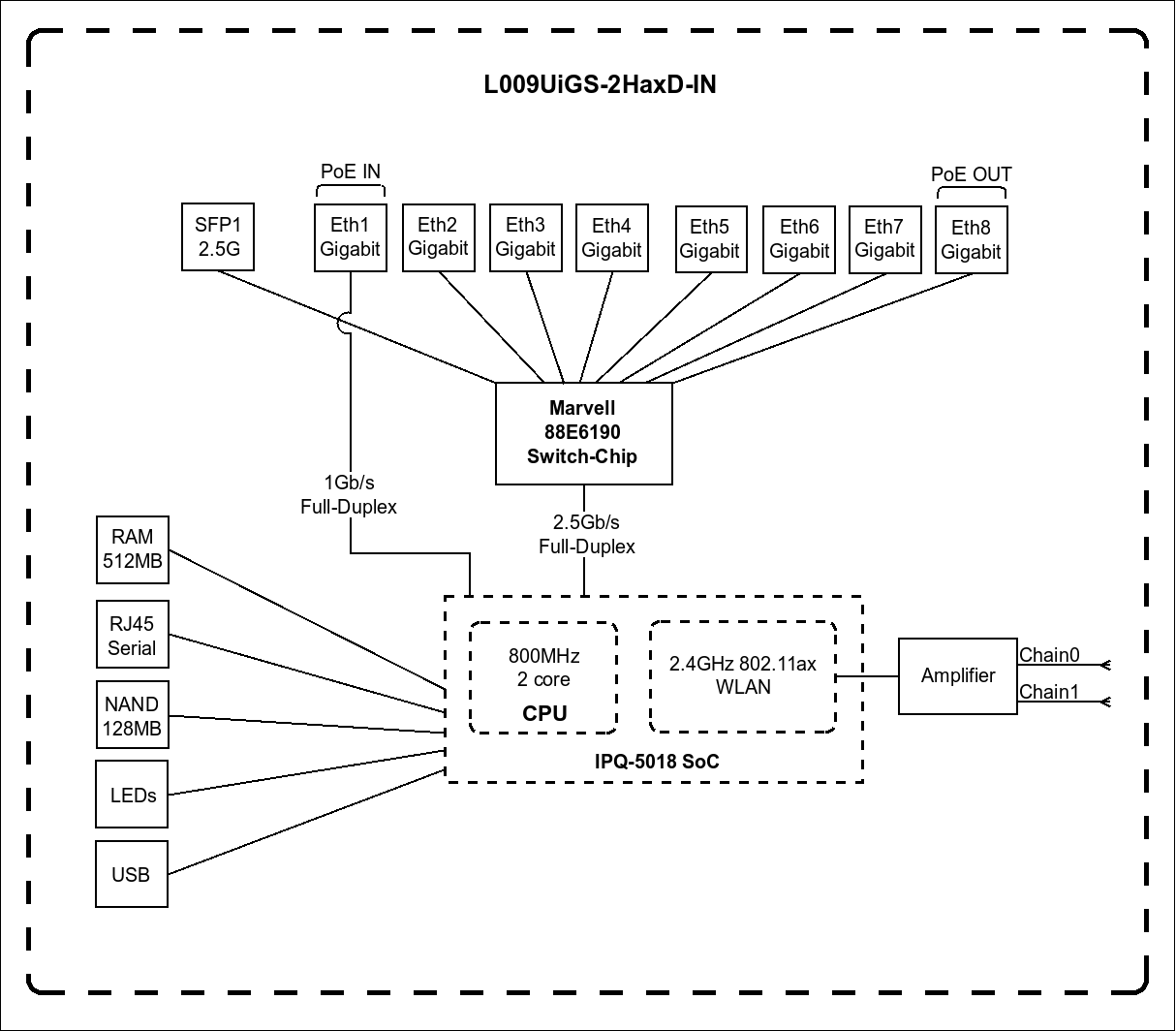
The L009UiGS-2HaxD-IN incorporates dual-chain 2.4GHz 802.11ax WiFi 6.
This gives it modern wireless functionality for compatible devices while retaining support for earlier 2.4GHz Wi-Fi standards.
MikroTik says the WiFi 6 implementation can deliver substantially improved 2.4GHz performance, responsiveness and multi-client behaviour compared with the older 802.11n wireless used in the RB2011 generation.
Important: It Is Not Dual-Band
The L009's integrated radio is 2.4GHz only.
There is no built-in 5GHz radio.
This matters for businesses expecting modern high-throughput Wi-Fi. For those installations, the better architecture may be:
Internet → L009 → Managed Switch → Dedicated Dual-Band WiFi 6 Access Points
The L009 can handle routing while dedicated APs handle wireless coverage.
External 4dBi Antennas
The wireless model uses external antennas with an official maximum gain of 4dBi and RP-SMA female antenna connectors.
External antennas provide useful flexibility in positioning compared with entirely internal antennas.
The actual Wi-Fi range depends on:
-
Building materials
-
Walls
-
Interference
-
Router location
-
Client devices
-
Channel selection
-
Regulatory power limits
Antenna gain alone should therefore not be treated as a guaranteed coverage distance.
Modern Dual-Core ARM Processor
The L009 uses the Qualcomm IPQ-5018 platform with two CPU cores operating at 800MHz.
Although the clock figure may appear modest compared with some high-end MikroTik routers, it represents a major architectural improvement over the older RB2011 platform.
MikroTik states that the L009 can deliver up to four times the performance of the RB2011 in many cases and configurations, including workloads ranging from fast-path routing to more complicated bridge filtering.
This makes the L009 particularly attractive as an upgrade for businesses still operating older RB2011 installations.
512MB RAM
The L009 provides 512MB DDR3L RAM, compared with 128MB on the older RB2011UiAS-2HnD-IN.
The additional memory provides more room for RouterOS functionality and more demanding configurations involving:
-
Firewall rules
-
VLANs
-
VPN
-
Routing
-
Containers
-
Multiple network services
-
Monitoring
-
Larger connection counts
The router also contains 128MB NAND storage.
RouterOS v7
The L009UiGS-2HaxD-IN runs RouterOS v7 with a Level 5 licence.
RouterOS provides functionality for:
-
NAT
-
Firewall
-
VLANs
-
DHCP
-
Static routing
-
OSPF
-
BGP
-
IPv6
-
VPN
-
Queues
-
QoS
-
Policy routing
-
Multi-WAN
-
Hotspot
-
PPPoE
-
Monitoring
-
SNMP
-
Scripting
-
Containers
MikroTik's March 2026 quick guide advises users to run RouterOS v7.12 or the latest applicable stable version and to select the correct regulatory country for wireless operation.
Container Support
One major improvement over the RB2011 generation is container support.
MikroTik specifically promotes the L009's ARM CPU and USB interface for custom container projects and gives a Pi-hole deployment as an example of what can be run on the platform.
Potential container applications depend on available memory, storage and RouterOS configuration.
The L009 should not be treated as a replacement for a full server, but container support creates useful possibilities for advanced network administrators.
USB 3.0 Port
The L009 includes a full-size USB 3.0 Type-A interface capable of supplying up to 1.5A according to MikroTik's specification sheet.
Depending on RouterOS compatibility and configuration, USB can be useful for supported storage or peripheral applications.
MikroTik also suggests the possibility of using a compatible LTE modem, giving network administrators another potential route for backup connectivity.
Compatibility should always be checked before purchasing a USB modem specifically for the L009.
PoE-In on Ether1
The first Ethernet port supports PoE input, allowing the L009 to be powered through its network cable instead of only through the DC jack.
Current MikroTik documentation lists PoE input through Ether1 and a 24–56V input range; the user manual identifies support for 802.3af/at powering.
This can simplify installations where the router is located away from a convenient power socket.
PoE-Out on Ether8
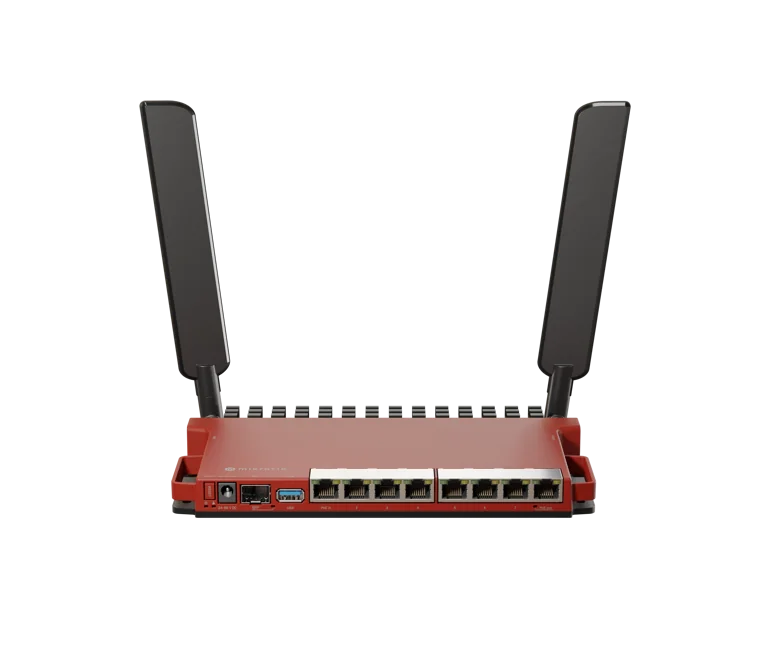
Ether8 supports passive PoE output, allowing the router to power a compatible downstream device.
This could potentially be used for a compatible:
-
MikroTik access point
-
Wireless radio
-
CPE
-
Other network device
However, there is an important limitation:
PoE-Out works only when the L009 is powered through its DC jack.
Voltage and PoE compatibility must also be checked carefully before connecting equipment. Passive PoE should not be assumed to be interchangeable with every 802.3af/at device.
Power Specifications
| Power Feature | Specification |
|---|---|
| DC Input Range | 24–56V |
| PoE-In | Ether1 |
| PoE-Out | Ether8, passive |
| Included Adapter | 24V 1.5A |
| Consumption Without Attachments | Up to 12W |
| Maximum With Suitable PSU/Attachments | Around 45W |
| Maximum USB Current | 1.5A |
The maximum figure includes potential attached-device loads and should not be confused with the router's normal standalone consumption.
MikroTik L009 for Fibre Internet
The L009 can serve as a capable fibre internet gateway.
A typical network is:
Fibre ONT → L009 → Switch / Users / Access Points
Depending on the ISP configuration, RouterOS can handle:
-
DHCP WAN
-
Static IP
-
PPPoE
-
NAT
-
Firewall
-
VLANs
-
VPN
-
Bandwidth management
Where compatible direct fibre termination is appropriate, the SFP interface can also be incorporated into the design.
MikroTik L009 for Starlink
The L009 can also be used as an advanced gateway behind Starlink.
A typical topology is:
Starlink → Ethernet → L009 → LAN
The MikroTik can then manage:
-
Firewall
-
VLANs
-
DHCP
-
Guest network
-
CCTV network
-
VPN
-
Bandwidth management
-
Access points
-
Multi-WAN
For a business Starlink deployment, the L009 can therefore replace a basic routing layer with much more granular network control.
Starlink + Fibre Failover
A useful business application is combining fibre and Starlink.
For example:
WAN 1 → Fibre
WAN 2 → Starlink
↓
MikroTik L009
↓
Office Network
RouterOS can be configured so that fibre remains the primary internet connection while Starlink takes over when the primary route becomes unavailable.
This is useful for businesses that rely on:
-
Cloud systems
-
Email
-
VoIP
-
Remote access
-
Online payments
-
CCTV monitoring
The effectiveness of failover depends on how link health is monitored and how RouterOS routes are configured.
MikroTik L009 for Multi-WAN
The L009's eight Gigabit ports provide substantial flexibility for multiple WAN connections.
A possible configuration is:
Ether1 → Fibre ISP
Ether2 → Starlink
Ether3 → 4G/5G router
Ether4–8 → LAN / infrastructure
RouterOS can implement:
-
Failover
-
Policy routing
-
Traffic distribution
-
WAN monitoring
-
Different WANs for different VLANs
Multi-WAN load balancing should not be confused with true bonding: two internet connections do not automatically become one single connection with their speeds added together.
MikroTik L009 for VLAN Networks
The L009 can be used as a central VLAN gateway.
For example:
| VLAN | Function |
|---|---|
| VLAN 10 | Management |
| VLAN 20 | Staff |
| VLAN 30 | Guest Wi-Fi |
| VLAN 40 | CCTV |
| VLAN 50 | VoIP |
| VLAN 60 | IoT |
RouterOS firewall policies can then restrict communication between these networks.
A guest network, for example, could be allowed internet access while being blocked from staff computers, CCTV and management devices.
MikroTik L009 for CCTV Networks
The L009 can also provide routing and segmentation for CCTV deployments.
Example:
Internet
↓
L009
↓
Managed PoE Switch
↓
IP Cameras + NVR
The CCTV equipment can be placed in a dedicated VLAN while firewall rules limit access from other networks.
This helps create a more organised network than placing cameras, office computers and guest Wi-Fi devices on the same subnet.
MikroTik L009 for Hotspot Networks
RouterOS makes the L009 suitable for managed hotspot applications.
Potential environments include:
-
Hotels
-
Apartments
-
Restaurants
-
Offices
-
Schools
-
Small campuses
-
Public Wi-Fi
A typical topology is:
ISP → L009 → PoE Switch → Multiple Access Points
For larger wireless networks, dedicated APs should be used rather than expecting the L009's built-in 2.4GHz radio to provide all coverage.
MikroTik L009 for VPN
The L009 can be configured for VPN applications such as:
Remote employee → Office
Branch → Head office
Office → Cloud
Site → Site
Actual encrypted throughput depends on the VPN technology, encryption, packet size, firewall rules and other RouterOS processing.
The L009 is therefore better viewed as an SMB VPN router than a substitute for high-performance CCR hardware in heavy VPN environments.
L009 Switch Architecture
The L009 uses a Marvell 88E6190 switch chip. MikroTik's product documentation describes a 2.5Gbps full-duplex link between the switch chip and CPU for most ports, while Ether1 has its own 1Gbps full-duplex CPU connection.
This architecture is worth understanding because eight Gigabit ports do not mean the CPU can independently route eight simultaneous Gigabit streams under every possible RouterOS workload.
Bridged, switched, routed, filtered and CPU-processed traffic can behave differently.
L009UiGS-2HaxD-IN vs RB2011UiAS-2HnD-IN
The L009 was specifically developed as a modern upgrade to the RB2011 generation.
| Feature | L009UiGS-2HaxD-IN | RB2011UiAS-2HnD-IN |
|---|---|---|
| CPU | 2 × 800MHz | 600MHz |
| RAM | 512MB | 128MB |
| Gigabit Ports | 8 | 5 |
| Wi-Fi | 2.4GHz WiFi 6 | 2.4GHz WiFi 4 |
| SFP | 1G + 2.5G support | 1G |
| Containers | Supported | No |
| RouterOS | v7 | Older-generation platform |
For organisations still operating RB2011 routers, the L009 is one of the most natural upgrade options while retaining a familiar MikroTik concept and price class.
L009UiGS-2HaxD-IN vs L009UiGS-RM
The key difference is wireless.
The L009UiGS-2HaxD-IN includes 2.4GHz dual-chain WiFi 6, while the L009UiGS-RM is the wired-oriented version.
The wireless IN model makes sense where basic integrated Wi-Fi is useful.
For rack installations already using dedicated enterprise access points, the wired model may be more appropriate.
L009UiGS-2HaxD-IN vs RB5009UG+S+IN
| Feature | L009UiGS-2HaxD-IN | RB5009UG+S+IN |
|---|---|---|
| CPU | Dual-core 800MHz | Quad-core 1.4GHz |
| RAM | 512MB | 1GB |
| Wi-Fi | 2.4GHz WiFi 6 | None |
| 1G Ethernet | 8 | 7 |
| 2.5G Ethernet | No dedicated RJ45 | 1 |
| SFP | Up to 2.5G | 10G SFP+ |
| USB | USB 3.0 | USB 3.0 |
| Target | SMB / RB2011 upgrade | High-performance SMB |
The L009 is attractive when integrated 2.4GHz Wi-Fi, eight Gigabit ports and moderate RouterOS performance are sufficient.
The RB5009 is a much stronger option when CPU performance, 2.5GbE and 10G connectivity are priorities.
L009 vs hAP ax³
The choice between the L009 and hAP ax³ depends heavily on whether routing flexibility or integrated Wi-Fi performance matters more.
MikroTik's current hAP ax³ provides dual-band WiFi 6, a quad-core ARM64 CPU and 2.5 Gigabit Ethernet, whereas the L009 provides eight Gigabit ports plus SFP connectivity but only 2.4GHz WiFi 6.
For a Wi-Fi-focused home or small office, the hAP ax³ may be more attractive.
For a wired business network needing more ports, SFP and RouterOS flexibility, the L009 may be the better architecture.
Rackmounting the L009
The L009 enclosure has an unusual design that allows up to four units to fit into a single 1U rack space using the appropriate mounting arrangement. MikroTik promotes this as one of the platform's quality-of-life improvements.
The K-79 rackmount kit is available separately for L009/RB5009 installations.
This makes the router useful not only on desktops but also in organised business network cabinets.
Advantages of MikroTik L009UiGS-2HaxD-IN
The L009 combines eight Gigabit Ethernet ports, 2.5G-capable SFP, WiFi 6, PoE, USB 3.0, RouterOS v7 and container support in a relatively compact platform.
Its strongest role is as a flexible SMB gateway or an RB2011 replacement rather than as a pure wireless router.
It is especially useful where one device needs to handle fibre or Starlink connectivity, VLANs, firewalling, VPN, multiple wired devices and basic 2.4GHz wireless access.
Limitations to Consider
The most important limitation is the 2.4GHz-only wireless radio. Although it uses WiFi 6 technology, it cannot provide the capacity or cleaner spectrum available from modern 5GHz Wi-Fi.
Its SFP interface supports up to 2.5G rather than 10G, and the dual-core CPU places it below the RB5009 and CCR families for demanding routing, VPN and heavy firewall workloads.
PoE-Out is passive and only works when the router is powered from the DC jack, so PoE compatibility must be verified before connecting another device.
Who Should Buy the MikroTik L009UiGS-2HaxD-IN?
The L009 is particularly suitable for small and medium businesses, RB2011 users upgrading their routers, fibre and Starlink installations, CCTV networks, hotspot deployments, branch offices and network administrators who need RouterOS flexibility without moving to a more expensive RB5009 or CCR platform.
Users whose main priority is fast dual-band wireless should instead consider a dedicated WiFi 6 access point or a MikroTik router such as the hAP ax³. Users requiring 10G routing should consider the RB5009 or higher platforms.
What's Included in the Box?
MikroTik's current specification sheet lists the following principal accessories:
| Included Item | Status |
|---|---|
| L009UiGS-2HaxD-IN | Included |
| 24V 1.5A Power Adapter | Included |
| HGO Indoor Antenna Kit | Included |
| Fastening Set | Included |
| K-79 Rackmount Kit | Optional |
MikroTik L009UiGS-2HaxD-IN Price in Kenya
MikroTik currently lists a suggested manufacturer price of US$129 for the L009UiGS-2HaxD-IN. This is a manufacturer reference price, not an Orbitlink Solutions Kenya retail quotation.
Local pricing can vary with exchange rates, freight, taxes and stock availability.
Contact Orbitlink Solutions for the current MikroTik L009UiGS-2HaxD-IN price and stock availability in Kenya.
Why Buy MikroTik L009UiGS-2HaxD-IN from Orbitlink Solutions?
The L009 should be selected according to the network rather than simply because it includes Wi-Fi. Orbitlink Solutions can help determine whether the L009, RB5009, hAP ax series or a router plus dedicated access points is the better design for the required number of users, internet speed, VLANs, VPN traffic, fibre or Starlink connection and wireless coverage.
For businesses migrating from an RB2011, the L009 is particularly attractive because it retains the multi-port RouterOS concept while providing Gigabit ports throughout, substantially more RAM, WiFi 6, 2.5G-capable SFP and container support.
Watch the MikroTik L009UiGS-2HaxD-IN Video
The L009UiGS-2HaxD-IN occupies an interesting position in MikroTik's range. It provides more physical connectivity and routing flexibility than many conventional wireless routers while remaining much more affordable and compact than high-performance RB5009 or CCR platforms. Its eight Gigabit ports and 2.5G-capable SFP interface make it especially useful as the wired centre of a small or medium network.
Its WiFi 6 label should nevertheless be understood correctly. The integrated wireless interface is dual-chain 2.4GHz 802.11ax, not dual-band WiFi 6. This makes it useful for basic local wireless connectivity and 2.4GHz devices, but organisations requiring high-capacity wireless should pair the L009 with dedicated 5GHz or dual-band WiFi 6 access points.
For existing RB2011 users, the upgrade is particularly significant. MikroTik moves from a 600MHz CPU to dual 800MHz cores, from 128MB to 512MB RAM, from five to eight Gigabit Ethernet ports, from 802.11n to 802.11ax wireless and adds container support plus 2.5G capability on the SFP cage.
Frequently Asked Questions About MikroTik L009UiGS-2HaxD-IN
What is the MikroTik L009UiGS-2HaxD-IN?
It is a RouterOS v7 wired and wireless router with eight Gigabit Ethernet ports, a 2.5G-capable SFP interface, 2.4GHz WiFi 6, PoE and USB 3.0.
How many Ethernet ports does the L009 have?
It has eight Gigabit Ethernet ports.
Does MikroTik L009 have WiFi 6?
Yes. The L009UiGS-2HaxD-IN uses 802.11ax WiFi 6.
Is the L009 dual-band?
No. This model provides 2.4GHz WiFi 6 only. It does not contain a built-in 5GHz radio.
Does the L009 support 5GHz Wi-Fi?
Not through its built-in radio. A separate 5GHz or dual-band access point can be connected through Ethernet.
What CPU does L009 use?
It uses an IPQ-5018 dual-core 800MHz processor.
How much RAM does it have?
It has 512MB DDR3L RAM.
Does L009 have SFP?
Yes. It has one SFP cage supporting 1G and compatible 2.5G connectivity.
Does L009 support 10G SFP+?
No. Its optical interface is not a 10G SFP+ port. For 10G, consider hardware such as the RB5009 or CCR series.
Does the L009 have PoE input?
Yes. Ether1 supports PoE input.
Does the L009 provide PoE output?
Yes. Ether8 provides passive PoE output, but PoE-Out operates only when the router itself is powered through the DC jack.
Does it have USB?
Yes. It has a USB 3.0 Type-A port.
Can I use an LTE modem with L009?
MikroTik specifically mentions using the USB interface with a suitable LTE modem as a possible application. Exact modem compatibility should be verified before purchase.
Does L009 support containers?
Yes. Container support is one of MikroTik's highlighted improvements over the RB2011 generation.
Does L009 run RouterOS v7?
Yes. It runs RouterOS v7 with a Level 5 licence.
Can MikroTik L009 work with Starlink?
Yes. It can operate as an advanced gateway behind a Starlink Ethernet connection.
Can I use Starlink and fibre together?
Yes. RouterOS can be configured for multi-WAN, automatic failover or policy routing.
Can the L009 create VLANs?
Yes. RouterOS supports VLAN configuration and routing.
Can it run a hotspot?
Yes. RouterOS supports hotspot functionality for managed networks.
Can L009 be used for VPN?
Yes. It can provide VPN functionality, although performance depends on protocol, encryption and configuration.
Is L009 better than RB2011?
For most new deployments, it is a substantial upgrade. MikroTik itself positions L009 as the successor to RB2011 and documents improvements in CPU performance, RAM, Gigabit ports, Wi-Fi and SFP capability.
Is L009 better than RB5009?
The RB5009 is considerably more powerful and provides 2.5GbE plus 10G SFP+. The L009 is more affordable and this particular model adds built-in 2.4GHz WiFi 6.
Can the L009 be rackmounted?
Yes. The optional K-79 rackmount kit can be used, and MikroTik designed the enclosure so multiple L009 units can fit efficiently in rack installations.
What is the MikroTik L009UiGS-2HaxD-IN price in Kenya?
Contact Orbitlink Solutions for the current exact-model price and stock availability.
Buy MikroTik L009UiGS-2HaxD-IN in Kenya
The MikroTik L009UiGS-2HaxD-IN is a strong choice for businesses and network administrators who need more than a conventional Wi-Fi router but do not require the processing capacity of an RB5009 or Cloud Core Router. Its combination of eight Gigabit ports, 2.5G-capable SFP, 2.4GHz WiFi 6, PoE, USB 3.0, 512MB RAM and RouterOS v7 creates a flexible platform for fibre, Starlink, VLAN, VPN, CCTV and hotspot networks.
For users upgrading from the RB2011, the L009 provides one of the clearest migration paths within the MikroTik ecosystem, with substantially newer processing, networking and wireless capabilities.
Contact Orbitlink Solutions
Orbitlink Solutions
Lyric House, 7th Floor, Room S9, Kimathi Street, Nairobi
Call / Text / WhatsApp: +254 743 720 551
Email: info@orbitlinksolutions.co.ke
Alternative Email: orbitlinksolutions@gmail.com
Opening Hours: Monday–Saturday, 9:00 AM–6:00 PM
Availability: Nairobi pickup and nationwide delivery
Contact Orbitlink Solutions for the current MikroTik L009UiGS-2HaxD-IN price in Kenya, stock availability, configuration and deployment guidance for fibre, Starlink, Wi-Fi, VLAN, VPN and multi-WAN networks.
Need Help Choosing? Ask a Technician
Get guidance on setup, compatibility, stock, and delivery before buying for your project.